

USPS
Priority Mail Intl
10–15 days$7.40
$1.90 of duties & taxes prepaid, not billed to your buyer
all-in · no surprises
Enhanced Click-N-Ship gives every USPS.com user commercial pricing, so the price argument is largely settled and this page concedes it. What is left is the flow: one label per order, keyed by hand or uploaded in bulk, with no rates from any other carrier to compare against.
The same USPS services you buy on usps.com, quoted next to UPS and FedEx on the same domestic parcel, with DHL on international lanes, so the best USPS price and the best price stop being the same question.
Top up once with card, Apple Pay, Google Pay, ACH, or crypto, then buy label after label from the balance.
For years the pitch for third-party shipping software was simple: usps.com sold you retail postage, and software got you the commercial rate. That was a real gap, it was worth real money, and it is the reason a generation of label tools exists at all.
USPS closed it. Enhanced Click-N-Ship put commercial rather than retail pricing in front of ordinary usps.com users, which means the old argument no longer works — and pages that still run it are quietly out of date. If your only reason for adding a tool between you and the Postal Service was the postage rate on a domestic USPS parcel, you can stop reading here with our blessing. Buy it on usps.com.
Conceding that is not generosity, it is the only way the rest of this page is worth anything. Once price is off the table, the question gets sharper and more useful: what is shipping software actually for? The answer is not a cheaper stamp. It is everything that happens either side of the stamp — where the address comes from, which carriers you were allowed to see, and what happens to the label after you print it.
Dated block: Enhanced Click-N-Ship, reviewed 2026-10-17
Sources: USPS online shipping with Click-N-Ship and USPS FAQ: Click-N-Ship, the basics, checked 2026-10-17. Re-verify annually, or sooner if USPS announces a rate or platform change. Nothing in this block appears in this page's title, description, or opening answer, because those are not places a stale number can be corrected.
Start from the shape of the tool rather than a feature checklist. Click-N-Ship is the retail counter, rebuilt as a web form. That framing predicts almost everything about how it behaves.
One label per order, and the address is your job. The tool has no idea an order exists until you tell it. So the loop is: open the order somewhere else, read the address, key it into the form, pick a service, pay, print, then go back and paste the tracking number into wherever the sale lives. Every step in that loop is a place a digit can move. The most common cause of a returned parcel is not a buyer typing their address wrong — it is a human copying it correctly ninety-nine times and wrongly on the hundredth at eleven at night. That is what a returned package usually is.
Bulk exists, but the unit of work becomes a file. The upload path is genuinely useful once your volume passes a certain point, and it is the right answer for a batch of near-identical parcels. The catch is the unit of work: a mis-mapped column or a bad row is fixed in the spreadsheet and uploaded again. A CSV flow that maps columns once, saves the preset, validates every row before money moves, and then buys row by row is a different mechanic — see bulk shipping labels from CSV for how that one works.
No rate exists outside USPS. This is the structural one. Commercial USPS pricing is a genuinely good deal on a lot of parcels — and a poor one on others, because which carrier wins moves with weight, zone, density, and the date you promised. On usps.com you cannot see that you lost; there is no losing quote to look at. Rate-shopping only helps if it happens on every order, which in practice means it has to happen on one screen. For which parcels tend to flip to which carrier, see the cheapest ground services compared.
After the label, you are on your own. A label bought and not used has to be refunded through the Postal Service's own request process, which is a review rather than an instant reversal. On a wallet-based tool, after the carrier accepts the void of an unused label, the credit posts back to the balance you buy from; the deadlines and mechanics live on voiding a shipping label. Tracking emails, a branded tracking page, and a queue that remembers which orders are still unshipped are likewise not what a retail counter is for.
None of that makes Click-N-Ship bad. It makes it a tool for buying a postage label, which is exactly what it says it is. Software earns its place at the moment the label stops being the job and the workflow around it starts being the job.
This is a short list and we mean every line of it.
The crossover is not really about volume, which is why "how many labels a week" is the wrong question. It is about where the address comes from. As long as you are the one who knows the address and you were going to type it anyway, usps.com costs you nothing extra. The moment the address arrives somewhere else — a Shopify order, an Etsy sale, a TikTok Shop notification, a DM with a screenshot attached — you have become the integration between two systems, and that job does not get better with practice.
The other trigger is the parcel that does not suit USPS. Heavy, bulky, time-critical, or bound for a lane where another carrier is simply better: on usps.com those orders are priced against one network and you never see what you paid for the privilege. If you want the USPS services you already buy quoted next to UPS and FedEx on the same parcel, with DHL on international lanes, that comparison is the reason to add a tool, not the postage rate, which USPS has already fixed. And if you want the broader look at what a multi-carrier tool changes day to day, GoatLabels vs Pirate Ship argues that case at length rather than repeating it here.
You do not have to choose, either. There is no monthly fee on Free, up to 50 shipments a month, so the two accounts can sit side by side for as long as you like: ordinary domestic USPS on usps.com if that is your habit, and everything that wants a comparison, a synced order, or an API call over here. Start with how USPS labels work on GoatLabels or what the plans cost.
Checked on from USPS Click-N-Ship's own pages. Plans, fees and policies change, so confirm on the vendor's current page before you decide. USPS Click-N-Ship is a trademark of its owner and is not affiliated with GoatLabels.
Click-N-Ship starts working when you start typing. This starts working when the order lands. The loop usps.com leaves you with — open the order, key the address, choose a USPS service, pay, print, then go back and paste the tracking number where the sale lives — collapses into one screen where the order is already there, the address has already been checked, and the USPS service you were about to buy is priced next to three carriers usps.com has no view of.
Hey! 2x hoodies (M) 1x tee (L) 😅 Ship to: Maya R. Austin, TX 78701
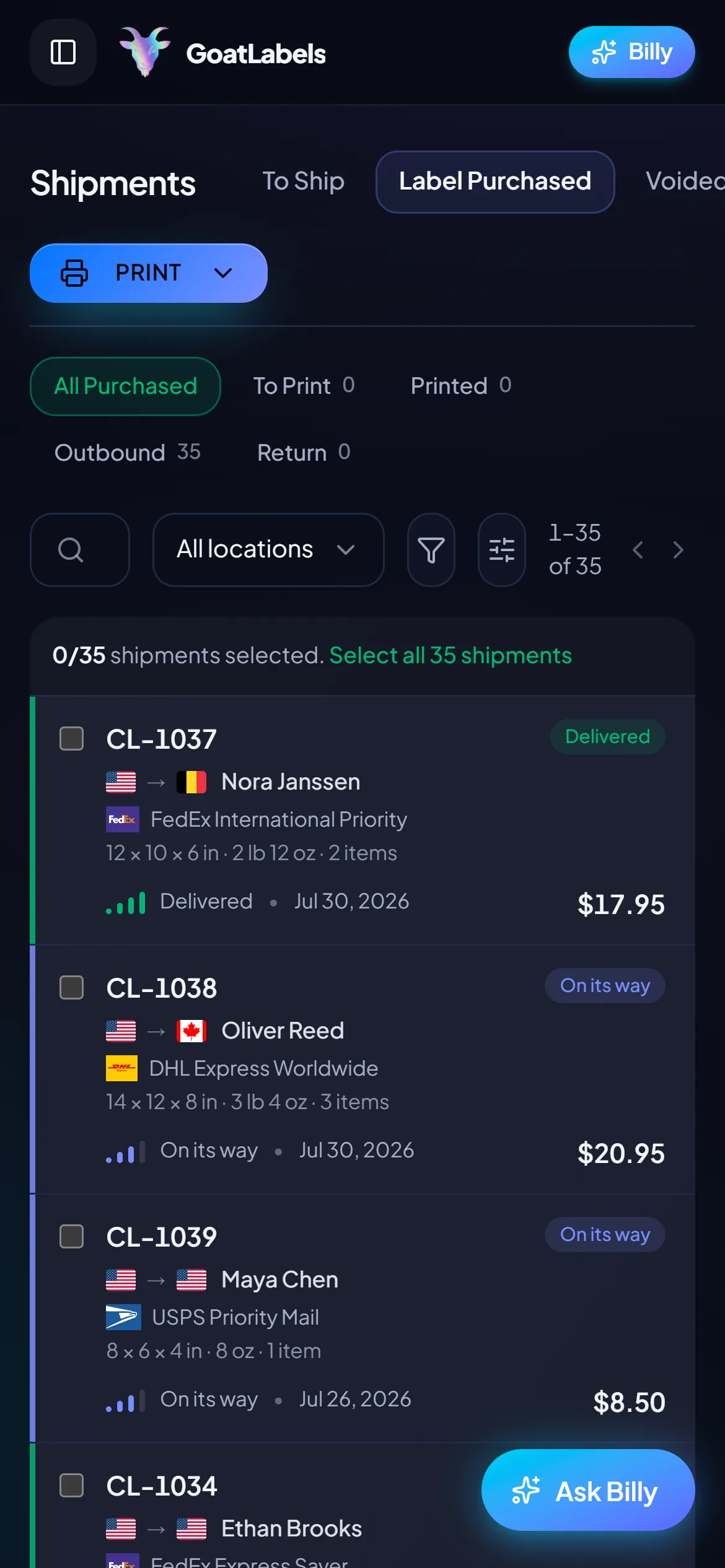
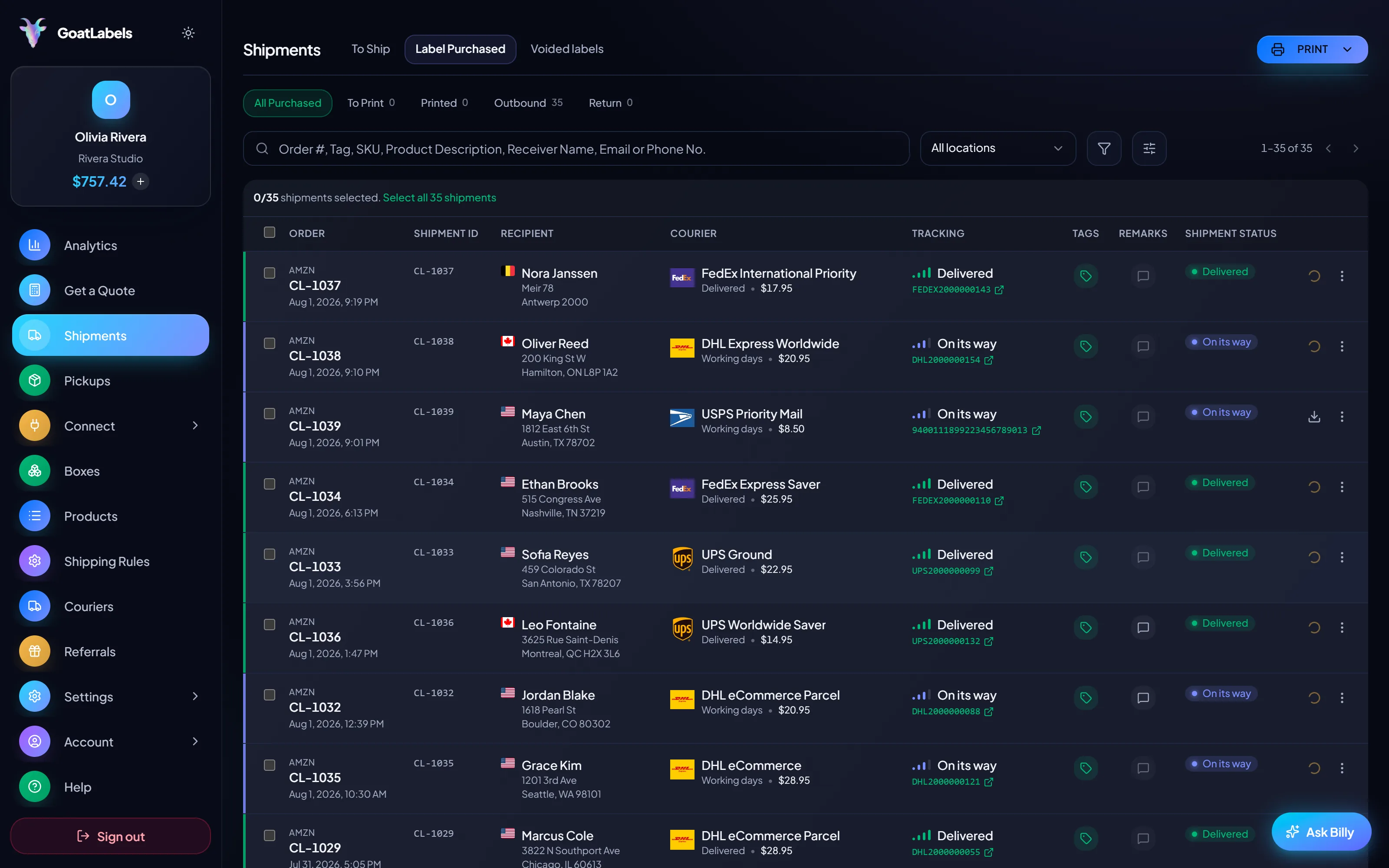
Thirteen store connectors, Shopify, Amazon, eBay, Etsy, TikTok Shop and more, sync into the To Ship queue instead of being re-keyed into a web form. A DM, a screenshot, or a typed address gets the same live quotes, a form only ever knows what you typed into it.
 Billy AI
Tracking pushes back to the order you printed from, rather than being copied across by hand. Void an unused label and, after the carrier accepts the void, the credit lands in the same balance you buy from instead of going through the Postal Service's own refund request.
Thirteen store connectors, Shopify, Amazon, eBay, Etsy, TikTok Shop and more, sync into one To Ship queue and push tracking back when you print, none of which happens on usps.com, where the address gets carried by hand from one screen to another and a digit only has to move once. Paste an Instagram or Facebook DM and Billy builds the label from the message itself.
 Shopify
 Etsy
Etsy
 WooCommerce
 TikTok Shop
 Amazon
 eBay
eBay
 Squarespace
 Wix
Wix
 Walmart
Shopify Plus
Soon
Walmart
Shopify Plus
Soon Square
 BigCommerce
 Magento
 Zapier
Soon
Zapier
Soon NetSuite
Soon
NetSuite
Soon Ecwid
Soon
Ecwid
Soon Temu
Temu
 Shein
Soon
Shein
Soon ChannelAdvisor
Soon
ChannelAdvisor
Soon SkuVault
Soon
SkuVault
Soon Zoho Inventory
Soon
Zoho Inventory
Soon Patreon
USPS settled the postage argument, so these are what is left: the parts of the workflow a web form for buying one label at a time was never built to carry.
Fund it with card, Apple Pay, Google Pay, ACH, or crypto, then buy label after label out of that balance instead of re-entering a card per purchase. A USPS label and a FedEx one are paid for identically. After the carrier accepts the void of an unused label, the credit posts back to the same balance, spendable on the next label, rather than going back to a card.
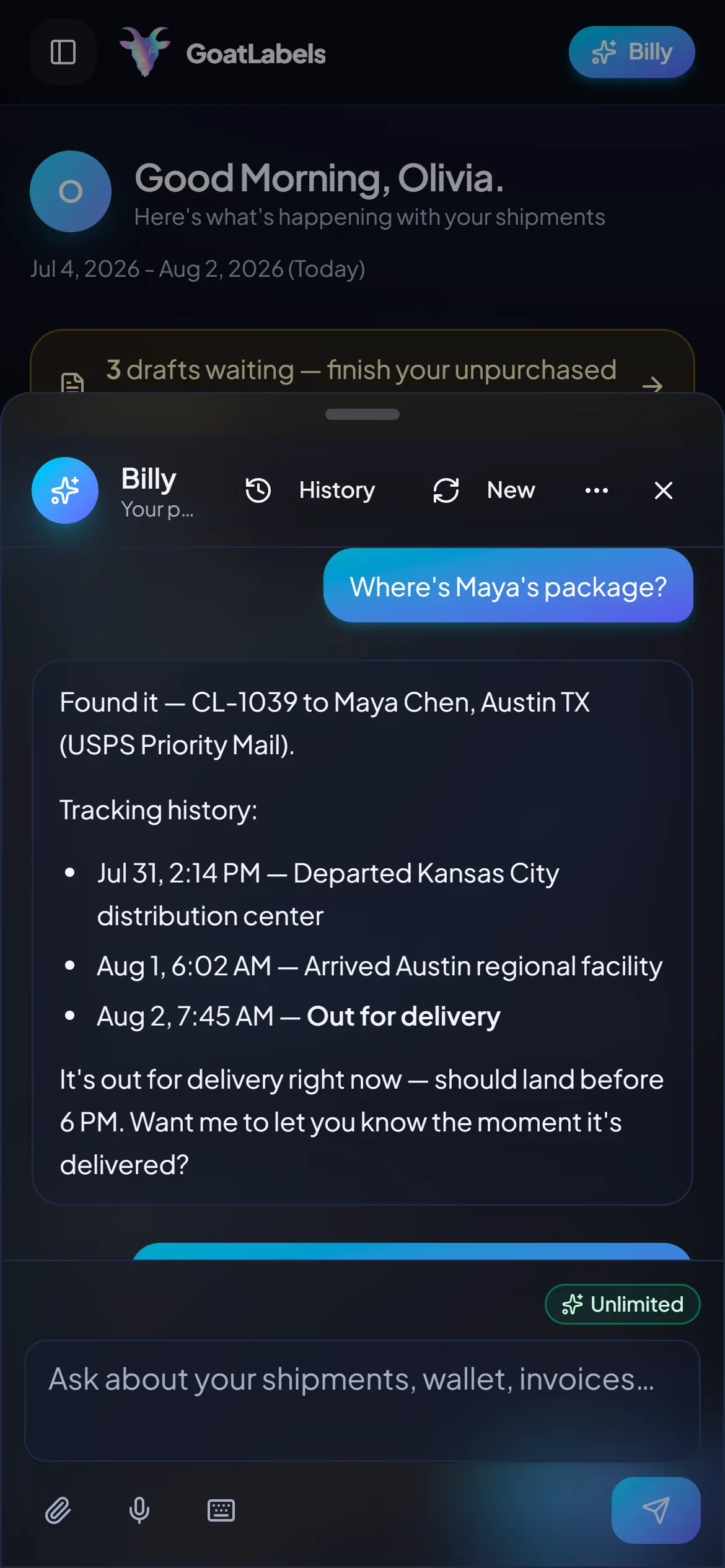
A web form has no idea an order exists until you type it in. Billy reads a synced order, a pasted DM, or a screenshot into a draft label and validates the address first — which is the difference between catching a dropped apartment number while it is free and paying for it twice three weeks later.
Billy
LIVE

On usps.com the best USPS price and the best price are the same question, because there is no losing quote on the screen to look at. Here the same domestic parcel is quoted against USPS, UPS and FedEx at once (DHL joins on international lanes), each as a single all-in number debited at purchase, so you can see what staying inside one network would have cost you.
The USPS domestic and international services you already buy are on the list — this is not a migration away from the Postal Service. UPS and FedEx appear beside them on domestic parcels and DHL joins on international lanes, which is what matters on the heavy, bulky, or time-critical parcels where USPS was never going to be the right answer. International quotes carry duties and taxes inside the same number where the service supports DDP.
UPS
$12.48
 FedEx
$13.22
FedEx
$13.22
 DHL
$14.10
USPS
$11.79
DHL
$14.10
USPS
$11.79
REST, JSON, one Bearer header, real idempotency keys, and signed webhooks — with unlimited calls on Free as well as Pro. If your orders already live in software, the labels can too, with no file to assemble, upload, and assemble again when a column was wrong.
Label ready
CL-1038 · Seattle, US
A web form on a phone is still a web form: you are the one carrying the address to it, from whichever app the order arrived in. Here the order is already in the queue, the all-in quotes land on one screen, and the label prints from the same phone you read the DM on.
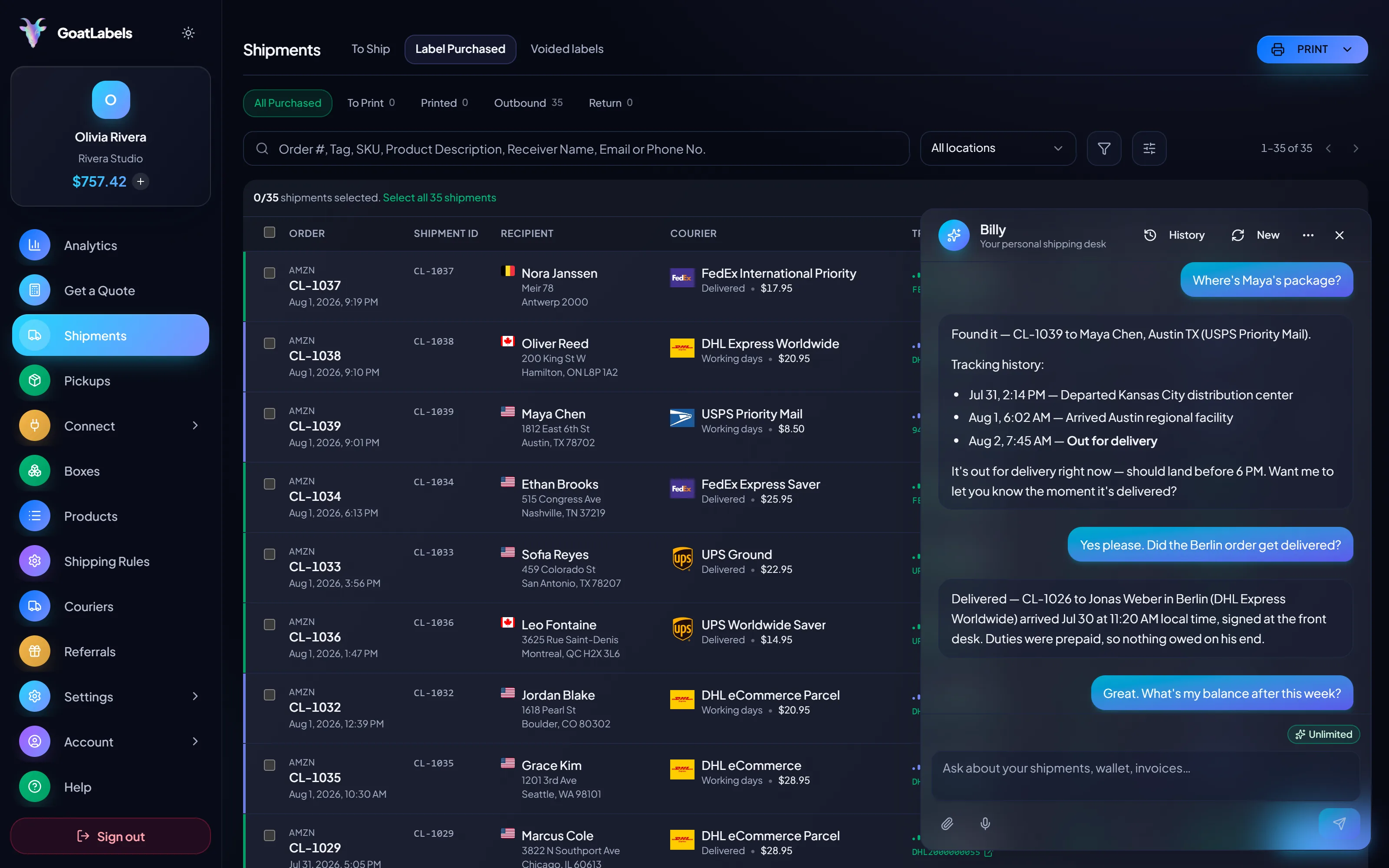
When the label is bought at a counter, the tracking number is something you saved somewhere — a confirmation email, a spreadsheet column, a tab you closed. Hold the mic, name the customer, and Billy pulls that label's tracking history and reads it back. It will also quote USPS, UPS and FedEx on the box in your hands (DHL on international lanes) and queue the one you pick, without an address being typed anywhere. This is the real product, not a render.
Listening
"Where's Maya's package?"
Out for delivery
CL-1039 · Austin, TX · by 6 PM
Speaks plain English · quotes each carrier as one all-in price · remembers customers and saved boxes · included on every plan, never a pricier tier.
This is the screen a single-carrier tool structurally cannot show you: one parcel priced by every carrier at the same moment, each column a single all-in number, duties included where the service supports DDP. Often USPS wins outright, as it does here; the point is that you can tell, instead of assuming and never finding out. Figures are illustrative.
Priority Mail Intl
10–15 days$7.40
$1.90 of duties & taxes prepaid, not billed to your buyer
all-in · no surprises
Intl Connect Plus
3–5 days$8.90
$2.20 of duties & taxes prepaid, not billed to your buyer
all-in · no surprises
Express Worldwide
1–2 days$9.80
$2.50 of duties & taxes prepaid, not billed to your buyer
all-in · no surprises
Quote the carriers and buy from your own script: REST, JSON, one Bearer header, signed webhooks instead of polling, and real idempotency keys. Unlimited calls on every plan, so the automated path never costs more than the manual one — and a bad row is a row, not a spreadsheet to fix and upload again.
POST /api/v1/shipments
Authorization: Bearer sk_live_…
Idempotency-Key: ord_8421

{
  "to": { "name": "Joyce", "city": "Berlin", "country": "DE" },
  "parcel": { "weight": 2.6, "weight_unit": "lb" },
  "service": "fedex_intl_priority"
}
usps.com costs nothing to open, so anything with a monthly bill has to earn it every single month. Free does not have one, and covers 50 shipments a month; past that, Pro is one flat $40 monthly plan with unlimited shipments. Keep both accounts open and send each parcel down whichever path suits it.
 — draft a label without opening the dashboard
Rate by plan
illustrativePro: one flat monthly plan, unlimited shipments
$0 / forever
Fund a wallet, pay per label, and pay nothing in a week you bought everything on usps.com instead.
The assistant that turns a synced order, a pasted DM, or a screenshot into a validated draft runs unlimited in the web app on Free. Pro adds Billy on Telegram.
Telegram, Pro
GET /api/v1/shipments
200 OK · plan: free
Unlimited calls on Free — still unlimited on Pro.
On Pro we will work with you to beat the label rates you are already getting from
ShippoPirate ShipShipStation
Label prices are quoted live from USPS, UPS, FedEx, and DHL as one all-in number, and that exact amount leaves your prepaid balance — no surcharges added at checkout. Full pricing details
Four shapes of seller for whom usps.com stops being the shortest path — every one of them because the address now arrives somewhere else, or because the parcel wants a carrier the Postal Service cannot quote against.
 Shopify, Etsy, WooCommerce, TikTok Shop
The moment orders land in a store, you are the integration between two systems: read it there, key it into a form, print, then carry the tracking number back. That job does not get better with practice. The To Ship queue does the carrying, both ways.
 Where USPS is not always the answer
Weight, zone, density, and the date you promised all move which carrier wins. With one network on screen there is no losing quote to look at, so a parcel that belonged on UPS or FedEx simply costs a little more, quietly, every time it goes out.
Same parcel, side by side
Order #1024 · USPS on this one, not on the next one

 The address arrives as a message
 Duties inside the same number
DDP
duties prepaid where the service supports DDP, so nothing lands on your buyer at the door
A video took off and I had 80 TikTok Shop orders by morning. I printed every label from my phone on the bus to the post office.
Early customer · TikTok
TikTok Shop seller
 TikTok Shop
I run my Etsy shop from the kitchen. The AI reads the order, picks the carrier, the label prints. That's the whole workflow now.
Early customer · Etsy
Etsy maker
Etsy
The API is what every shipping API pretends to be. Idempotency that actually works.
Sasha R.
Staff engineer, marketplace
Paste one order, let Billy fill the address, and see the USPS service you were about to buy quoted next to UPS and FedEx on the same parcel, with DHL on international lanes.
No card required. No contract. No monthly fee on Free (up to 50 shipments a month), so both accounts can coexist.
GoatLabels is not affiliated with, endorsed by, or sponsored by the United States Postal Service. Click-N-Ship is a USPS service and its features, pricing, and limits are theirs to publish — check usps.com for current details.
Updated