

USPS
Priority Mail Intl
10–15 days$7.40
$1.90 of duties & taxes prepaid on the rows that carry customs columns
all-in · no surprises
Upload a CSV, map your columns to shipping fields once and save the mapping, then validate every row before any money moves. Rows with a bad address are flagged, the rest are quoted across USPS, UPS and FedEx (DHL on international rows), and the file is purchased row by row from one prepaid wallet.
USPS, UPS and FedEx quote each domestic row's own parcel, DHL joins on international rows, so a heavy row and a light row in the same upload can land on different carriers.
Rows are bought one at a time against a single balance, so a half-finished file leaves you with exactly the labels you paid for and nothing in between.
Updated 2026-10-16
Less than most people assume, and in a stricter form than most people expect. Eight fields have to resolve before a row can be bought: recipient name, address line 1, city, a two-letter ISO country code, weight, length, width, and height. That is the whole required set. Everything else in the catalog is optional — order number, company, email, phone, address line 2, state or province, postal code, package type, a pinned carrier, a pinned service, and the three customs columns of declared value, item description, and HS code.
Two of those deserve calling out because they are where clean-looking files break. Country has to be ISO-2 — US, GB, HK — not "United States" and not "USA", because that code is what selects which carrier services are even eligible for the row. And the three dimensions are required, not the nice-to-have they are on a single manual shipment, because a file is quoted without a human looking at each box. The one exception is a USPS flat-rate container: map the package type column instead and the dimensions stop mattering, since the container defines them.
Your file almost certainly does not use those names, and it does not have to. Headers are matched after lower-casing and stripping punctuation, so "Shipping Postal Code", "shipping_zip" and "Zip Code" all land on the same field, and the usual Shopify, Etsy, Amazon and eBay export headers are recognised on sight. One deliberate exception: any column starting with "From" is never auto-mapped, because bulk import always ships from your account's saved sender address and marketplace exports habitually put junk in their From columns. If the reason you are exporting at all is that Shopify has paused label buying, skip the file: shipping Shopify orders while label buying is on hold covers syncing the store instead.
If you are building the file by hand rather than exporting it, start from the template. Its 21 headers are spellings the importer recognises on sight, so every column auto-maps on the mapping step with nothing left to pick, and the three example rows cover the three shapes a file usually mixes: a domestic parcel with dimensions, a USPS flat-rate box with no dimensions, and an international row with the customs columns filled. Delete the examples, keep the header row, add your shipments.
Download goatlabels-bulk-labels-template.csv 21 columns, 3 example rows, 1 KB. Weight in pounds, dimensions in inches.
The dashboard's Upload step also offers Domestic, International and Multi-box template buttons, so you never have to come back here for a copy.
This is the complete field catalog the mapping step offers, with the header spellings auto-detect recognises for each. Matching ignores case, spaces and punctuation, so "Shipping Postal Code", "shipping_postal_code" and "SHIPPINGPOSTALCODE" are the same header. Any header that starts with "From" is skipped on purpose; the file never sets the sender.
| GoatLabels field | Required | Accepted header aliases | Example |
|---|---|---|---|
| Order number | optional | Order Number, Order ID, Order, Order Name, Order Num, Ref, Reference | 1001 |
| Recipient name | required | Recipient Name, Name, Ship To Name, To Name, Buyer Name, Customer Name, Shipping Name, Full Name | Tino Martinez |
| Company | optional | Company, Company Name, Business Name, Shipping Company | Bennett & Co |
| optional * | Email, Buyer Email, Customer Email, Shipping Email, Recipient Email | tino@example.com | |
| Phone | optional * | Phone, Phone Number, Shipping Phone, Buyer Phone, Recipient Phone, Tel, To Phone Number | +1 609 555 0134 |
| Address line 1 | required | Address 1, Address Line 1, Line1, Street, Street Address, Shipping Address1, Address, To Address1 | 1528 Riverside Dr |
| Address line 2 | optional | Address 2, Address Line 2, Line2, Apt, Suite, Shipping Address2, To Address2 | Apt 2 |
| City | required | City, Town, Shipping City, To City | Trenton |
| State / Province | optional | State, Province, Region, Shipping State, Shipping Province, To State/Province | NJ |
| Postal code | optional | Postal Code, Postcode, Zip, Zip Code, Shipping Zip, Shipping Postal Code, To Zip/Postal Code | 08618 |
| Country (ISO-2) | required | Country, Country Code, Shipping Country, Shipping Country Code, ISO2, To Country | US |
| Weight | required | Weight, Weight (kg), Weight (lb), Weight (lbs), Parcel Weight, Ship Weight | 2.5 |
| Length | required | Length, Length (cm), Length (in), Box Length | 12 |
| Width | required | Width, Width (cm), Width (in), Box Width | 9 |
| Height | required | Height, Height (cm), Height (in), Box Height | 4 |
| Package type | optional | Package Type, Packaging, Box Type, Parcel Type, Package | Medium Flat Rate Box |
| Boxes (multi-box) | optional | Boxes, Parcels, Packages, Multibox, Box List | 3 x 24x18x18 @ 32lb |
| Carrier | optional | Carrier, Courier, Shipping Carrier, Preferred Carrier | USPS |
| Service | optional | Service, Service Level, Shipping Service, Service Type, Shipping Method | Priority |
| Declared value (USD) | optional | Declared Value, Declared Value USD, Value, Item Value, Customs Value, Total | 60 |
| Item description | optional | Description, Item Description, Items, Item Name, Title, Product Name | Leather wallet |
| HS code | international | HS Code, Harmonized Code, Tariff Code, HTS | 4202.31 |
* Email and phone are optional columns, but the carrier contact rules checked at the validate step want a recipient phone and email on most rows (USPS and every international service), so a file without them fails validation with "Recipient phone required" rather than at purchase. Weight and dimensions are read in the unit you set on the mapping step, kg or lb and cm or in; a header ending in "(lbs)" switches the weight unit to pounds for you. Boxes is read where multi-box shipments are enabled on your account; elsewhere the row asks you to split it into one row per box.
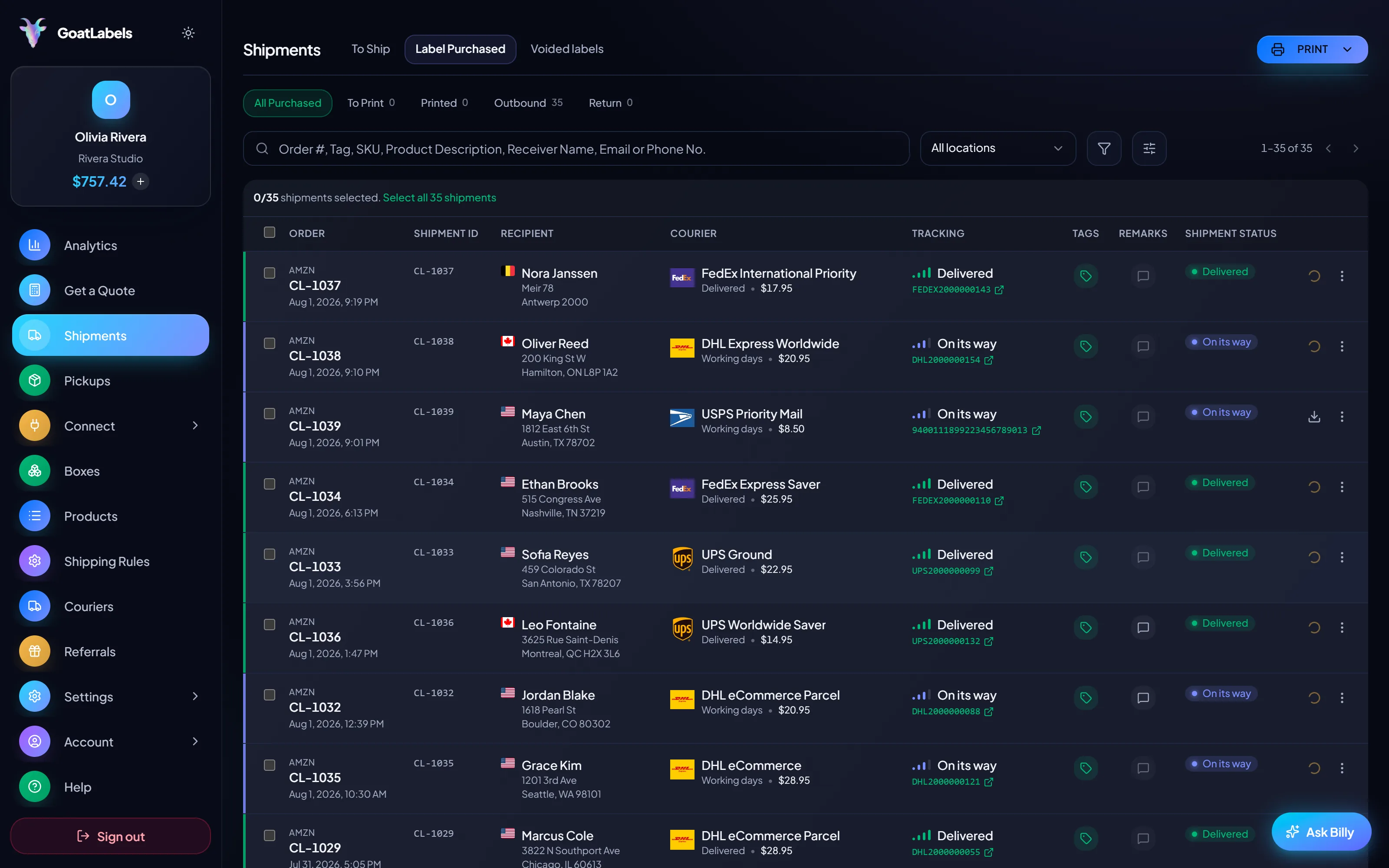
The Bulk import page is a four-step wizard and the step names below are the ones on screen. The whole first pass, including saving the preset, takes about fifteen minutes; every file of the same shape after it takes the upload.
Auto-detection gets most of the way and then stops, because no heuristic knows whether your "Total" column is the order total or the declared customs value. The mapping step is one dropdown per field, grouped by recipient, address, package, customs, and service, with the required ones marked — you finish what auto-detection started, set whether weights are pounds or kilos and dimensions inches or centimetres, and you are done.
Then save it under a name. "Etsy export", "backer survey", "wholesale PO". The next file of the same shape applies that preset in one click, and the presets list is yours to manage — apply, rename by saving again, delete. This is the difference between a one-off import and a repeatable process: the first file costs you ten minutes of mapping, and every file after it costs you the upload. If you are fulfilling a crowdfunding campaign, the late-pledge file and the replacement-parts file are the same shape as the original survey export, which is exactly the case presets are for — shipping labels for Kickstarter covers the rest of that job. Wholesale sellers get the same benefit from the opposite direction: a Faire purchase order has the same columns every month, and shipping labels for Faire explains why each carton in a multi-carton order needs its own row. A Big Cartel shop has no connector at all, so its order export is the integration, and batch-shipping a Big Cartel drop is one saved preset plus one upload.
The validate step is the reason to do this in a wizard rather than a script that buys as it reads. Every row is checked before any money moves: required fields present, address accepted by the carrier network, country code valid, weights and dimensions in range, phone and email well-formed where they are supplied, and a restricted-goods keyword scan that mirrors the one a single shipment gets — so a row that would be refused at purchase is refused now, at the point where fixing it is free.
Rows come back with their problems named on the row rather than as a count at the top. A missing secondary unit, a postal code that does not match the city, an ISO code that is actually a country name — you edit, re-check, and move on. Good rows do not wait for bad ones; they proceed to quoting while you repair the rest. This is the single highest-value step in the whole flow, because the alternative version of catching these is a pallet of returns three weeks later, and what happens to a parcel that comes back costs the label twice plus the packaging. Most of those defects repeat from file to file, and why a real address fails validation covers each one and its fix.
Once rows are valid they are quoted in batch against USPS, UPS and FedEx, with DHL on international rows, and each row takes the cheapest all-in option for its own parcel, not one carrier chosen for the whole file. Rows that have to go a specific way keep their pinned carrier or service from the mapped columns. International rows use the customs columns you mapped; duties default to the recipient unless you explicitly choose to prepay them, and what to write on the form is on customs forms for small parcels.
Purchasing runs sequentially, one row at a time, and that is a deliberate design decision rather than a performance limitation. A parallel fan-out would let two rows clear the same wallet-balance check against the same starting balance and over-debit you; serialising the purchases makes the balance arithmetic exact. It also means a failure is contained to its own row instead of poisoning the batch.
So when a row fails — the carrier declines it, the address turns out to be undeliverable at purchase time, the balance will not stretch — that row reports its own error and the file carries on or stops with the reason visible. You get a summary of how many purchased, how many were skipped, and how many failed, and you can retry a single failed row without touching the ones that worked. Re-running a file you have already partly bought is safe: rows with a label already attached are recognised and skipped rather than purchased a second time.
One thing to know before a very large run: on the Free plan the monthly shipment allowance is enforced per row as the batch executes, so a file that starts under the cap stops exactly at it rather than silently overshooting, and the remaining rows report why. A single file is capped at 500 rows, so larger exports get split — which is a reasonable review checkpoint anyway. The plan detail is on pricing.
How a whole shipping day is sequenced around the file, from merging channels to packing against the printed stack, is on the batch fulfillment day workflow. Files exported from a warehouse system follow the same path; the warehouse angle is on shipping labels for warehouses. Print-on-demand shops that ship the stickers, prints, and bundles their provider does not handle use the same file path, and self-fulfilled print-on-demand orders covers which orders to keep in-house.
The order matters more than the steps do. Mapping happens before validation so the checker knows which column is the postal code; validation happens before quoting so a broken row never reaches a carrier; quoting happens before purchase so you approve the price. Money moves last, one row at a time.
Ship To Name, Ship To Address 1, Ship To City, Ship To Zip, Weight (lbs) — whatever your platform decided to call them.
Marketplace exports, warehouse extracts, backer surveys, wholesale POs — anything that saves as a .csv.
 Map & validate
Purchased, skipped, and failed are counted separately — and re-running a file never buys a row twice.
Shopify, Amazon, eBay, Etsy, Walmart and the rest of the 13 connected stores can sync orders straight into the To Ship queue with no file at all — but their CSV exports import just as happily, and their header names are recognised on sight. Anything that saves as a .csv works: a warehouse extract, a backer survey, a wholesale PO, a spreadsheet somebody keeps by hand.
 Shopify
 Etsy
Etsy
 WooCommerce
 TikTok Shop
 Amazon
 eBay
eBay
 Squarespace
 Wix
Wix
 Walmart
Shopify Plus
Soon
Walmart
Shopify Plus
Soon Square
 BigCommerce
 Magento
 Zapier
Soon
Zapier
Soon NetSuite
Soon
NetSuite
Soon Ecwid
Soon
Ecwid
Soon Temu
Temu
 Shein
Soon
Shein
Soon ChannelAdvisor
Soon
ChannelAdvisor
Soon SkuVault
Soon
SkuVault
Soon Zoho Inventory
Soon
Zoho Inventory
Soon Patreon
Anyone can loop over a file and call an API. What decides whether a 400-row import is a good afternoon or a bad month is what happens to the rows that are wrong, and whether the money moved before or after you found out.
Rows are purchased sequentially against a single prepaid balance, so two rows can never clear the same balance check and over-debit you. Fund it with a card, Apple Pay, Google Pay, ACH, or crypto. Stop halfway and you own exactly the labels you paid for.
Headers are auto-detected from the common marketplace exports, you finish the mapping by hand, and then you save it. Apply it to the next file in one click. The first import costs ten minutes; every import after it costs the upload.
Billy
LIVE

Required fields, carrier address validation, ISO-2 country codes, weight and dimension ranges, phone and email format, and a restricted-goods scan — all at the validate step, all with the failure reason on the offending row. Fixing is free; printing a bad row is not.
USPS, UPS and FedEx price each domestic row's own parcel, DHL joins on international rows, and the cheapest all-in option wins per row, so the file does not get flattened onto one carrier. Rows that must go a specific way keep a pinned carrier or service from their mapped columns.
UPS
$12.48
 FedEx
$13.22
FedEx
$13.22
 DHL
$14.10
USPS
$11.79
DHL
$14.10
USPS
$11.79
If the file is really a database query, the REST API does the same job programmatically with signed webhooks, real idempotency keys so a retried row never buys two labels, and unlimited calls on every plan.
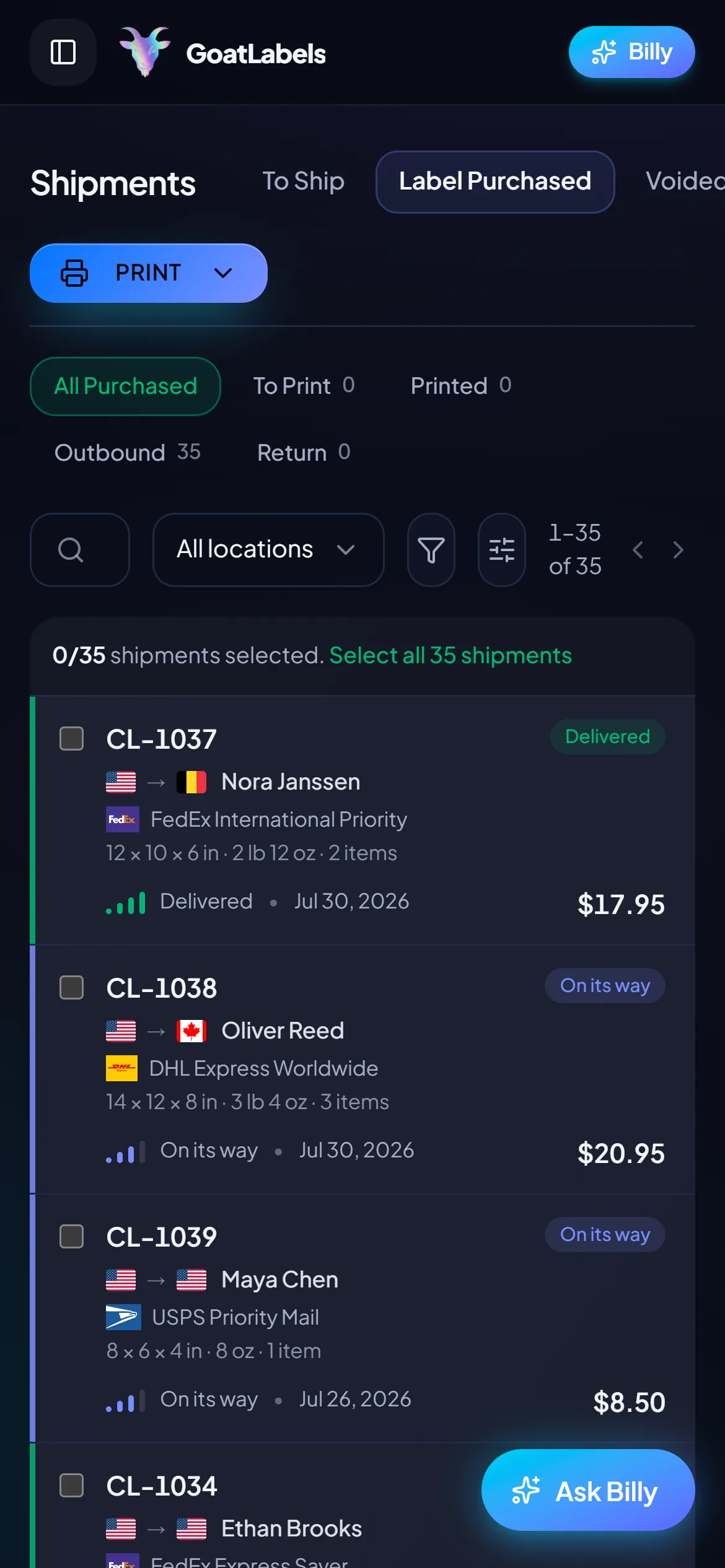
Label ready
CL-1038 · Seattle, US
Every batch has a tail: the late pledge, the address correction that arrived by DM, the one carton nobody counted. Re-exporting and re-mapping a file for three rows is absurd, so those go the other way: straight from the phone, into the same queue, against the same carriers and the same wallet.
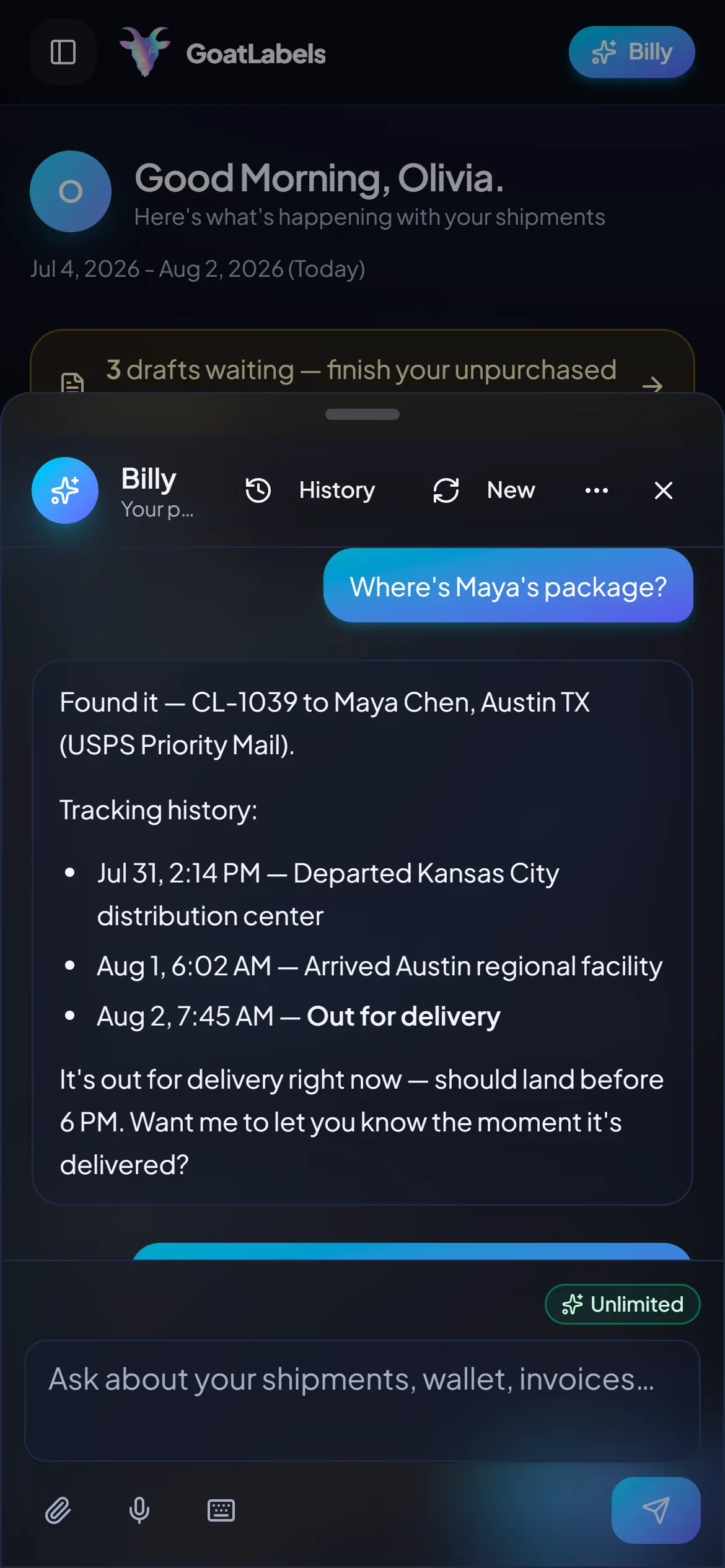
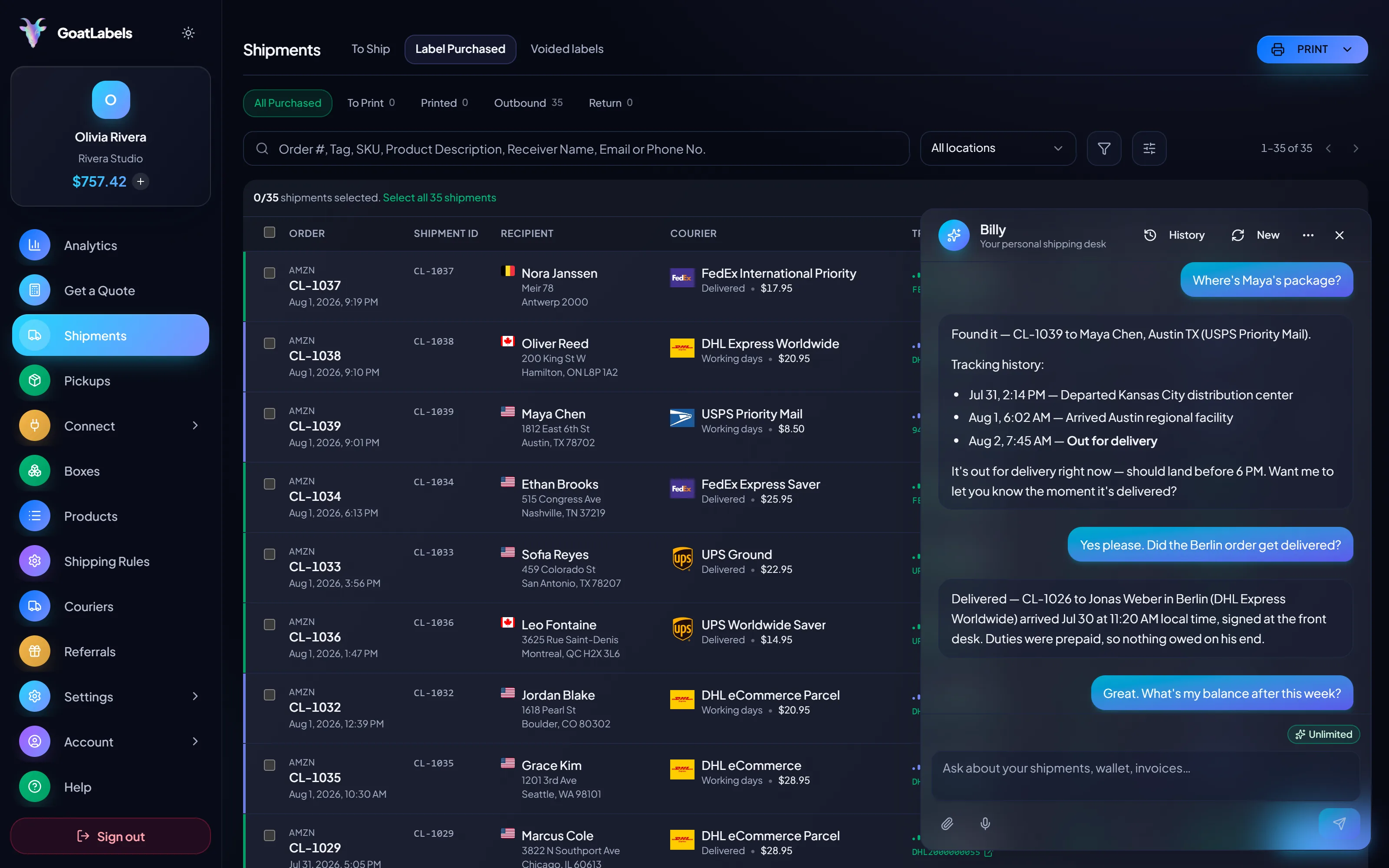
A 400-row import turns into 400 questions later, and the answers are not in the spreadsheet you uploaded. Ask out loud — "where's Maya's package?" — and Billy pulls the tracking history and reads it back. The same assistant drafts and validates the one-off rows the batch missed, on every plan, at no extra cost. This is the real product, not a render.
Listening
"Where's Maya's package?"
Out for delivery
CL-1039 · Austin, TX · by 6 PM
Speaks plain English · answers for labels bought in a batch or one at a time · remembers customers and saved boxes · included on every plan.
A file is not one shipment, and flattening it onto one carrier is how a batch quietly overpays. Every valid row is priced against its own parcel by the carriers that serve its lane, DHL among them on international rows, each column a single all-in number locked at quote time, so a heavy row and a light row in the same upload can end up on different carriers.
Priority Mail Intl
10–15 days$7.40
$1.90 of duties & taxes prepaid on the rows that carry customs columns
all-in · no surprises
Intl Connect Plus
3–5 days$8.90
$2.20 of duties & taxes prepaid on the rows that carry customs columns
all-in · no surprises
Express Worldwide
1–2 days$9.80
$2.50 of duties & taxes prepaid on the rows that carry customs columns
all-in · no surprises
Plenty of batches start life as a SELECT and only become a CSV because something downstream wanted one. Skip the export: REST, JSON, one Bearer header, and real idempotency keys so a retried row never buys two labels — with unlimited calls on every plan, which is what makes looping over ten thousand rows a non-event.
POST /api/v1/shipments
Authorization: Bearer sk_live_…
Idempotency-Key: ord_8421

{
  "to": { "name": "Joyce", "city": "Berlin", "country": "DE" },
  "parcel": { "weight": 2.6, "weight_unit": "lb" },
  "service": "fedex_intl_priority"
}
Importing is not a paid feature and neither is the wizard. Free covers 50 shipments a month — and because the plan allowance is enforced per row as the batch executes, a file that starts under the cap stops exactly at it rather than silently overshooting. Pro lifts the cap entirely.
 — chase a failed row without opening the dashboard
Rate by plan
illustrativePro: one flat monthly plan, unlimited shipments
$0 / forever
Import, map, validate, and save presets on the free plan — the labels are the only cost.
The assistant that turns a pasted order or a screenshot into a validated draft runs unlimited in the web app on Free. It is what you use for the late pledge and the corrected address — the rows that were never going to be worth a second file. Pro adds Billy on Telegram.
Telegram, Pro
GET /api/v1/shipments
200 OK · plan: free
Unlimited calls on Free — still unlimited on Pro, which is what makes a scripted import cheaper than a metered one.
On Pro we will work with you to beat the label rates you are already getting from
ShippoPirate ShipShipStation
Every row's price is quoted live from USPS, UPS and FedEx (DHL on international rows) as one all-in number, and that exact amount leaves your prepaid wallet as the row is bought. Nothing is added at checkout and nothing is billed per file. Full pricing details
These are the shapes where orders never arrive one at a time: they arrive as an export, a survey, a purchase order, or a migration — and the label work is a batch from the moment it starts.
One survey export, hundreds of identical boxes
A backer survey is the purest bulk case there is: one file, one parcel spec, and addresses that have been sitting in a form for a year. Map it once, validate every row before you print, and the late-pledge file reuses the same preset.

 Purchase orders, not shopping carts
Wholesale orders arrive as a PO or a buyer's spreadsheet, often with several cartons per account and a column layout that never changes from month to month. That stability is exactly what a saved mapping preset is for.
Pinned where it matters
Map the carrier column to hold one account's rows to one carrier

Moving off another platform mid-queue
Warehouse extracts and internal systems
8
required columns — the rest of the catalog is optional
The messages below are the ones the validate, quote and purchase steps actually print on a row, in roughly the order a first import meets them.
A video took off and I had 80 TikTok Shop orders by morning. I printed every label from my phone on the bus to the post office.
Early customer · TikTok
TikTok Shop seller
 TikTok Shop
I run my Etsy shop from the kitchen. The AI reads the order, picks the carrier, the label prints. That's the whole workflow now.
Early customer · Etsy
Etsy maker
Etsy
The API is what every shipping API pretends to be. Idempotency that actually works.
Sasha R.
Staff engineer, marketplace
Upload the export, map the columns once, let every row be validated before a cent moves, then buy the file against USPS, UPS and FedEx (DHL on international rows) from one prepaid wallet.
No card required. Save the mapping and the next file is a one-click job.
Updated