

USPS
Priority Mail Intl
10–15 days$7.40
$1.90 of duties & taxes prepaid, not billed to your buyer
all-in · no surprises
Shopify blocks label purchases for four reasons: a verification hold, an outstanding shipping-label balance, an order or location not eligible for Shopify Shipping, and an order already fulfilled. You can clear the balance by paying it and reopen a fulfilled order yourself; the other two are Shopify's to release.
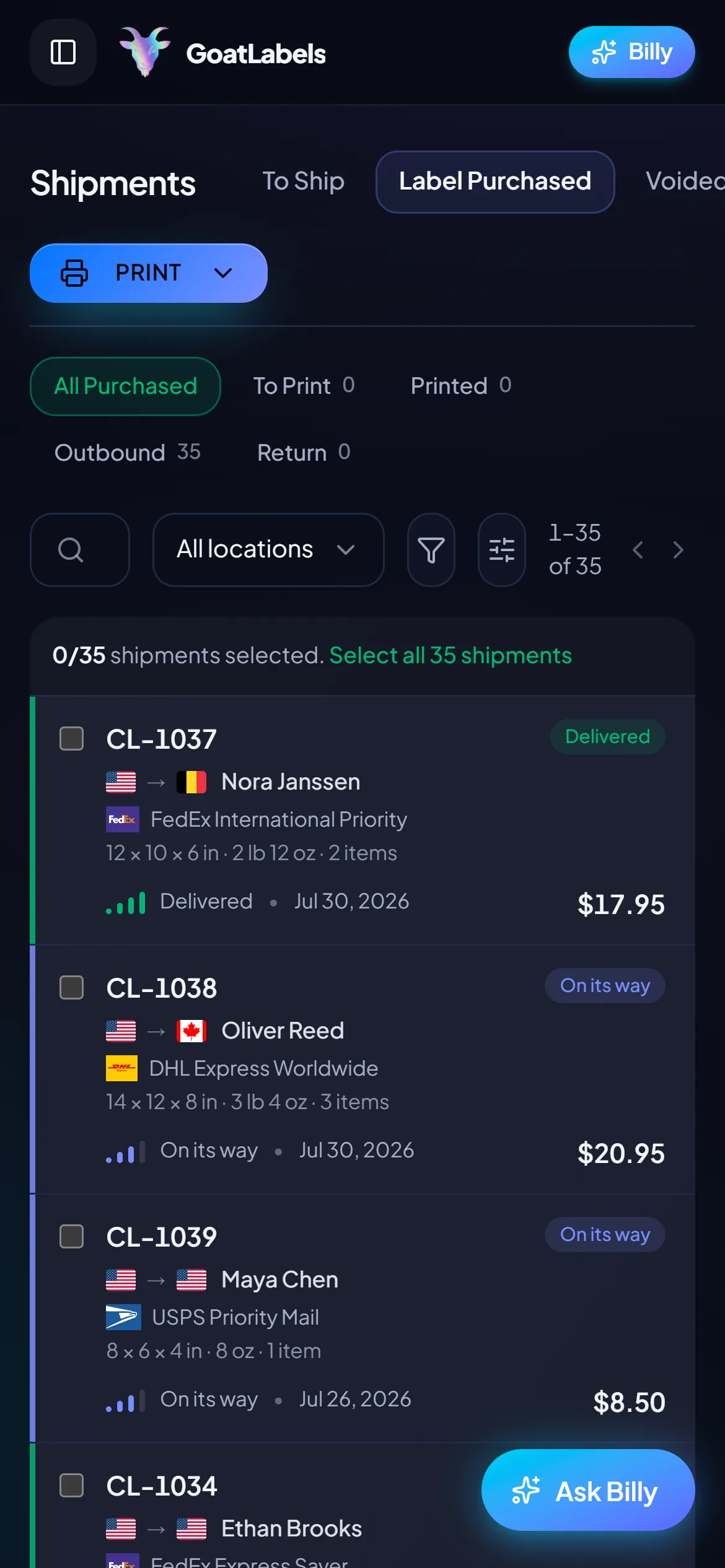
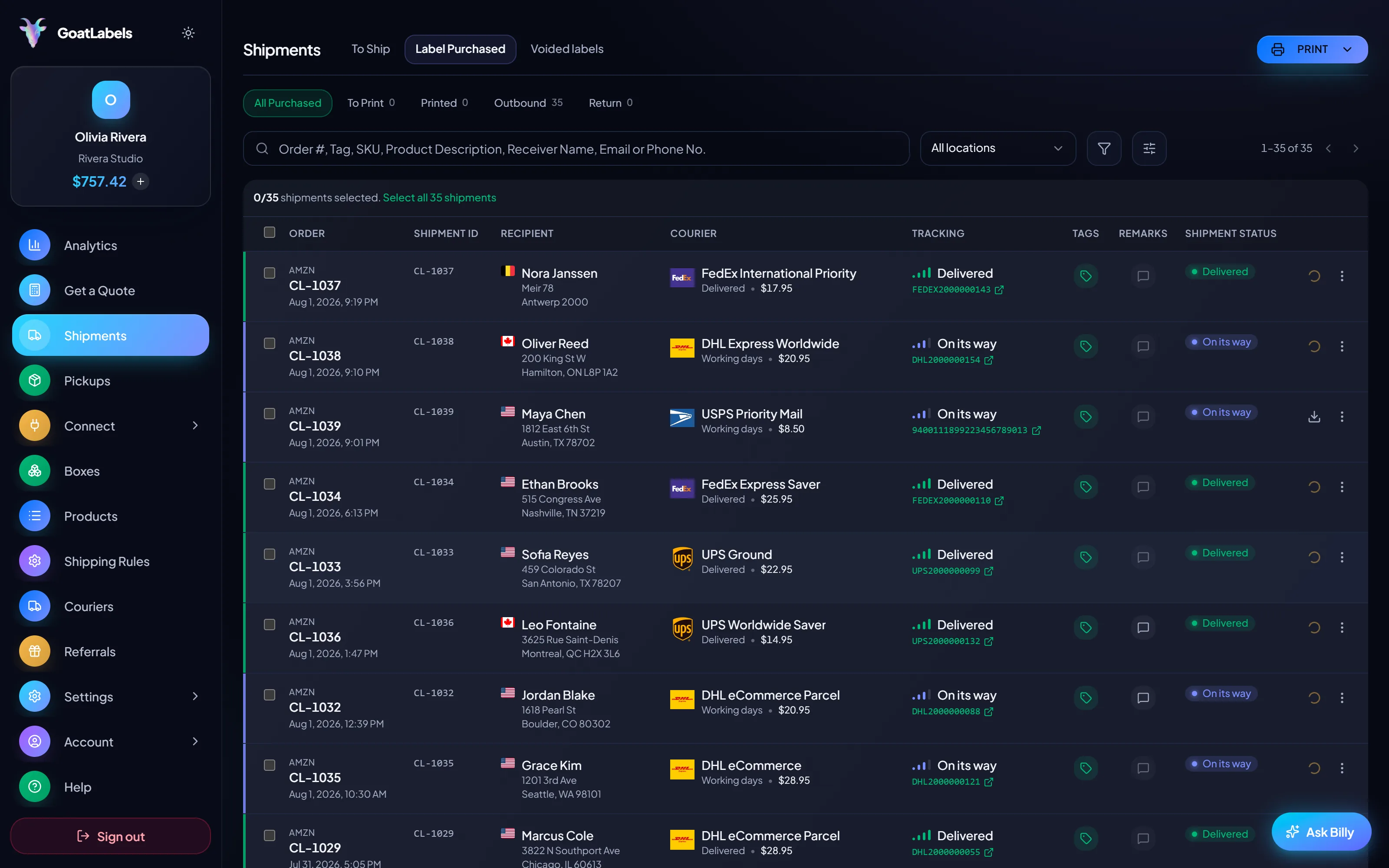
Sync the same Shopify orders into a separate To Ship queue, quote each one against USPS, UPS and FedEx (DHL on international lanes), and paste the tracking number back onto the Shopify fulfillment.
You fund a wallet before you print instead of being billed after. There is no label credit line here, so there is nothing for a failed collection to pause.
The frustrating part of this error is that one string covers four unrelated situations, and the message does not say which one you are in. Two of them you can resolve yourself in the next ten minutes. Two of them are Shopify's to release, and no amount of clicking will speed them up. Working out which you have is the whole job, and it takes about two minutes if you check in the right order: the order first, then the balance, then the store.
Start at the order. If a single order refuses a label while the rest of the queue buys them normally, the problem is that order — usually because it is already fulfilled, or it is assigned to a location that cannot use Shopify Shipping. If every order refuses, the problem is at the store level, and it is either an unpaid shipping-label balance or a verification hold. The balance is visible in your billing settings; the hold is not something the admin will explain to you.
Dated fact block — Shopify policy
Shopify blocks a label purchase for four documented reasons: (1) shipping-label purchases paused pending verification of the store; (2) an outstanding shipping-label balance — Shopify pays the carrier and bills you afterwards, so a failed collection suspends further buying; (3) a store, fulfillment location, or order that is not eligible for Shopify Shipping, which is offered only in specific countries and only from a location in one of them; and (4) an order that is already fulfilled, archived, has no shippable address, or has been routed to a fulfillment service instead of to you.
Verified against Shopify's own Help Center documentation for Shopify Shipping on 3 August 2026. Shopify changes eligibility countries and billing behaviour without notice. Nothing in this block is a GoatLabels product claim.
The outstanding balance. Shopify fronts your postage and collects it later, which makes label buying a small credit line rather than a purchase. When the collection fails — an expired card, a bank declining an unfamiliar merchant, a chargeback clawing the balance negative — the unpaid amount sits there and label buying stops. Open the billing section of your admin, look for the shipping-label balance, and settle it with a payment method you have just confirmed works. Buying usually resumes once the payment clears rather than instantly, so do this before you start packing, not after.
The already-fulfilled order. You cannot buy a label for an order Shopify considers done. This catches people constantly: someone marked the order fulfilled manually to get it out of the open queue, or an app did it automatically, and now the label button is gone. Cancel the fulfillment on that order to reopen it, then buy the label. If you cancel a fulfillment that already had a tracking number attached, remember the buyer may have been emailed that tracking — re-enter the correct number when you re-fulfill so their notification is not left pointing at a parcel that never existed.
The other two are not yours to fix, and it is worth saying plainly that most verification holds are ordinary risk process rather than an accusation. Shopify is extending credit to buy postage on your behalf; a new store, a step change in volume, a fresh payment method, or a chargeback pattern can all trigger a review. What actually shortens it is answering the request completely the first time — the identity or business documents they ask for, in the format they ask for — instead of sending a partial reply and restarting the queue. There is no escalation path that beats a complete first response.
Eligibility is the flatter of the two. Shopify Shipping is only offered in certain countries and only from a fulfillment location inside one, so a store that has just added a warehouse abroad, moved its origin address, or started routing some orders to a second location will find that exactly those orders lose the label button while the rest keep it. That is not a hold and it will not clear on its own; it is a structural limit on where Shopify sells postage, and the fix is either moving the origin or buying those labels somewhere else.
Three steps, and none of them wait on a verification queue. The same orders arrive in a separate To Ship queue, each one gets quoted against USPS, UPS and FedEx (DHL on international lanes) and bought from a prepaid balance, and the tracking number goes back onto the Shopify fulfillment so the buyer's shipping-confirmation email behaves exactly as it always has. Nothing here resolves the hold or the outstanding balance — it just stops the queue from being the emergency while you deal with them.
Paid Tuesday, packed Wednesday, and the label button still says the shop cannot purchase shipping labels. Ship to: Maya R. Austin, TX 78701
Thirteen store connectors, Shopify, Amazon, eBay, Etsy, TikTok Shop and more, sync into the queue automatically, no CSV export out of the admin, no retyping addresses. An order that never reached Shopify at all can be pasted in as plain text.
 Billy AI
Mark the Shopify order fulfilled with that carrier and tracking number and the buyer gets the normal notification, tracking resolving as usual. Void the label and, after the carrier accepts the void, the credit lands back in your balance rather than on a card statement.
Shopify is a supported sync channel here, so the orders you cannot buy labels for inside Shopify arrive in a separate To Ship queue automatically — no CSV export, no retyping addresses out of the admin. Each one gets quoted against USPS, UPS and FedEx (DHL on international lanes), and the tracking number goes back onto the Shopify fulfillment so the buyer's notification behaves exactly as it normally would.
 Shopify
 Etsy
Etsy
 WooCommerce
 TikTok Shop
Shopify Plus
Soon
TikTok Shop
Shopify Plus
SoonWhatever the cause, the orders keep aging, and an unshipped order is a refund request with a delay fuse on it. Fulfilling a Shopify order has never required a Shopify-bought label: you buy the postage wherever you like, then mark the order fulfilled with the carrier and tracking number entered by hand or written back by an integration. The buyer receives the normal shipping-confirmation email, tracking resolves, and the order leaves the open queue. None of that resolves the hold or the balance — those still need dealing with — but it stops the queue from being the emergency. If you want a standing second label source for the store rather than a one-off workaround, the Pirate Ship alternative for Shopify compares the options.
Multi-origin orders are the case worth planning for. If your store fulfills from more than one location, Shopify splits an order into a fulfillment per location, and each one is evaluated on its own. One eligible warehouse and one ineligible one means half an order ships on a Shopify label and half does not — from the same order screen, with the same error string on only some of the lines. Handle those splits deliberately: buy the outside label for the blocked half, enter its tracking on that fulfillment specifically, and check that the buyer ends up with two working tracking numbers rather than one working and one silent. If you print a label and then realise the split was wrong, voiding it returns the credit to your wallet after the carrier accepts the void rather than leaving it stranded on a carrier account.
Orders that never reached the Shopify admin at all — an email order, a phone order, a screenshot — can be drafted from pasted text instead of retyped; that workflow is documented on AI shipping labels. The price side is not the point of this page, but while you are quoting outside Shopify anyway it costs nothing to see every carrier's price on the same parcel; that argument lives on cheap shipping labels, the plans are on pricing, and if a card is the thing that failed you in the first place, the wallet also takes crypto. If your labels work and you want the plan and carrier facts instead, read shipping labels for Shopify stores.
Every blocker on this page traces back to the same design: Shopify buys your postage first and collects afterwards, which means a billing process sits between you and the label. Removing that intermediary is the structural answer, not a discount.
You fund the balance before you print, with a card, Apple Pay, Google Pay, an ACH bank transfer, or crypto. Because the money is already there, no invoice is generated, no collection can fail, and there is no outstanding label balance that could exist to suspend you. If a top-up method stops working you simply top up with another one.
Shopify orders sync into the To Ship queue directly. For anything that never made it into Shopify — an email order, a phone order, a screenshot from a marketplace — Billy drafts the label from pasted text and is included on every plan; the full workflow is on our AI shipping labels page.
Billy
LIVE

The number you see is the number that leaves your balance when you buy. Nothing is appended at checkout, so there is no gap between what you approved and what was taken — which is precisely the gap an outstanding balance grows in.
USPS, UPS and FedEx quote the same domestic parcel side by side (DHL on international lanes), so a blocked order is not stuck waiting on one provider's eligibility rules. If a location is ineligible for Shopify Shipping, that is a limit on where Shopify sells postage, not a limit on where the parcel can go.
UPS
$12.48
 FedEx
$13.22
FedEx
$13.22
 DHL
$14.10
USPS
$11.79
DHL
$14.10
USPS
$11.79
If you would rather automate the fulfillment write-back than paste tracking numbers one at a time, the API is REST and JSON with signed webhooks and unlimited calls on every plan, so scripting the backlog does not move you to a pricier tier.
Label ready
CL-1038 · Austin, US
A verification hold never lands on a convenient day, and the orders it stopped are usually already boxed. The queue, the quotes, the buy button, and the tracking number you paste back into Shopify all fit on the phone sitting next to the tape gun; there is no desktop leg of the trip and no laptop to go back to.
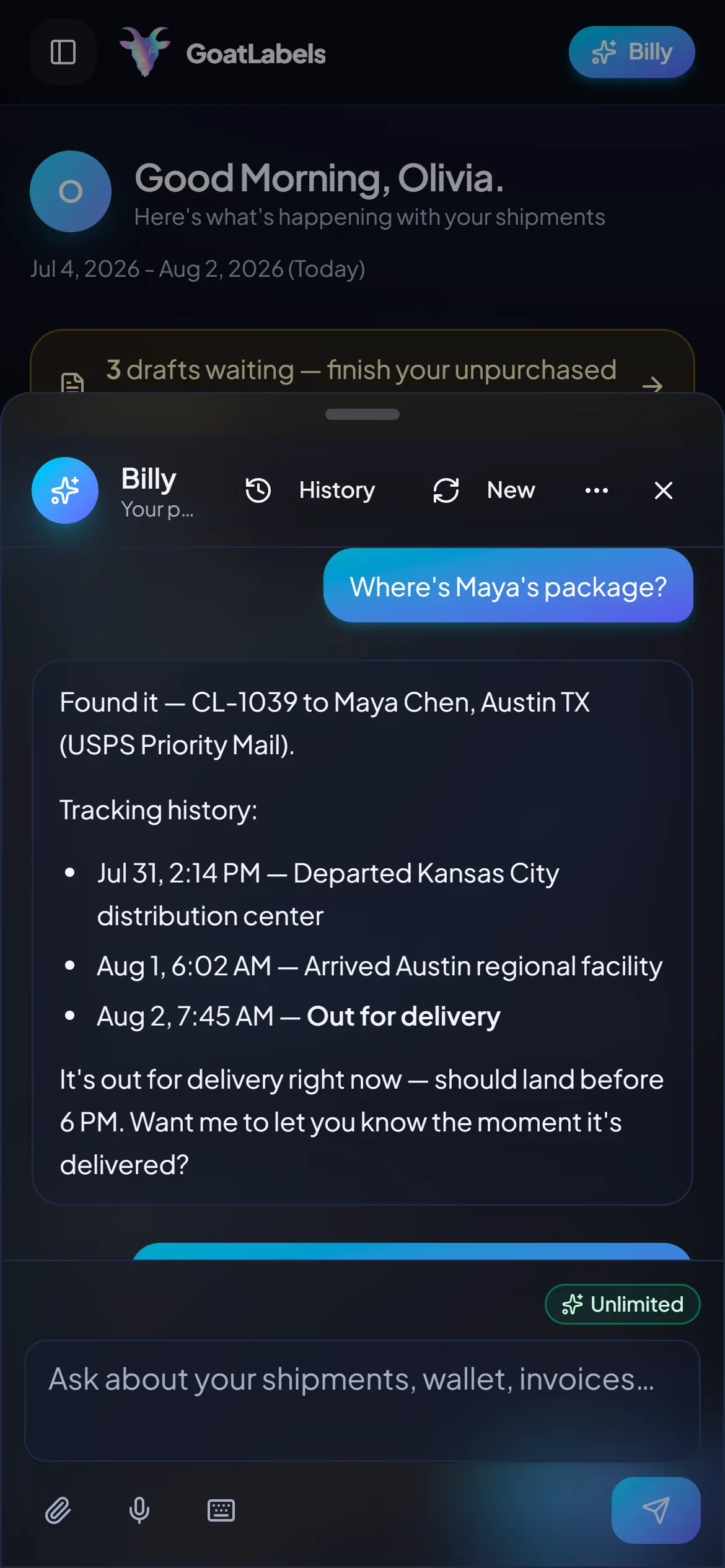
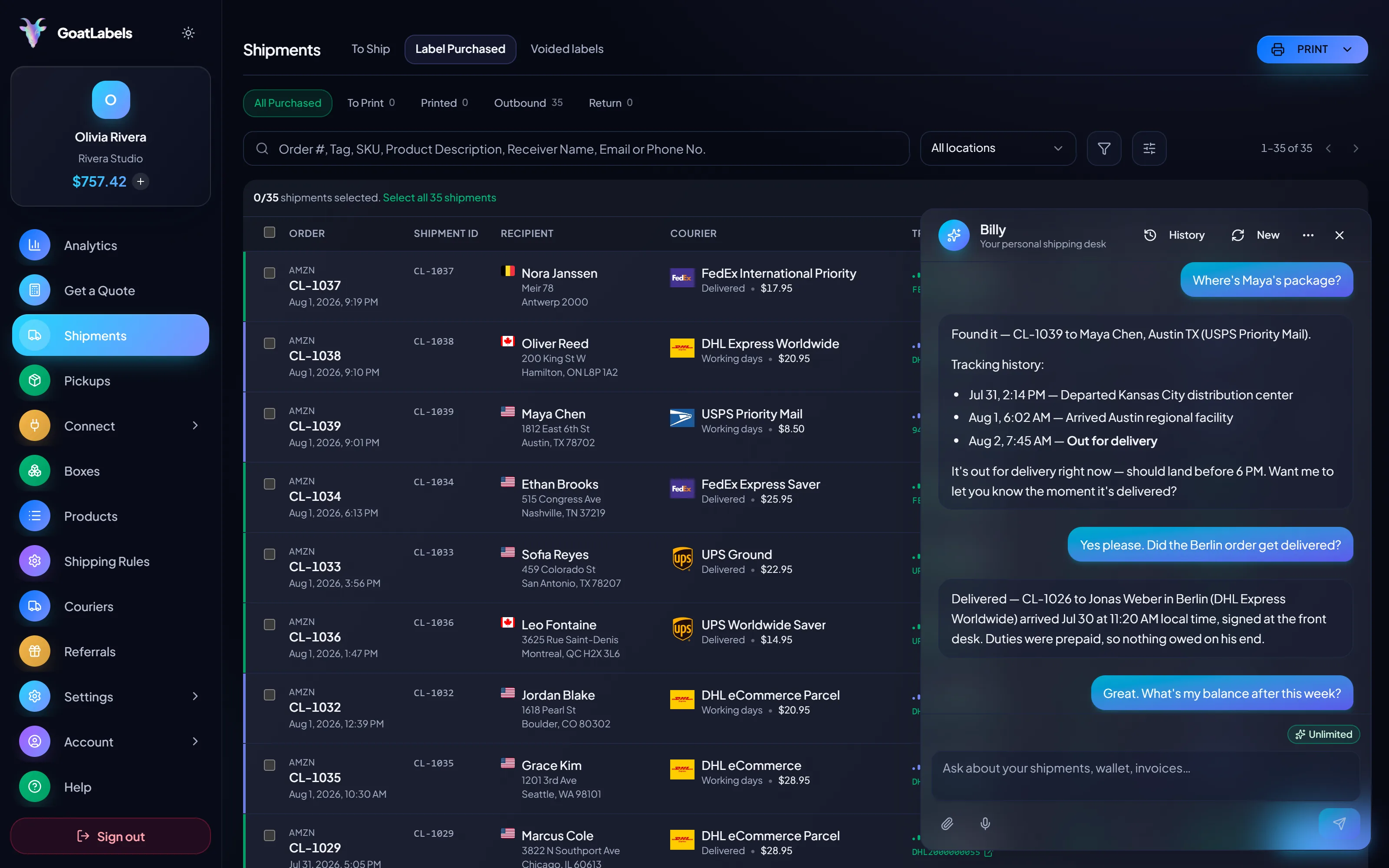
Orders shipped outside Shopify still have to be answered for inside it, and the question is always the same one: where is this parcel and what did I tell the buyer. Ask out loud and Billy pulls the tracking history for that shipment and reads it back, so a customer email gets answered without opening the admin, the carrier's site, and a spreadsheet of tracking numbers you pasted last week. It drafts labels from a spoken address too. This is the real product, not a render.
Listening
"Where's the parcel for order 1042?"
Out for delivery
CL-1039 · Austin, TX · by 6 PM
Speaks plain English · answers for labels bought outside Shopify · remembers customers and saved boxes · included on every plan, never a pricier tier.
An ineligible location is a limit on where Shopify sells postage, not a limit on where your parcel can go. The same box is quoted against every carrier at once and each column is one all-in number locked at quote time — no fuel line, no residential line, and no invoice arriving afterwards to be collected from you.
Priority Mail Intl
10–15 days$7.40
$1.90 of duties & taxes prepaid, not billed to your buyer
all-in · no surprises
Intl Connect Plus
3–5 days$8.90
$2.20 of duties & taxes prepaid, not billed to your buyer
all-in · no surprises
Express Worldwide
1–2 days$9.80
$2.50 of duties & taxes prepaid, not billed to your buyer
all-in · no surprises
If pasting tracking numbers onto fulfillments one at a time is the part that hurts, script it: REST, JSON, one Bearer header, signed webhooks when a label is bought or scanned, and real idempotency keys so a retried backlog job never buys two labels for the same order. Unlimited calls on every plan.
POST /api/v1/shipments
Authorization: Bearer sk_live_…
Idempotency-Key: ord_8421

{
  "to": { "name": "Joyce", "city": "Berlin", "country": "DE" },
  "parcel": { "weight": 2.6, "weight_unit": "lb" },
  "service": "fedex_intl_priority"
}
Half the blockers on this page exist because postage was bought on credit and collected later. Here the money is in the wallet before the label prints, so no invoice is generated and there is nothing a failed collection could suspend. Free covers 50 shipments a month with no monthly fee; Pro is a flat monthly plan with unlimited shipments.
 — draft a backlog label without opening a dashboard
Rate by plan
illustrativePro: one flat monthly plan, unlimited shipments
$0 / forever
Fund a wallet, pay per label, and ship the backlog without asking anyone's permission.
The assistant that reads a pasted order or a screenshot into a draft — and validates the address before you spend anything — runs unlimited in the web app on Free. That matters most on the orders that never reached the Shopify admin at all. Pro adds Billy on Telegram.
Telegram, Pro
GET /api/v1/shipments
200 OK · plan: free
Unlimited calls on Free — still unlimited on Pro.
On Pro we will work with you to beat the label rates you are already getting from
ShippoPirate ShipShipStation
Label prices are quoted live from USPS, UPS, FedEx, and DHL as one all-in number, and that exact amount leaves your prepaid balance — nothing is added at checkout and nothing is collected afterwards. Full pricing details
Same queue, same side-by-side quotes, same prepaid wallet, whether the hold caught two orders or two hundred. These are the four shapes of Shopify seller where the label button going dark costs the most.
 Verification pause, worst week
Risk review tends to trigger on exactly the signal a good week produces — a step change in volume — so the pause lands when the queue is deepest. Answering the request completely is the only thing that shortens it; shipping the queue elsewhere is the only thing that stops it costing you.
 An outstanding label balance
An expired card or a bank declining an unfamiliar merchant turns postage you already used into a debt that stops the next label. Settle it in the admin, and in the meantime buy from a balance that was funded before anything printed.
Same orders, separate queue
Order #1042 · quoted across carriers

 Email, phone, and DM orders
 Where eligibility splits an order
DDP
duties inside the quote where the service supports it
Updated 2026-08-03
A video took off and I had 80 TikTok Shop orders by morning. I printed every label from my phone on the bus to the post office.
Early customer · TikTok
TikTok Shop seller
 TikTok Shop
I run my Etsy shop from the kitchen. The AI reads the order, picks the carrier, the label prints. That's the whole workflow now.
Early customer · Etsy
Etsy maker
Etsy
The API is what every shipping API pretends to be. Idempotency that actually works.
Sasha R.
Staff engineer, marketplace
Sync the same Shopify orders into a separate queue, quote each one across carriers, buy from a prepaid balance, and paste the tracking straight back onto the fulfillment.
Fund the wallet by card, Apple Pay, Google Pay, ACH, or crypto — nothing is billed to you after the fact.
Updated