

USPS
Ground Advantage
2 to 5 days$11.40
all-in · no surprises
For an ordinary in-show sale, Whatnot's own prepaid label is the right answer. You need an outside label in three cases: a bundle heavier than the shipping profile you set at listing time, a lot outside Whatnot's label size and weight limits, and approval-gated Bring Your Own Label.
Weigh the packed box, quote it across USPS, UPS and FedEx (DHL on international lanes), and buy on what it actually weighs, for the BYOL-approved sales where that is allowed.
Card, Apple Pay, Google Pay, ACH, or crypto tops up one balance, so a show night that produces forty parcels is not forty checkouts.
Whatnot prices a sale from the shipping profile attached to the item when you listed it, and in a live show that assumption breaks constantly. A buyer takes one lot, then four more, then a giveaway win, and the whole thing leaves as a single box that weighs several times what any one of those listings claimed. The prepaid label is still the one the profile bought. The parcel is not.
What happens next is not a Whatnot problem, it is a carrier one: the parcel gets weighed in the network, the weight does not match the label, and the difference comes back as an adjustment against whoever bought the label. The prevention is to set profiles for the bundle you actually expect a repeat buyer to walk away with, not for a single item in isolation — and to weigh the packed box before it leaves rather than after. When a bundle has already outgrown the profile, an outside label priced on the box's real weight is the honest fix, and on Whatnot that route needs approval first (see below).
Whatnot's prepaid label is generated inside a published weight and size envelope. Past it there is no label to generate — not a more expensive one, none. Sellers hit this in predictable categories: bulk sneaker lots, vintage furniture and lighting, sealed card cases, framed art, anything sold by the crate rather than by the piece. The show does not warn you, because the constraint lives on the parcel, not on the listing.
Once a parcel is over a limit, carriers stop agreeing with each other, which is the whole reason a multi-carrier quote matters here. One carrier will refuse the piece outright, another will take it with oversize handling attached, and past a further threshold it stops being a parcel and becomes freight with a different booking process entirely. Which of those you are in depends on the box's dimensions as much as its weight. The thresholds themselves, and how dimensional weight gets billed against them, are set out on package size and weight limits by carrier — measure first, because limits eliminate carriers before price ever gets a vote.
Bring Your Own Label on Whatnot is an application, not a toggle. Until you are approved, the sale ships on Whatnot's label, and that is not a technicality to route around. Shipping an unapproved outside label means the parcel moves under a tracking number the platform's order does not recognise: the order looks unshipped, the payout timeline that keys off valid tracking does not start, and the buyer protection both sides rely on is attached to the shipment Whatnot knows about — not to yours.
So the order of operations is fixed. Apply for BYOL, get approved, and only then buy outside labels for the sales it covers. After you buy one, enter the tracking number against the order in Seller Hub inside Whatnot's window, exactly as the platform requires — that entry is what makes an outside label a legitimate shipment rather than a silent one. Nothing on this page is a workaround for the approval, and if Whatnot has not approved you, the correct answer to every case above is to use their label and eat the difference.
Most of the time. For an ordinary in-show sale that fits the profile you set and sits inside the label envelope, Whatnot's prepaid label is the correct choice and buying elsewhere is worse on every axis: it is already priced into the flow, the tracking is native to the order, and the protection follows it without you entering anything. The general case for using the platform's own label — and the two questions that decide it — is argued on when the platform's own label is the right call. This page is only about the three sales where Whatnot cannot print one that fits. Which is also why nothing here asks you to commit to a plan: labels come out of a prepaid balance with no monthly fee on Free, so a month where every sale fitted Whatnot's own label bills you nothing.
This is the loop for a sale Whatnot has approved you to ship yourself. The packed box gets weighed for real, the order is pasted rather than synced, USPS, UPS and FedEx price the box on its actual weight and dimensions, the label comes out of one prepaid balance, and the tracking number goes onto the order in Seller Hub, which is the step that makes an outside label a legitimate shipment.
took 5 lots in the stream + the giveaway win — can they all go in one box?
There is no Whatnot connector, so the order arrives as a paste or a screenshot — and none of this applies until Whatnot has approved you for BYOL. Unapproved, the sale ships on Whatnot's label.
 Billy AI
Then enter the tracking number against the order in Seller Hub, inside Whatnot's window. Nothing pushes it across for you, and that entry is what keeps the payout and the buyer protection attached to the shipment.
Store sync spans 13 store connectors, including Shopify, eBay, Etsy, Amazon, and TikTok Shop. Whatnot is not one of them, so a show sale never appears in a queue on its own: on a BYOL-approved order you paste it or screenshot it, Billy drafts the label, and you enter the tracking number against the order in Seller Hub yourself.
 Shopify
 Etsy
Etsy
 WooCommerce
 TikTok Shop
 Amazon
 eBay
eBay
 Squarespace
 Wix
Wix
 Walmart
Shopify Plus
Soon
Walmart
Shopify Plus
Soon Square
 BigCommerce
 Magento
 Zapier
Soon
Zapier
Soon NetSuite
Soon
NetSuite
Soon Ecwid
Soon
Ecwid
Soon Temu
Temu
 Shein
Soon
Shein
Soon ChannelAdvisor
Soon
ChannelAdvisor
Soon SkuVault
Soon
SkuVault
Soon Zoho Inventory
Soon
Zoho Inventory
Soon Patreon
This is not a replacement for Whatnot Shipping. It is the part that starts when a bundle is over the profile, a lot is over the envelope, or BYOL has been approved and the label is now yours to buy.
A show ends with a burst of parcels, not a steady trickle. Top up once with card, Apple Pay, Google Pay, ACH, or crypto and every label after is a debit against that balance instead of a fresh checkout. No monthly fee on Free (up to 50 shipments a month), so a week with no show costs nothing at all.
There is no Whatnot connector, so an order arrives as text on a screen. Paste it or screenshot it and Billy pulls the buyer, the address, and the parcel out and validates the address before any money moves. The full workflow lives on our AI shipping labels page; here it is just how the order stops being a retype.
Billy
LIVE

An oversized lot is exactly where a sticker rate misleads, because the handling attached to it is where the cost actually is. Every quote is a single all-in number, and that exact amount leaves your prepaid balance. If the carrier re-weighs the box, the adjustment lands as its own readable ledger entry rather than as a surprise.
Inside the ordinary envelope carriers price similarly enough that the choice is minor. Past it they stop agreeing entirely: one refuses the piece, one accepts it with oversize handling, one wants it as freight. Quoting USPS, UPS and FedEx on the same crate (DHL on international lanes) is the only way to find out which is which without a browser tab per carrier and a phone call.
UPS
$12.48
 FedEx
$13.22
FedEx
$13.22
 DHL
$14.10
USPS
$11.79
DHL
$14.10
USPS
$11.79
Hundreds of lots a week is where clicking stops scaling. Quote and buy from your own script over REST and JSON, with signed webhooks for tracking events and real idempotency keys so a retried order never buys two labels. Unlimited calls on every plan, including the free one.
Bundle · label ready
5 lots, one box · enter tracking in Seller Hub
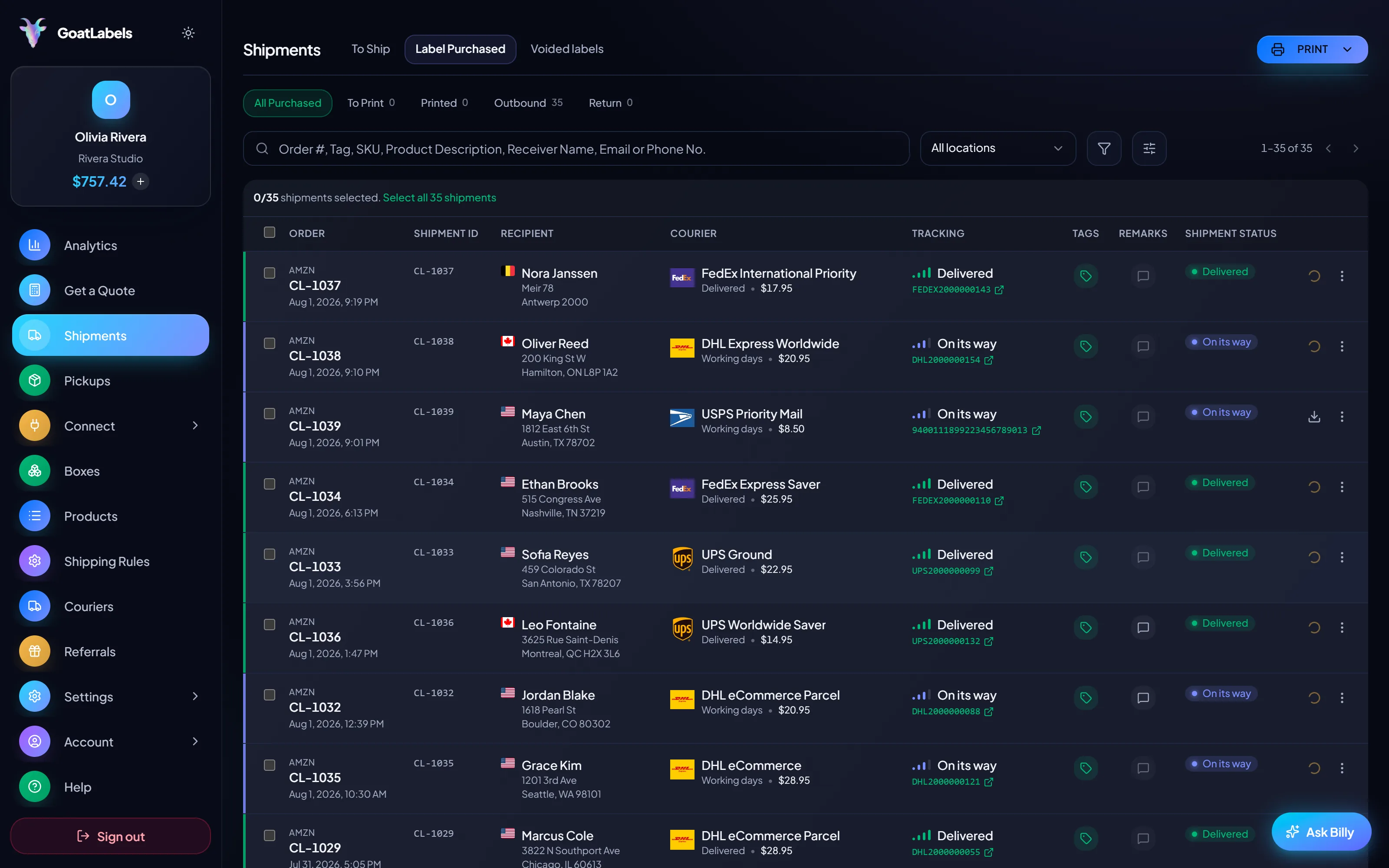
Nobody packs a show-night queue at a desk. The boxes are on the floor, the scale is on the table, and the phone is the only screen in reach — so weighing, quoting, buying, and printing all happen there, in the order the boxes are stacked.
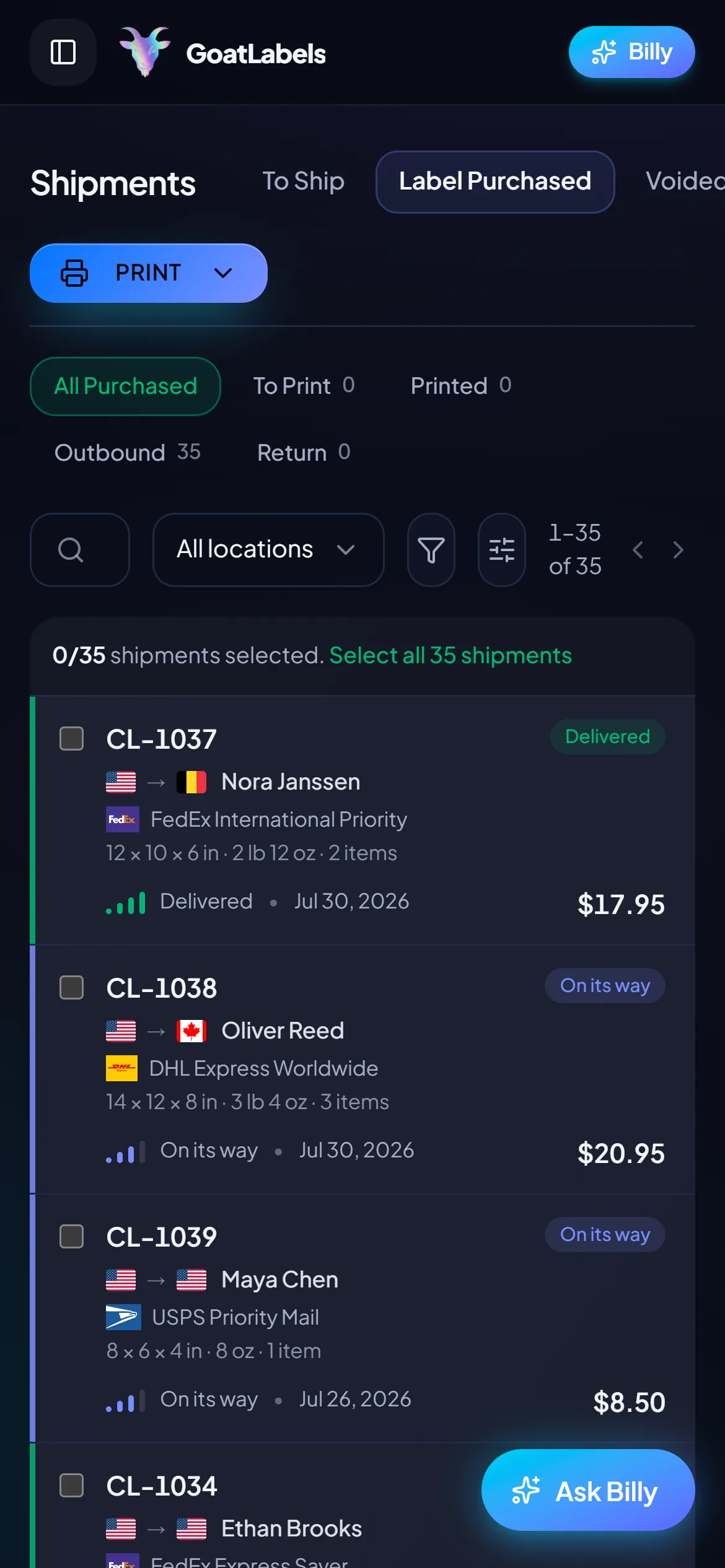
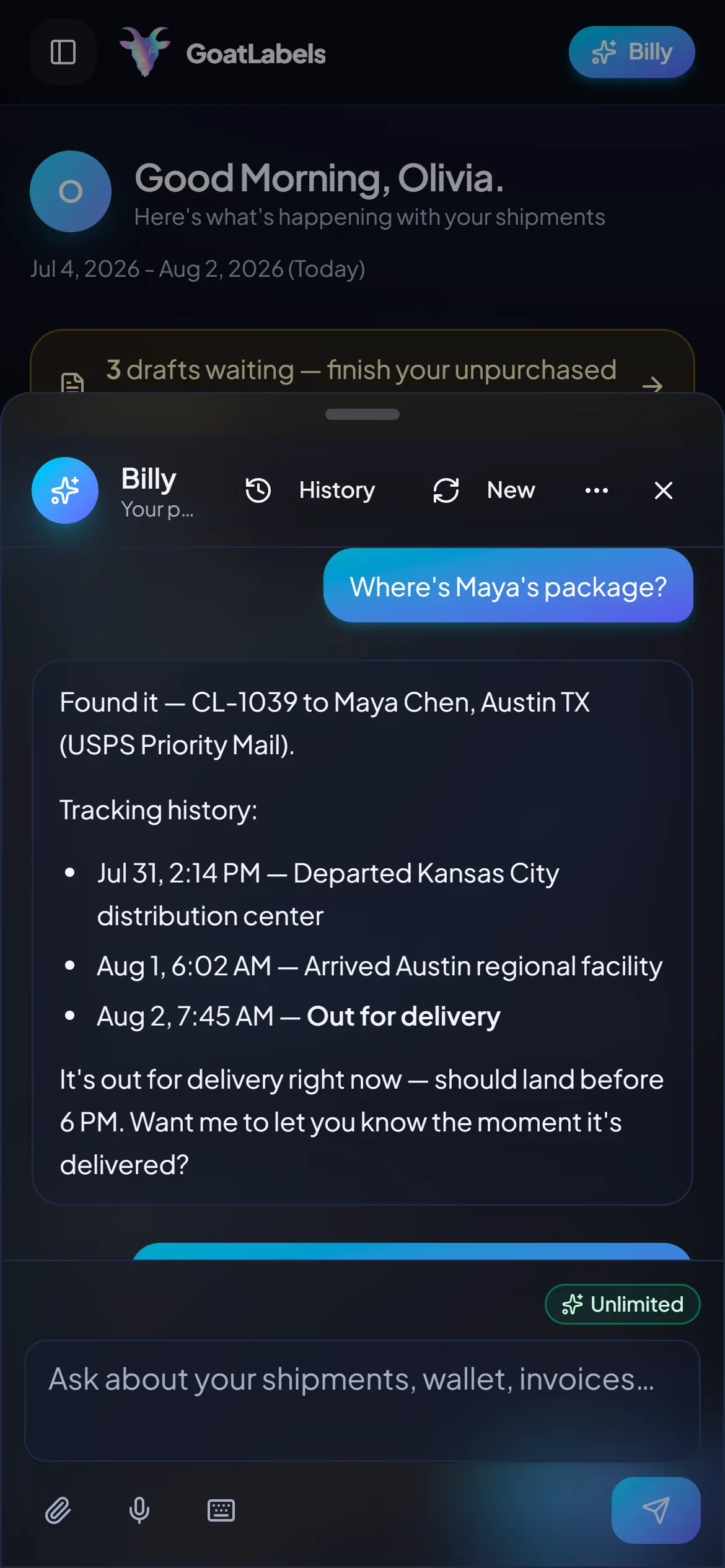
A post-show packing run is two-handed from start to finish. Ask out loud: Billy finds the shipment, quotes USPS, UPS and FedEx on the box you just weighed (DHL on international lanes), and reads the all-in price back so you never put it down. Included on every plan. This is the real product, not a render.
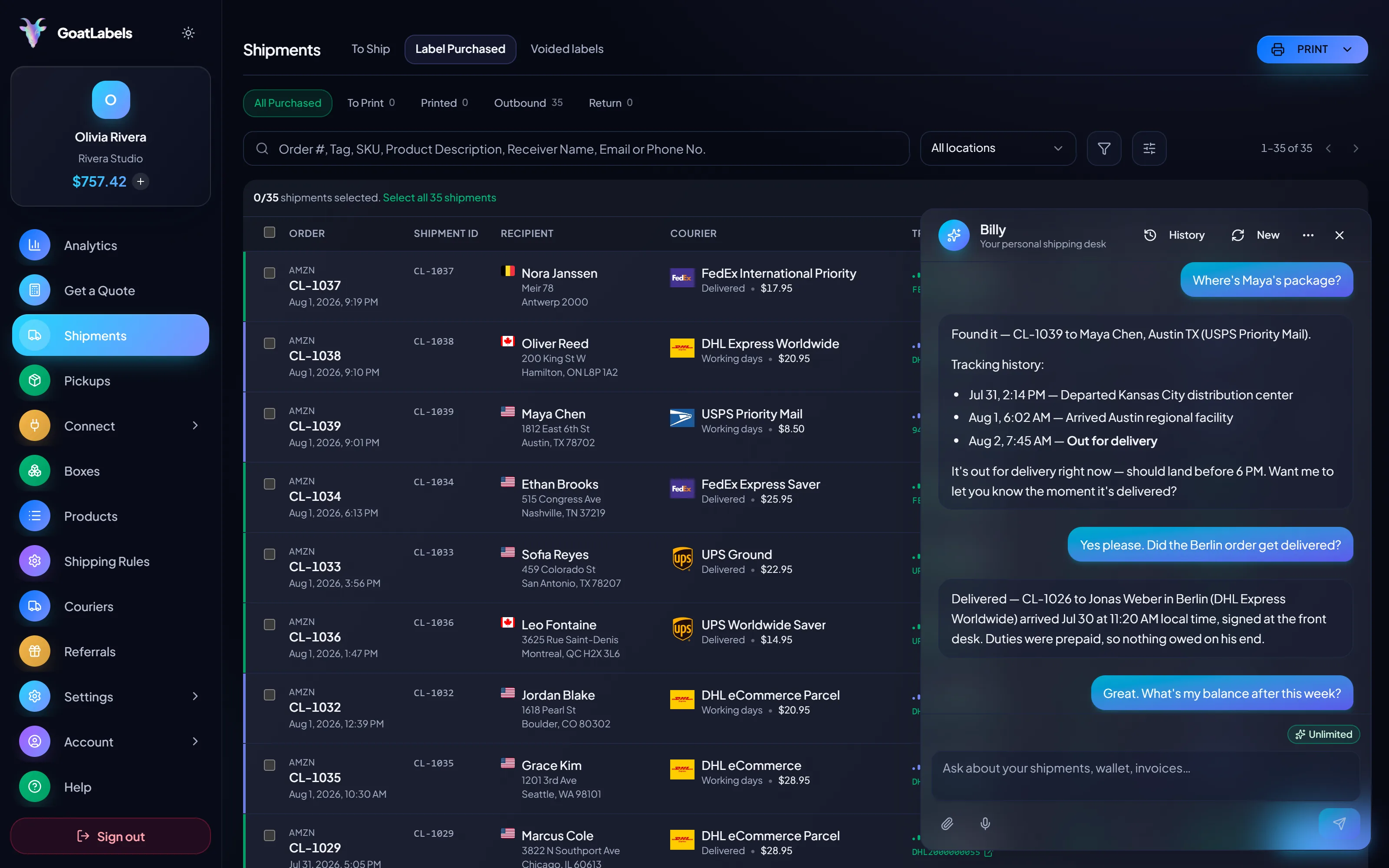
Listening
"What did the five-lot bundle cost to ship?"
Out for delivery
Bundle · scanned this morning
Speaks plain English · remembers your saved box sizes · phone at the packing table, browser, or Telegram on Pro.
Once a bundle is over the profile or a lot is over the envelope, the only honest price is the one taken from the packed box's real weight and dimensions. Each carrier comes back as one all-in number, and the column you pick is the exact amount that leaves your prepaid balance. Figures are illustrative.
Ground Advantage
2 to 5 days$11.40
all-in · no surprises
Ground
1 to 5 days$9.85
all-in · no surprises
Ground
1 to 5 days$11.20
all-in · no surprises
Hundreds of lots a week is where clicking through parcels stops scaling. The API is here, free, on the plan you are already on — because changing shipping tools later just to get one is a migration nobody wants to do twice.
POST /api/v1/shipments
Authorization: Bearer sk_live_…
Idempotency-Key: ord_8421

{
  "to": { "name": "Joyce", "city": "Berlin", "country": "DE" },
  "parcel": { "weight": 2.6, "weight_unit": "lb" },
  "service": "fedex_intl_priority"
}
Shows come in bursts and the weeks between them are empty, so a flat monthly fee bills hardest exactly when you are not shipping. Free covers 50 shipments a month with connected shops, the assistant, and the API all included. Past 50 shipments a month, Pro is one flat monthly plan with unlimited shipments.
 — draft a label without leaving the packing table
Rate by plan
illustrativeone flat plan, unlimited shipments
$0 / forever
Enough for a seller running the occasional show, and nothing owed in the weeks between them.
The assistant that turns a pasted Whatnot order into a draft label runs on Free, unlimited, in the web app on desktop and mobile. Pro adds Billy on Telegram.
Telegram, Pro
GET /api/v1/shipments
200 OK · plan: free
Unlimited calls on Free — still unlimited on Pro.
Put a real parcel through and compare the side-by-side rate against what that label costs you on
ShippoPirate ShipShipStation
Label prices are quoted live from USPS, UPS, FedEx, and DHL and shown as one all-in number, with nothing added at checkout. Whatnot's own label pricing, and its BYOL approval, are Whatnot's. Full pricing details
Not every Whatnot seller needs an outside label. These four run into the profile, the envelope, or the approval question week after week.
 Card and collectible breaks
One buyer takes eleven lots across two hours and it leaves as one heavy box. Every shipping profile in that bundle was written for a single card sleeve, so the profile is wrong by construction rather than by accident.
 Furniture, art, sneaker lots, crates
The categories where the prepaid label simply does not generate. Measure the crate, find out which carriers will still take it, and price the handling before the show rather than at the counter.
Over the envelope
Measured, then quoted against every carrier on dimensions

 The lot that sold in the DMs
 Whatnot plus Shopify, Etsy, or TikTok
1
queue and one prepaid balance behind every channel you sell on
Related: shipping labels for TCGplayer, AI shipping labels, and package size and weight limits.
A video took off and I had 80 TikTok Shop orders by morning. I printed every label from my phone on the bus to the post office.
Early customer · TikTok
TikTok Shop seller
TikTok Shop
I run my Etsy shop from the kitchen. The AI reads the order, picks the carrier, the label prints. That's the whole workflow now.
Early customer · Etsy
Etsy maker
Etsy
The API is what every shipping API pretends to be. Idempotency that actually works.
Sasha R.
Staff engineer, marketplace
Weigh the real box, quote it against USPS, UPS and FedEx, buy from a prepaid wallet, and enter the tracking in Seller Hub, once Whatnot has approved you for BYOL.
Free to start, no card required, no monthly fee on Free, up to 50 shipments a month. GoatLabels has no say in Whatnot's BYOL approval.
Updated