

USPS
Ground Advantage
2 to 5 days$11.40
all-in · window quoted, scans recorded
Every tracking status maps to a physical scan event: label created means no scan yet, in transit means a hub scan, out for delivery means the last facility. The statuses worth acting on are the stalls and the exceptions — most of the rest are the network describing itself, not a problem.
USPS, UPS, FedEx, and DHL describe the same physical journey in different words — every label bought here carries its carrier's tracking from the first scan.


 all four
Every shipment gets a branded tracking page and tracking emails under your name, so the status your buyer refreshes is one you present — whichever of the four carriers is underneath.
A tracking page is not a live feed of a parcel's position. It is a log of moments when a barcode passed a scanner, translated into customer language. Between those moments the carrier knows nothing new, which is why tracking moves in jumps rather than glides. The scanners live in specific places: the retail counter or pickup driver who creates the acceptance event, the automated sortation lines inside regional hubs that generate arrival and departure pairs, the delivery station that loads the parcel onto a route, and the courier's handheld that records the final handover. Map those and the whole vocabulary collapses into one shape — possession, sortation, last facility, door.
This is also why a status is best read as evidence rather than as a promise. An acceptance scan proves the carrier physically has the parcel — the single most important event in the log, because it moves responsibility from your packing bench into the network. A hub scan proves the parcel was alive and moving at that timestamp, nothing more. And the absence of a scan proves almost nothing: parcels ride through facilities in containers and sacks, and a piece that misses a scanner pass simply goes dark until the next one catches it. The log is honest, but it is sparse, and most tracking anxiety comes from reading sparse as stopped.
Each carrier dresses those scan events in its own vocabulary, which is why a seller shipping on USPS and UPS in the same week reads two different stories about two identical journeys. The table below maps the four vocabularies onto the shared physical events, with a flag for whether each row is routine or worth acting on.
Status concordance — verified against each carrier's own tracking documentation on 2026-08-15.Sources: the USPS tracking status help pages, the UPS and FedEx tracking support glossaries, and DHL's shipment status explanations. Carriers reword these strings without notice and the phrasing varies slightly by service, so treat the wording as representative and the event column as the stable truth. Next review: 2027-02.
| Physical event | USPS says | UPS says | FedEx says | DHL says | Flag |
|---|---|---|---|---|---|
| Label registered, no physical scan | Shipping Label Created, USPS Awaiting Item | Label Created / Shipment Ready for UPS | Label Created / Shipment information sent to FedEx | Shipment information received | Normal before drop-off |
| Carrier takes physical possession | USPS in possession of item / Accepted | Origin Scan / Pickup Scan | Picked Up | Shipment picked up | Normal |
| Pass through a sort facility | Arrived / Departed USPS Regional Facility | Arrived at Facility / Departed from Facility | Arrived at FedEx location / In transit | Processed at facility / Transferred through hub | Normal — most of a parcel's life |
| Reached the delivery station | Arrived at Post Office / Out for Delivery | Out For Delivery | On FedEx vehicle for delivery | With delivery courier | Normal — same-day delivery likely |
| Journey deviates from plan | Alert / delivery exception detail | Exception (cause in the detail line) | Delivery exception | On hold / Clearance event | Act if the cause names you or the address |
| Handed over at destination | Delivered / Delivered to Agent | Delivered (with location note) | Delivered | Delivered | End state — disputes are their own topic |
| Coming back to you | Return to Sender | Returned to Sender | Returning package to shipper | Shipment returned | Act now — a return is already in motion |
Two translation habits cause most of the cross-carrier confusion. The first is that one carrier logs a hub visit as an arrival and departure pair while another logs a single processed event, so the same journey produces a longer log on one tracking page than the other — more lines is not more progress. The second is that the label-created state reads like a shipment on some pages and like a warning on others, when it always means exactly one thing: postage exists, and no scanner has seen the parcel yet.
The filter that keeps a seller sane is sorting every status into one of three buckets. The first bucket is the network describing itself: arrivals, departures, in-transit updates, out for delivery. These need nothing from you, and refreshing them changes nothing. The second bucket is exceptions — the carrier flagging a deviation and, almost always, naming a cause in the detail line. The cause is the instruction: weather and mechanical delays self-resolve and the parcel reroutes; an address problem needs the buyer's input quickly, before attempts are exhausted; a damaged-in-transit note means evidence and a claim conversation are coming. The third bucket is the stall, where the log simply stops adding lines — no exception, no movement, just silence. A stall is a missing scan far more often than a lost parcel, and diagnosing one is its own discipline keyed to which scan you have: our guide to stalled USPS tracking walks that decision, branch by branch.
Every log finishes in one of three places. Delivered is the common one, and its detail line matters more than sellers expect: delivered to an agent, a parcel locker, or a front desk means the parcel left the network into hands that were not the buyer's, which is the first avenue to check when a buyer disputes receipt. When tracking shows delivered and the buyer says otherwise, the claim paths and seller-protection framework live in our guide to delivered but not received. The second end state is the return: once a return-to-sender status appears, the parcel is already traveling back, and what a returned parcel costs and who pays is decided by the reason it bounced. The third is the dead end — a log that never reached delivery and stopped adding lines for good. That parcel is a claim case, and the filing windows and evidence that a no-scan claim requires are covered in our guide to lost and damaged package claims.
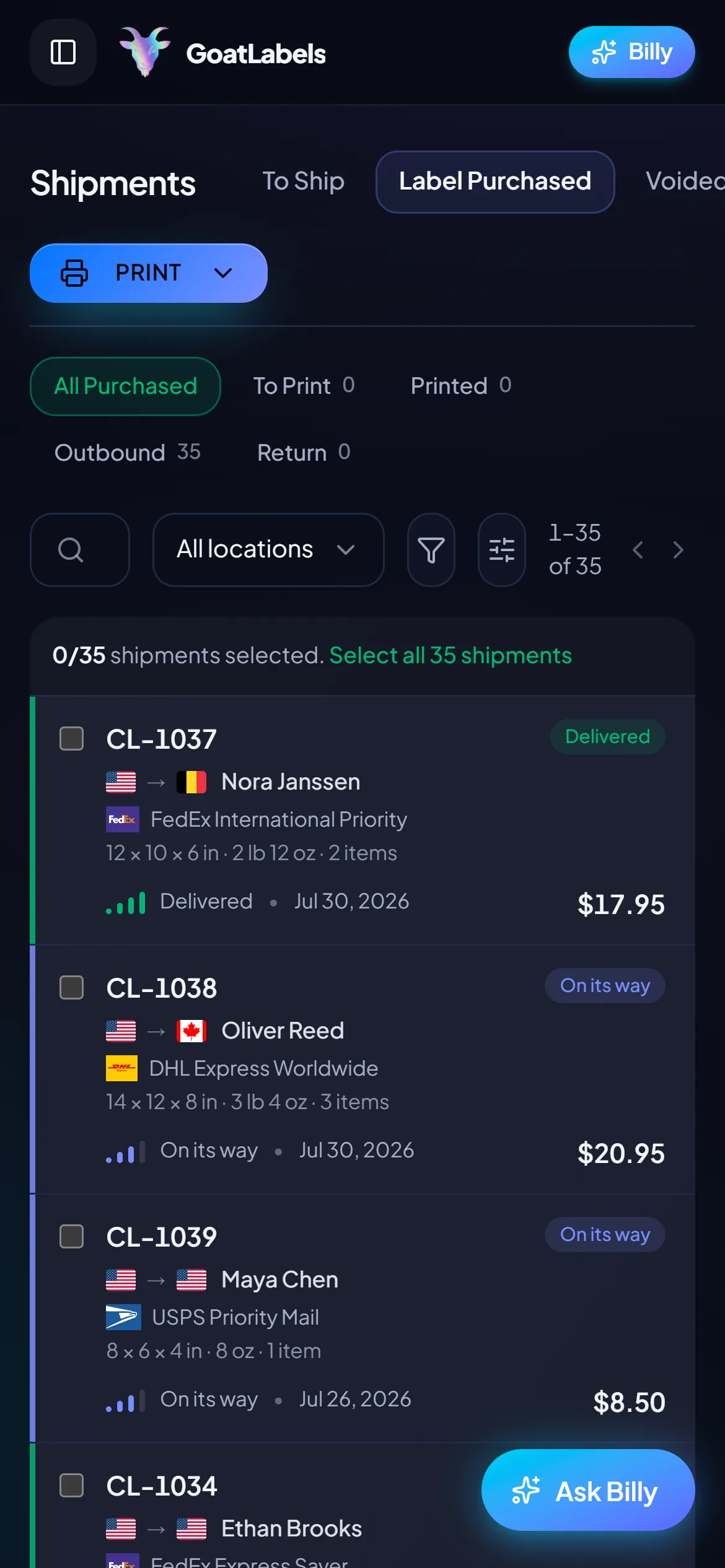
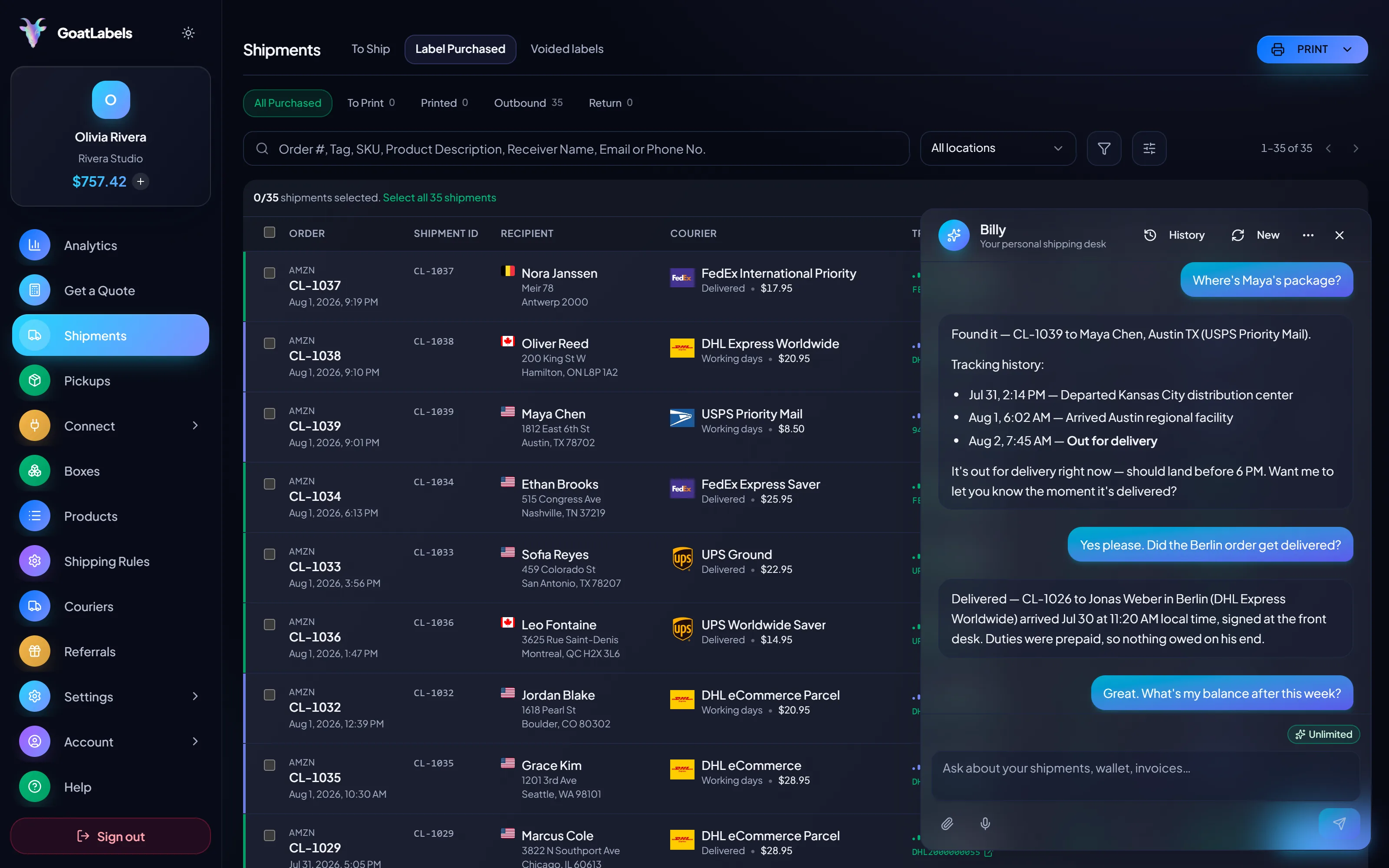
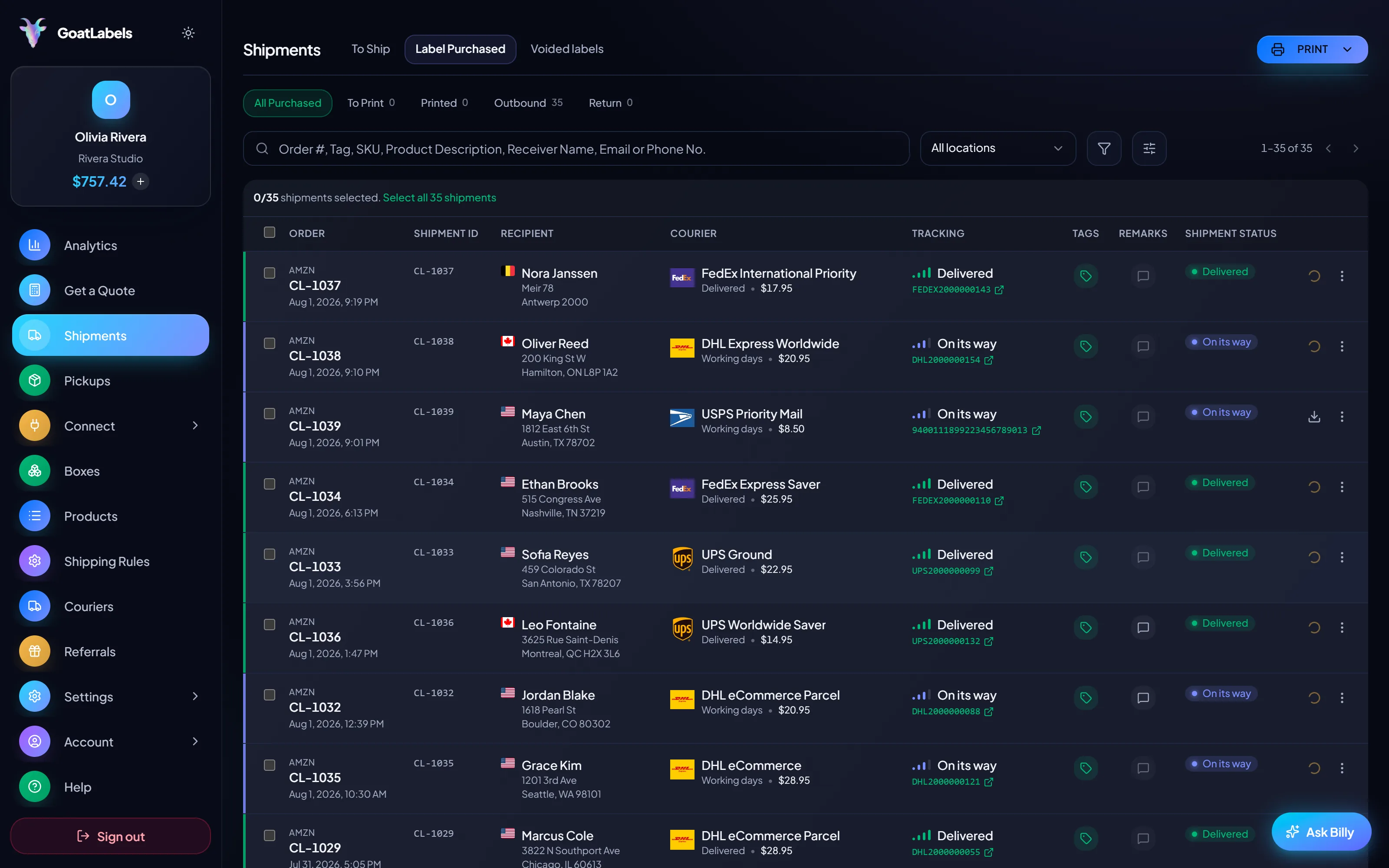
Where GoatLabels sits in all of this is deliberately simple: every label bought here — USPS, UPS, FedEx, or DHL — feeds its scans into one shipments queue, so four vocabularies land in one place instead of four tabs. And the buyer-facing half runs under your name: a branded tracking page and tracking emails that send as scans arrive, which answers the where-is-it message before it is sent. The statuses do not change. Who has to explain them does.
Nothing on a tracking page exists without a scan behind it, which means the seller's real leverage is upstream of the log: get the address right so the parcel is deliverable, and get the label bought so the acceptance scan happens on the day the parcel actually goes. That is this loop. The order arrives however it arrived, Billy validates the destination before any postage exists, and the label that comes out carries its carrier's tracking from the acceptance scan onward — into one queue for you and a branded page for the buyer.
hey where is my order? tracking hasn't moved since Tuesday
The most consequential tracking event happens before the parcel moves: a validated address. A mistyped destination is what turns a routine log into an exception nobody can refresh their way out of.
 Billy AI
From the acceptance scan on, every event lands in one shipments queue for you and on a tracking page carrying your name for the buyer — four vocabularies arriving in one place instead of four tabs.
Thirteen store connectors, Shopify, Amazon, eBay, Etsy, TikTok Shop and more, sync orders into one To Ship queue, and when you print, the tracking number pushes back onto the order it came from, so the buyer's own order page shows a status without anyone copying a number between tabs. Paste an Instagram or Facebook DM instead and Billy builds the label; that shipment's scans land in exactly the same queue, worded by exactly the same four carriers.
 Shopify
 Etsy
Etsy WooCommerce
 TikTok Shop
 Amazon
 eBay
eBay Squarespace
 Wix
Wix WalmartShopify PlusSoon
 Square
 BigCommerce
 Magento
 ZapierSoon
 NetSuiteSoon
 EcwidSoon
 Temu
Temu SheinSoon
 ChannelAdvisorSoon
 SkuVaultSoon
 Zoho InventorySoon
 Patreon
Reading statuses is the seller's half. The buyer's half — the page they refresh and the emails they get — ships with every label bought here.
Every shipment's tracking lands in the same queue whichever carrier is underneath, so a morning's check is one list — not four tracking pages in four vocabularies. The wallet that bought the labels sits beside it: one balance, funded by card, Apple Pay, Google Pay, ACH, or crypto.
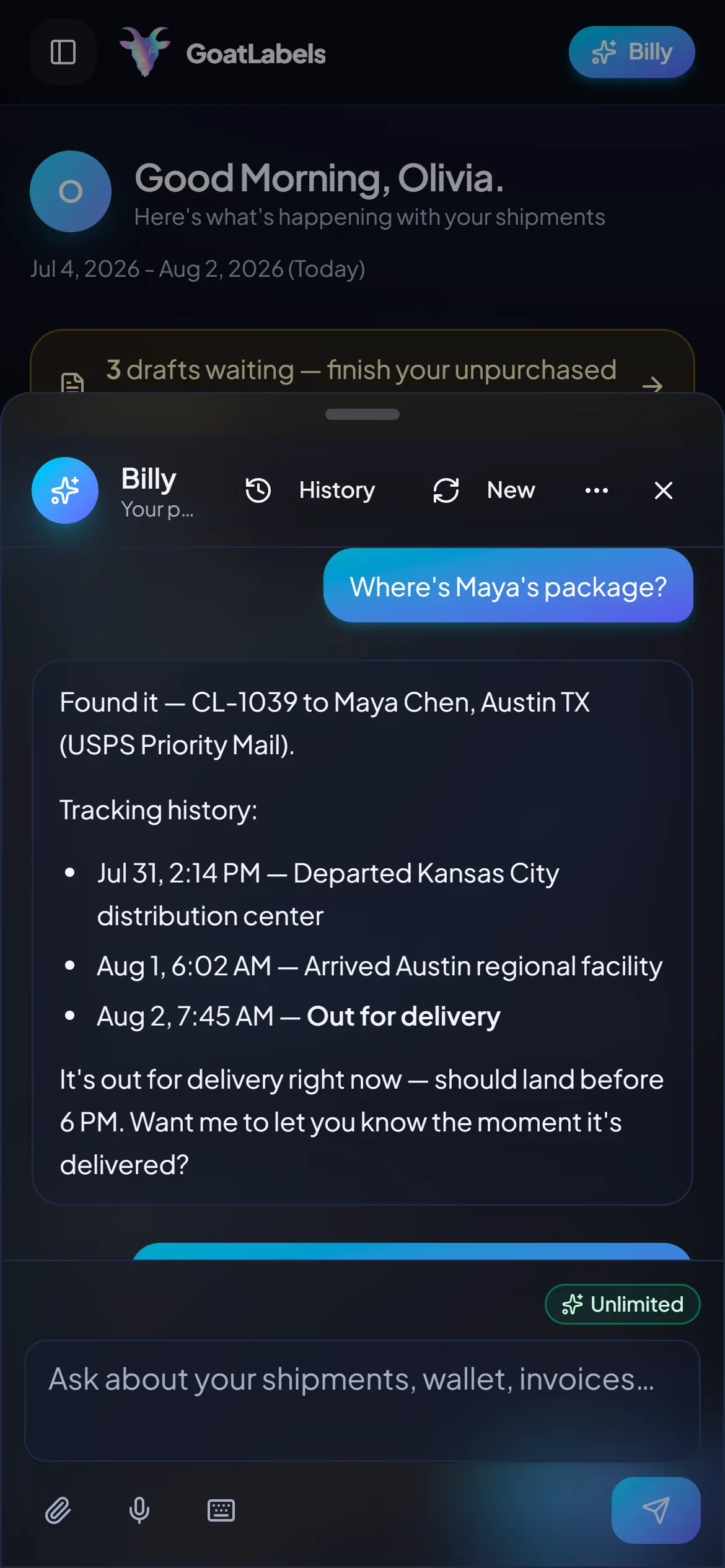
Billy reads a shipment's state back when you ask — the latest scan, in words rather than carrier codes. The same assistant drafts labels from a pasted order or a screenshot, so the question and the fix live in one place.
BillyLIVEThe quoted number is the final number, and the tracking that comes with the service is part of it — no per-shipment tracking fee, no tier where scan visibility is a paid add-on, no monthly fee on Free, up to 50 shipments a month.
Buyers follow the parcel on a tracking page carrying your name and get emails as scans arrive — the where-is-my-order message answered before it is written, on every carrier, on every plan.
UPS$12.48FedEx$13.22DHL$14.10USPS$11.79Signed webhooks push shipment events to your systems instead of your code polling four carriers, with unlimited API calls on every plan — the concordance above, delivered as JSON.
Status updated
Out for delivery · Columbus, OH
Where-is-my-order messages do not wait for you to get back to the desk, and neither does an exception that needs the buyer's input today. The queue, the latest scan on every shipment, and the full log behind it all fit on the phone in your hand — along with the label for the replacement, if that is where the conversation ends up.
A tracking question has a one-line answer buried under a page of log lines. Ask out loud — where is the Ohio order — and Billy reads the shipment back: the latest scan, what it physically means, and whether it is the kind of status that needs anything from you. Four carriers' vocabularies, one plain-English answer, while your hands stay on the parcel you are packing.
Listening
"Where is the Columbus order right now?"
Latest scan
Departed regional facility · in transit
Speaks plain English · reads a shipment's tracking state back · drafts labels from a pasted order, screenshot, or voice · included on every plan, never a pricier tier.
Every quote carries a delivery window beside its all-in price, and that window is what the carrier expects. The statuses that follow are what actually happened. Choosing a service is also choosing which of the four vocabularies above you and your buyer will be reading for the next few days, which is why the two belong on one screen rather than in two tools.
Ground Advantage
2 to 5 days$11.40
all-in · window quoted, scans recorded
Ground
1 to 5 days$9.85
all-in · window quoted, scans recorded
Ground
1 to 5 days$11.20
all-in · window quoted, scans recorded
The concordance above is a table because carriers speak four vocabularies. Over the API it is a normalised event instead: subscribe once and every acceptance, hub, exception, and delivery scan arrives signed and in the same shape, whichever carrier recorded it — rather than your code polling four tracking endpoints and parsing four dialects.
POST /api/v1/shipments
Authorization: Bearer sk_live_…
Idempotency-Key: ord_8421

{
  "to": { "name": "Joyce", "city": "Berlin", "country": "DE" },
  "parcel": { "weight": 2.6, "weight_unit": "lb" },
  "service": "fedex_intl_priority"
}
Plenty of tools meter the buyer-facing half — a tracking page on one tier, notification emails on the next, scan history behind an upgrade. Here the tracking that comes with the carrier service is simply part of the label, and the branded page and the emails ship on Free. Pro buys unlimited shipments, never a better view of where your parcels are.
 — ask where a parcel is without opening the dashboard
Rate by plan
illustrativePro: one flat monthly plan, unlimited shipments
$0 / forever
50 shipments a month with every scan, every status, and a branded tracking page included.
Ask where a shipment is and Billy reads the latest scan back in plain English instead of carrier codes. Unlimited in the web app on Free; Pro adds Billy on Telegram.
Telegram, ProGET /api/v1/shipments
200 OK · plan: free
Unlimited calls on Free — still unlimited on Pro.
Put a real parcel through and compare the side-by-side rate against what that label costs you on
ShippoPirate ShipShipStationThe statuses themselves belong to the carriers — USPS, UPS, FedEx, and DHL each word the same scan differently, which is what the concordance above translates. What is ours is where they land: one queue, one branded page, one set of emails. Full pricing details
The status belongs to the carrier. Explaining it is always the seller's job — and these are the four shapes of seller who do the most explaining.
 TikTok Shop & live commerce
A hundred orders overnight is a hundred logs somebody may have to read aloud. A branded tracking page and emails that send as scans arrive answer most of those messages before they are written; the ones that still arrive get answered from a single queue rather than four carrier sites.
 Etsy & independent creators
At low volume every silent log feels like a lost parcel. Most silence is a missed scan rather than a missing box, and knowing which statuses are just the network describing itself is what stops a quiet Tuesday turning into a refund you did not owe.
Silence is not a status
No scanner passed, so no line was written — the parcel is still moving

 The orders with no order page

 Where a status becomes a database row
1
signed webhook feed carrying all four carriers' scan events
A video took off and I had 80 TikTok Shop orders by morning. I printed every label from my phone on the bus to the post office.
Early customer · TikTok
TikTok Shop seller
TikTok ShopI run my Etsy shop from the kitchen. The AI reads the order, picks the carrier, the label prints. That's the whole workflow now.
Early customer · Etsy
Etsy maker
EtsyThe API is what every shipping API pretends to be. Idempotency that actually works.
Sasha R.
Staff engineer, marketplace
Every label bought here feeds its scans into one shipments queue, and your buyer follows a branded tracking page under your name — USPS, UPS, FedEx, or DHL underneath.
Sign up in seconds. No card required. Branded tracking on every plan.
Updated