

USPS
Ground Advantage
2 to 5 days$11.40
all-in · no surprises
If your Marketplace listing has no label button, Facebook is not selling you one, so you buy it yourself. Name a carrier in the listing, quote the parcel across USPS, UPS and FedEx, buy from a prepaid wallet, then paste the tracking number into the order before the ship window closes.
Every domestic parcel quoted against USPS, UPS and FedEx (DHL on international lanes) before you commit a shipping price to the listing.
Top up with card, Apple Pay, Google Pay, ACH, or crypto and spend it a label at a time — Marketplace volume is lumpy by nature.
Marketplace runs two shipping models, and only one of them prints a label for you. In the first, Facebook sells the buyer prepaid shipping at checkout and hands you a label to print. In the second — the one where the listing says the seller arranges shipping — Facebook collects the address and the payment and then stops, because it never bought a label to give you. Which model a listing gets is Facebook's call, not a switch you flip after the sale: it turns on the category, the item, the country you list in, and your own history on the platform.
The tell is in the listing, not in the order. If there was no prepaid shipping option when you created it, there will be no label button after it sells, and refreshing the order page will never produce one. Most sellers read that as a bug and go hunting for the setting that turns it back on. There isn't one. The second model is working exactly as designed, and what it moves onto you is concrete: a real label, a tracking number entered on the order, and a parcel actually handed to a carrier inside Facebook's ship-by window.
Every shipped Marketplace order carries a ship-by date, and the only thing that clears it is you marking the order shipped with a carrier and a tracking number. That paste is the whole obligation. Miss it and Facebook has no way to tell a slow seller from a seller who took the money and vanished, so the order becomes cancellable, the payout stops, and a pattern of it reaches your selling privileges. Buying a good label does not protect you on its own — the label is invisible to Facebook until its number is typed onto the order.
The failure mode that costs the most is not lateness, it is a number that never scans. Tracking entered from a label you bought but did not hand over reads, from the outside, exactly like a fabricated shipment: the buyer refreshes, nothing moves, and the dispute that follows opens with you already looking wrong. So run the sequence the other way round. Pack it, buy the label the day it actually goes, drop it, then paste the number while the acceptance scan is fresh. If you bought early and it is not going today, void the label and buy it again on the day: a void and the wallet credit that posts after the carrier accepts it is a much cheaper mistake than a tracking number that sits still.
Marketplace makes you commit to shipping before you know where the parcel is going. You set a shipping price, or you absorb it, at listing time — and the buyer's zone, the single biggest lever on what the label ends up costing, is not known until days later. That is precisely the situation where a standing default carrier is most expensive, because you priced the listing on a habit rather than on a quote.
Weigh and measure the item before you list it, not after it sells. Then quote that parcel to the far side of the country, price the listing on that worst case, and let the rate-shop hand you the difference when it sells three states away instead. GoatLabels quotes USPS, UPS and FedEx on the same domestic parcel and returns each all-in price, so the worst case is a number you looked up rather than one you guessed. Which carrier wins moves with weight and zone — a 3 lb box and a 22 lb one rarely come back with the same name on top — and the bulky-but-light items Marketplace is full of, a lamp or a boxed monitor or a car seat, are exactly where the habit carrier is wrong most often. How the carrier rate-shop prices a parcel works through that in full.
There is no Facebook Marketplace connector, and we are not going to imply otherwise. Store sync covers 13 platforms (Shopify, Amazon, eBay, TikTok Shop, Etsy and more); Marketplace is not on that list and is not on a roadmap you should plan around. So a Marketplace sale arrives the way it always arrives — as a message thread and an order page — and it becomes a label by paste. Copy the buyer's address out of the order, or screenshot it, and Billy drafts the label from that: name, address, parcel, validated before any money moves. That workflow has its own page, and it is the same one Instagram sellers run for DM orders.
The return leg is yours too: nothing pushes tracking back to Facebook for you. We cannot write to a Marketplace order, so once the label is bought you copy the tracking number into the order yourself. That is one paste per order, and it is the paste the entire ship window turns on. What you get in exchange for doing it by hand is that every Marketplace parcel gets priced against USPS, UPS and FedEx instead of one carrier, paid out of the same prepaid wallet as everything else you sell, and printed from the phone you were already holding when the buyer messaged.
Facebook hands you an address and stops. This is the rest of it: the order arrives as a paste or a screenshot, Billy reads the buyer and validates the address, the carriers price the parcel, and the label comes out of a prepaid wallet, leaving you one thing to do by hand, which is put the tracking number back on the Facebook order.
still available? happy to pay shipping — 3402 N Union Ave, Tacoma WA 98407
There is no Marketplace connector, so nothing syncs: the order gets here as a paste or a screenshot, exactly as it left the thread.
 Billy AI
Then paste the tracking number onto the Facebook order while the acceptance scan is landing. Nothing pushes it across for you, and that paste is what the whole ship-by window turns on.
Store sync covers 13 platforms, including Shopify, Amazon, eBay, TikTok Shop and Etsy. Facebook Marketplace is not one of them and is not on a roadmap you should plan around, so a Marketplace sale never lands in a queue on its own — you paste the order or screenshot it, Billy drafts the label, and the tracking number goes back onto the Facebook order by hand.
 Shopify
 Etsy
Etsy
 WooCommerce
 TikTok Shop
 Amazon
 eBay
eBay
 Squarespace
 Wix
Wix
 Walmart
Shopify Plus
Soon
Walmart
Shopify Plus
Soon Square
 BigCommerce
 Magento
 Zapier
Soon
Zapier
Soon NetSuite
Soon
NetSuite
Soon Ecwid
Soon
Ecwid
Soon Temu
Temu
 Shein
Soon
Shein
Soon ChannelAdvisor
Soon
ChannelAdvisor
Soon SkuVault
Soon
SkuVault
Soon Zoho Inventory
Soon
Zoho Inventory
Soon Patreon
This does not sync with Marketplace, mark orders shipped, or touch your Facebook account. It is the part between the buyer's address and a parcel with a scanning tracking number on it.
Clearing a garage is four sales one week and none for a fortnight. Top up one prepaid balance with card, Apple Pay, Google Pay, ACH, or crypto and spend it a label at a time. No monthly fee on Free (up to 50 shipments a month), so a month with a single Marketplace sale bills you for a single label.
A Marketplace order is text on a screen and an address you would otherwise copy by hand. Paste it or screenshot it and Billy pulls out the buyer, the address, and the parcel and validates the address before money moves — a mistyped street number is the most expensive error in shipping, and Facebook will not catch it for you.
Billy
LIVE

Marketplace makes you commit to a shipping price before you know the buyer's zone, so the quote has to be a number you can rely on. It is one all-in figure at quote time, and that exact amount leaves your balance. A carrier re-weigh shows up as its own readable ledger entry rather than as an unexplained difference.
Rated side by side on the same domestic parcel, with DHL on international lanes. Marketplace is full of large-and-light items — a lamp, a boxed monitor, a car seat — and that is exactly where a habit carrier is wrong most often, because past a threshold the price comes off the dimensions rather than the scale.
UPS
$12.48
 FedEx
$13.22
FedEx
$13.22
 DHL
$14.10
USPS
$11.79
DHL
$14.10
USPS
$11.79
Quote and buy from your own script over REST and JSON, with signed webhooks for tracking events and real idempotency keys so a retried order never buys two labels. Unlimited calls on every plan, including the free one.
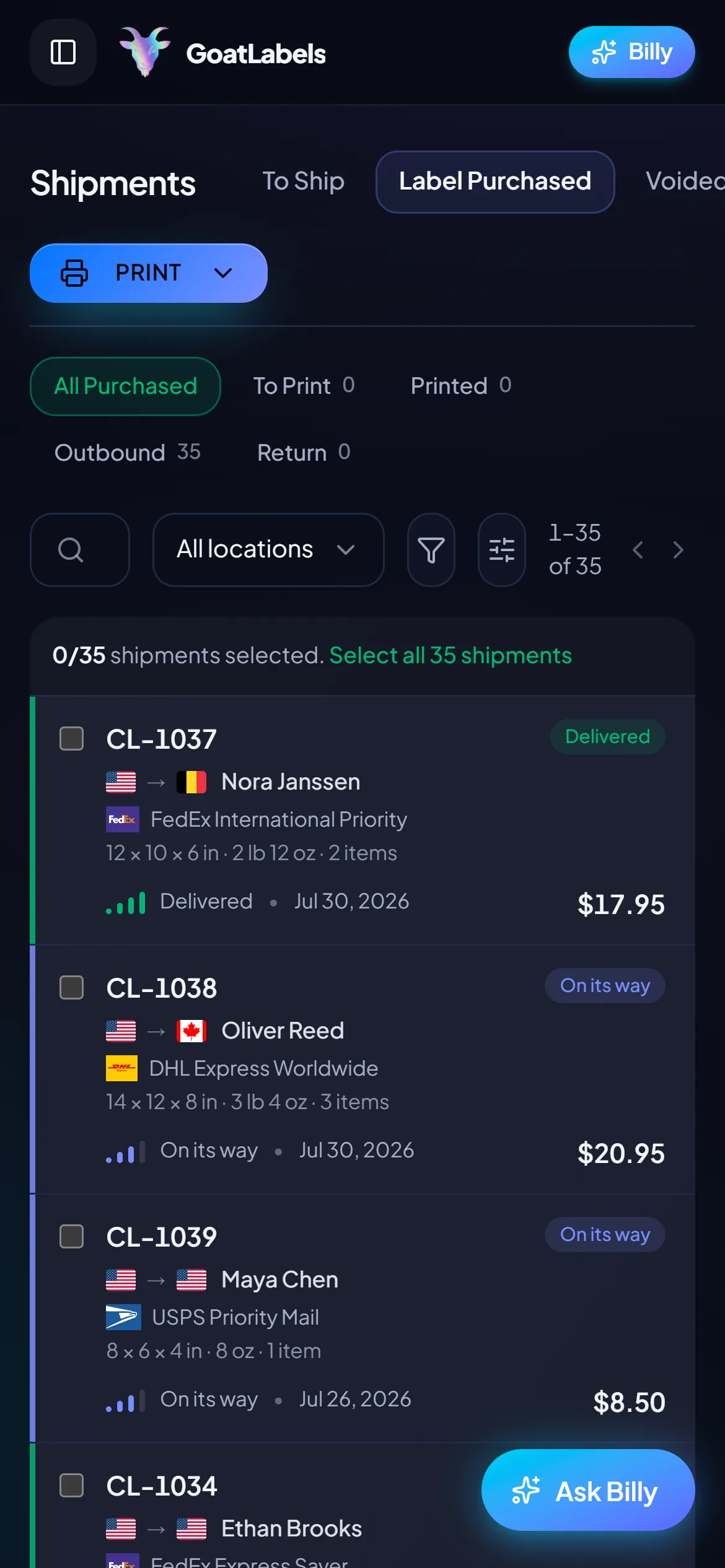
Marketplace order · label ready
Tacoma, WA · paste the tracking back
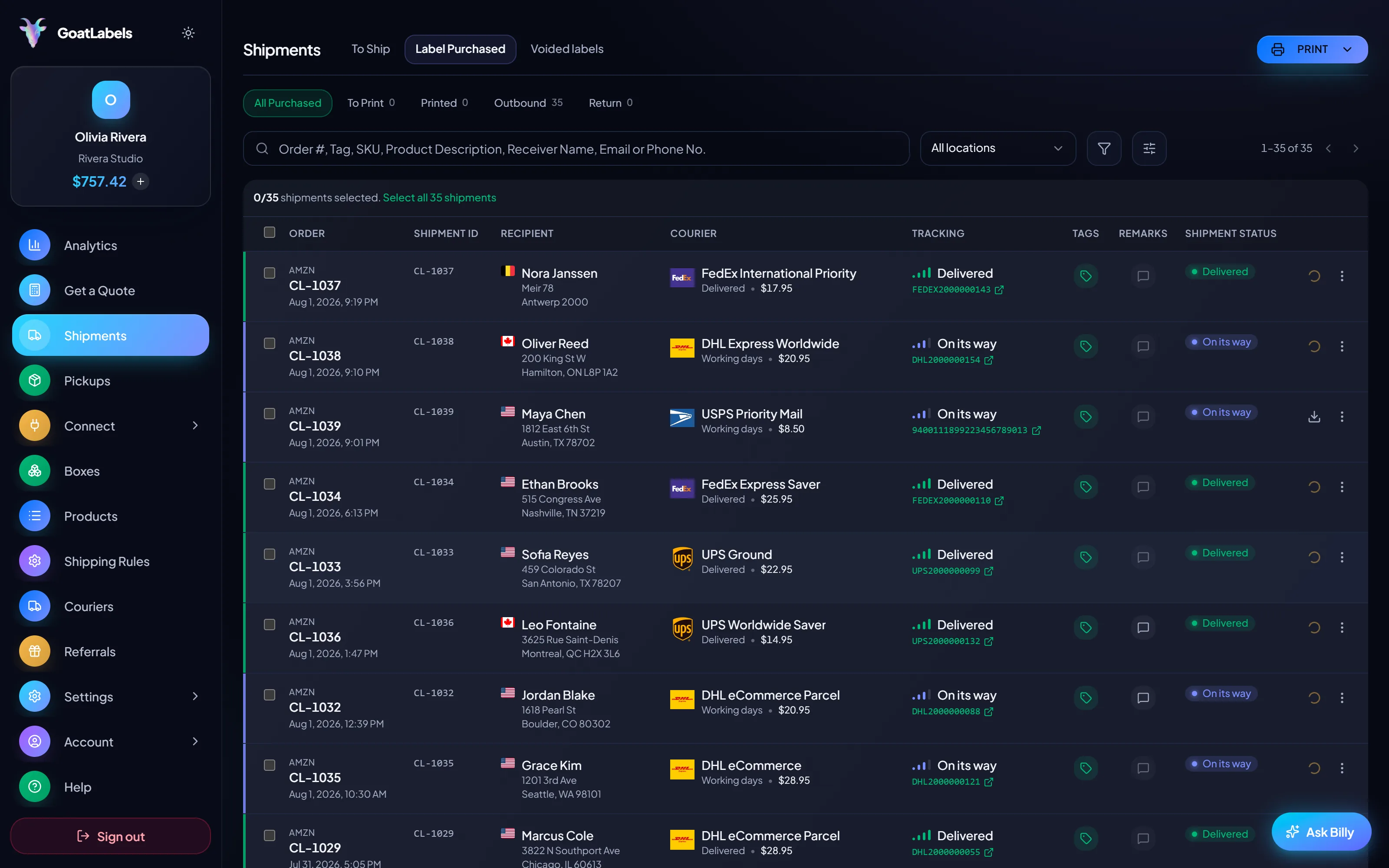
Nobody negotiates a Marketplace sale at a desk. The thread, the address, and the ship-by reminder all land on the phone in your hand, so the quote, the prices, and the buy button live there as well; there is no desktop leg of this trip.
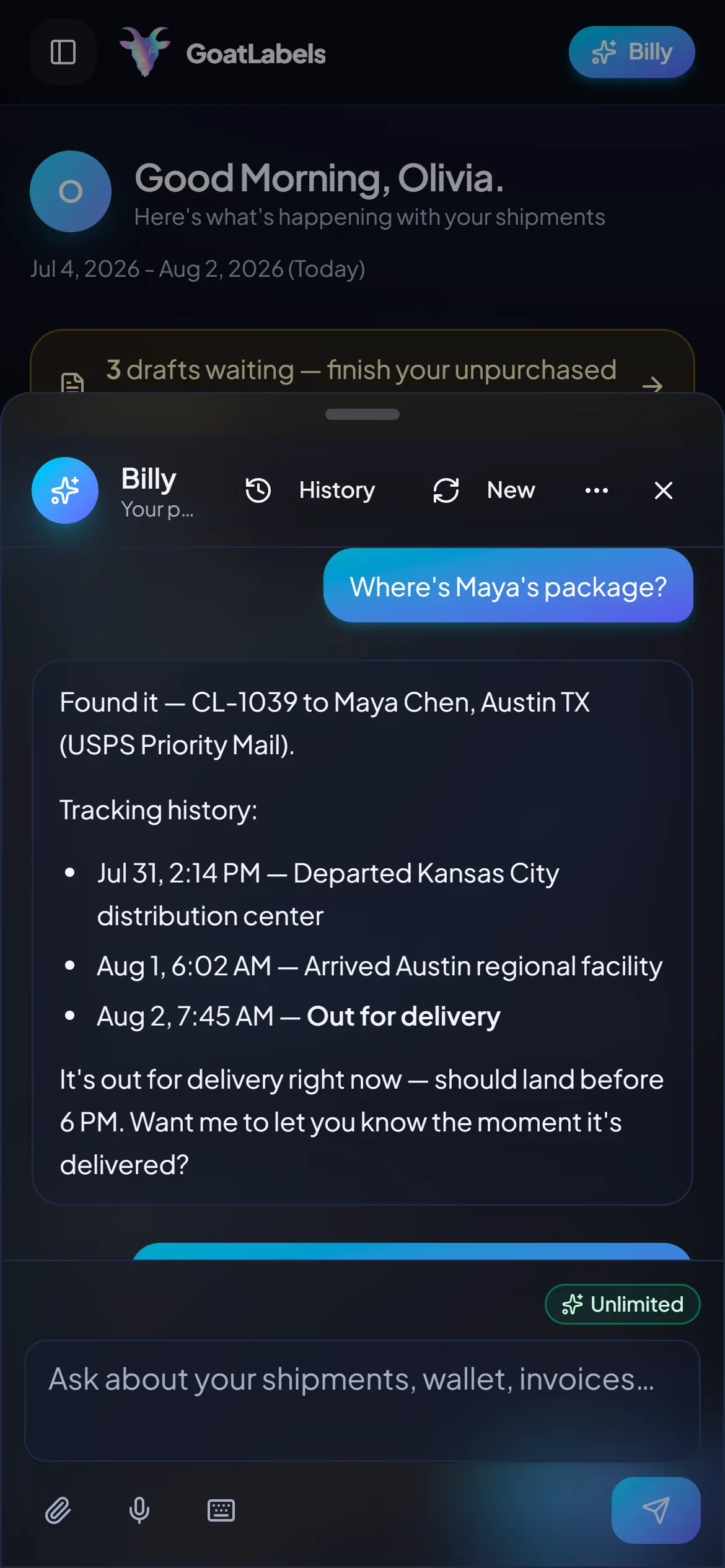
Packing a Marketplace sale is a two-handed job and the phone is already covered in packing tape. Ask out loud: Billy looks up the shipment, quotes USPS, UPS and FedEx on that parcel, and reads the all-in price back so you never open a tab. Included on every plan. This is the real product, not a render.
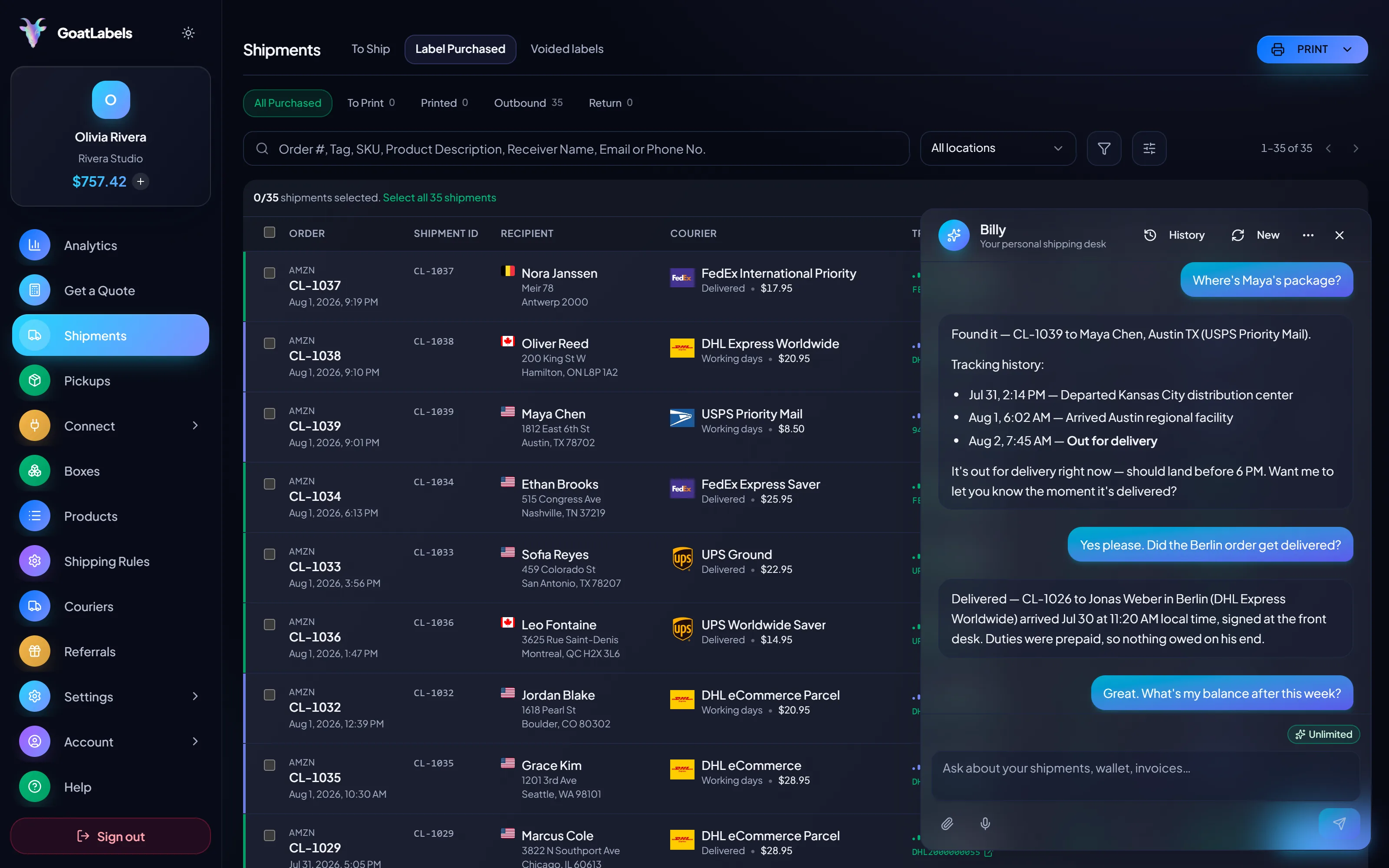
Listening
"Did the Tacoma parcel scan yet?"
Out for delivery
Tacoma, WA · scanned this morning
Speaks plain English · remembers your saved box sizes · phone at the packing table, browser, or Telegram on Pro.
Marketplace asks you to commit to shipping before you know where the parcel is going, so quote the packed box to the far side of the country and price the listing on that. Each carrier comes back as one all-in number, and the column you pick is the exact amount that leaves your prepaid wallet.
Ground Advantage
2 to 5 days$11.40
all-in · no surprises
Ground
1 to 5 days$9.85
all-in · no surprises
Ground
1 to 5 days$11.20
all-in · no surprises
Most Marketplace sellers never open this section. It is here, free, for the ones whose garage sale became a side business with a spreadsheet behind it — because changing shipping tools later just to get an API is a migration nobody wants to do twice.
POST /api/v1/shipments
Authorization: Bearer sk_live_…
Idempotency-Key: ord_8421

{
  "to": { "name": "Joyce", "city": "Berlin", "country": "DE" },
  "parcel": { "weight": 2.6, "weight_unit": "lb" },
  "service": "fedex_intl_priority"
}
Marketplace volume is lumpy by nature: a few sales when you clear a room, then nothing. Free covers 50 shipments a month with connected shops, the assistant, and the API all included. Past 50 shipments a month, Pro is one flat monthly plan with unlimited shipments.
 — draft a label without leaving the thread
Rate by plan
illustrativeone flat plan, unlimited shipments
$0 / forever
Enough for a room's worth of listings, and nothing owed in the months you sell nothing.
The assistant that turns a pasted Marketplace order into a draft label runs on Free, unlimited, in the web app on desktop and mobile. Pro adds Billy on Telegram.
Telegram, Pro
GET /api/v1/shipments
200 OK · plan: free
Unlimited calls on Free — still unlimited on Pro.
Put a real parcel through and compare the side-by-side rate against what that label costs you on
ShippoPirate ShipShipStation
Label prices are quoted live from USPS, UPS, FedEx, and DHL and shown as one all-in number — the figure you can put on the listing, with nothing added at checkout. Full pricing details
Four shapes of Marketplace seller who end up buying the label themselves, and the reason it happens is different in every one.
 One-off items, no two alike
Nothing repeats — a coat, a router, a box of records, each a different weight and shape. There is no saved package preset that fits, so the only defence against overpaying is quoting the parcel in front of you rather than reaching for the carrier you used last time.
 Big boxes, low density
A lamp, a stroller, a boxed monitor: light for its size, and the item type where a habit carrier is wrong most often. Measure it before the listing goes up, quote it to a far zone, and set the listing's shipping price from that instead of from a guess you have to eat later.
Measured before listing
Quoted to the far zone first, priced on the worst case
The sale that happened in a thread
 Marketplace plus a real shop
1
wallet and one queue behind every channel you list on
Updated 2026-08-03
A video took off and I had 80 TikTok Shop orders by morning. I printed every label from my phone on the bus to the post office.
Early customer · TikTok
TikTok Shop seller
 TikTok Shop
I run my Etsy shop from the kitchen. The AI reads the order, picks the carrier, the label prints. That's the whole workflow now.
Early customer · Etsy
Etsy maker
Etsy
The API is what every shipping API pretends to be. Idempotency that actually works.
Sasha R.
Staff engineer, marketplace
Paste the Marketplace order, compare the all-in quotes, buy from a prepaid wallet, and paste the tracking number back before the window closes.
No contract. No card required. No monthly fee on Free (up to 50 shipments a month), and an accepted void credits back to your wallet.
Updated