

USPS
Ground Advantage
2 to 5 days$11.40
all-in · no surprises
Switch before your next Stamps.com billing date: a GoatLabels account is free to open, the wallet funds instantly, and Billy AI drafts your first labels the same day.
USPS, UPS and FedEx on every domestic parcel, DHL on international lanes: live all-in rates, no monthly fee on Free, up to 50 shipments a month.
Card, Apple Pay, Google Pay, ACH, or crypto — one prepaid balance.
The migration itself is short. What makes it feel risky is doing the steps in the wrong order — so the sequence below opens the new account first, proves it on a real parcel, and only cancels the old one once labels are already printing. Endicia sits under the same corporate roof and leaves the same way: switching from Endicia, step by step.
Open your Stamps.com billing page and write down the day the next charge lands. Everything below is scheduled backwards from that date, because the only expensive way to migrate is to do it slowly enough to pay for one more month you never used.
Signing up is free and takes seconds, and the wallet accepts card, Apple Pay, Google Pay, ACH bank transfer, or crypto. Load only what your next few days of shipping needs — a prepaid balance is not a deposit, and it is not a plan you are now committed to.
Store connectors, Shopify, Etsy, WooCommerce, eBay and Wix, sync into the To Ship queue and push tracking back when you print. If your orders come out of DMs instead, connect nothing: paste the message or drop the screenshot and Billy drafts the label from it.
Take the next order you were going to ship anyway, quote it here against USPS, UPS and FedEx (DHL on international lanes), and compare the all-in number with what you were about to buy. One parcel is a faster answer than a week of spreadsheet comparison.
This is the whole migration. There is no data import, no CSV mapping, and no address book to move by hand — type or paste an address once and it is saved. Many sellers can reach this step the same afternoon they started.
Cancel online (My Account, Manage Account, Account Settings, Change/Cancel Plan) or by phone with Stamps.com's Customer Care Center, with days to spare rather than hours. Stamps.com bills at the end of each cycle, so expect one final service fee after you close. Keep the account open until you have printed here for a couple of days if that makes you more comfortable; nothing on our side charges you for the overlap.
Stamps.com is a trademark of its owner and is not affiliated with GoatLabels. Their cancellation process and billing terms are theirs to change — follow the instructions on their own support pages.
Shipping migrations go wrong in one specific way: the old tool is off before the new one has printed anything real, and a day's orders sit in a box while somebody reads a help article. Nothing in this sequence requires that. Both accounts can be live at once, the prepaid wallet has no minimum making the overlap expensive, and there is no import job that has to finish before you can print. The hand-over is a decision you make after the first label comes out of the printer, not before.
Checked on from Stamps.com's own pages. Plans, fees and policies change, so confirm on the vendor's current page before you decide. Stamps.com is a trademark of its owner and is not affiliated with GoatLabels.
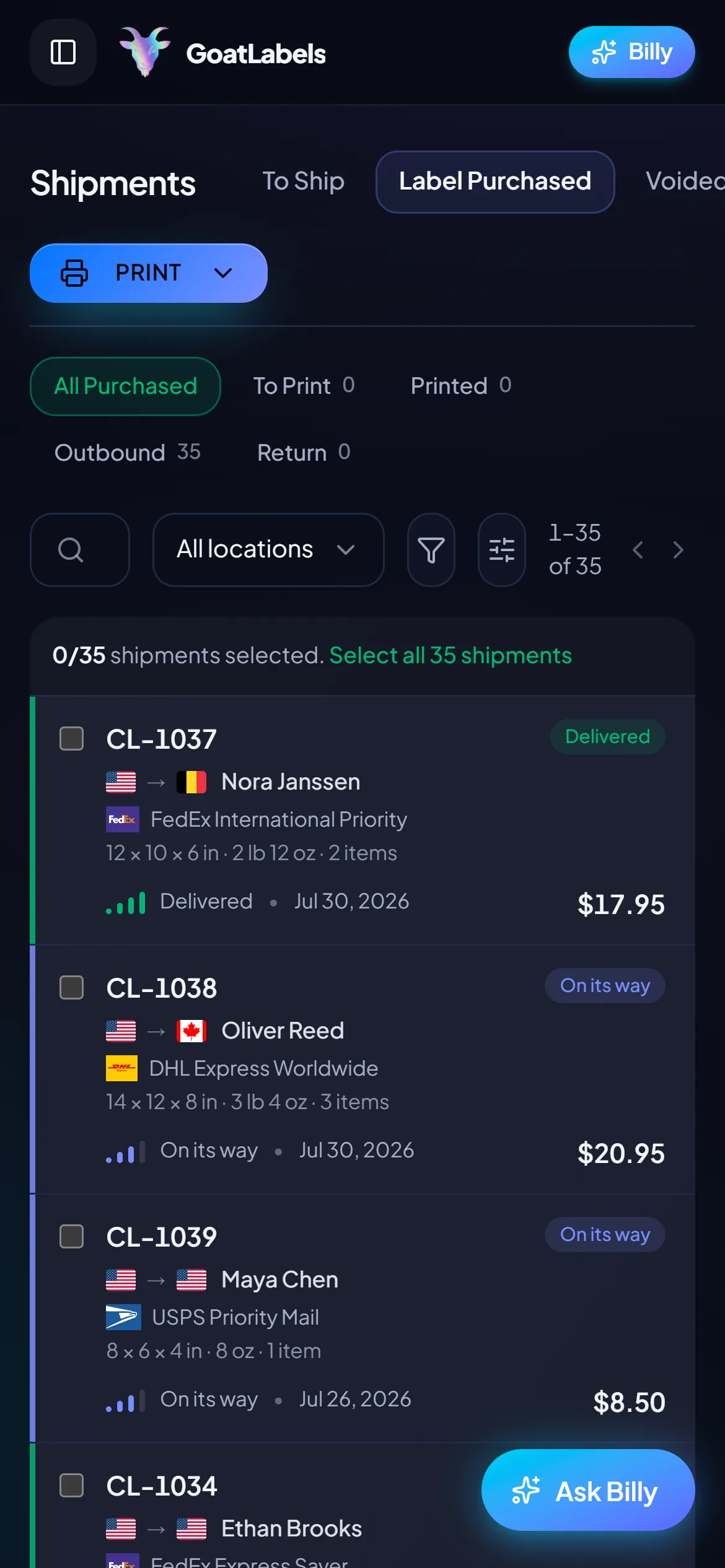
Once the account is open, the working day looks like the one you already know, with the parts that used to be manual taken over. Orders arrive from any of Shopify, Etsy, WooCommerce, eBay or Wix, from the REST API, or as a pasted DM or screenshot, and land in one To Ship queue. Billy fills in the addresses, the package details, and the service, then hands the draft back for you to confirm. Every label is a debit against the prepaid wallet you funded with card, Apple Pay, Google Pay, ACH, or crypto, so the month after the switch costs what you shipped, plus Pro's flat $40 if you ship more than 50. Rate-shop USPS, UPS and FedEx at the all-in price (DHL on international lanes), print from your phone or a thermal printer, and let signed webhooks and idempotency keys carry the same events on the API side.
Hey! 2x hoodies (M) 1x tee (L) 😅 Ship to: Maya R. Austin, TX 78701
Connectors, REST API, DMs, and screenshots — one queue, and no import job to run first.
 Billy AI
No renewal date on Free, and Pro cancels anytime. Signed webhooks push tracking back to the store and to your stack.
Shopify, Etsy, WooCommerce, eBay and Wix sync into To Ship and get tracking pushed back when you print, so the storefronts you had wired up are reconnected in the time it takes to authorise them. The orders that never had a connector are the easy part here: paste an Instagram or Facebook DM, or a screenshot of one, and Billy builds the label anyway.
 Shopify
 Etsy
Etsy
 WooCommerce
 eBay
eBay
 Wix
Wix
A migration is only worth doing if nothing important is left behind. USPS is still there, the carriers multiply rather than shrink, the API comes free, and the recurring charge is replaced by a balance you top up when you feel like it.
Card, Apple Pay, Google Pay, ACH bank transfer, and crypto all top up the same balance, and it funds instantly enough to print on the day you open the account. Void a shipment and, after the carrier accepts the void, the credit lands back in the wallet.
A DM, a comment thread, a voice note, a screenshot — Billy reads any of them and drafts the whole label. There is no learning curve to clear before the first parcel goes out, which is exactly what a switch day needs.
Billy
LIVE

Fund the wallet, pay per label, and on Free ship nothing in February without paying for February. Free covers 50 shipments a month; past that, Pro is one flat monthly plan with unlimited shipments.
Live all-in rates side by side, USPS, UPS and FedEx on every domestic parcel and DHL on international lanes, and the number you see is the exact amount that leaves your balance. That is the honest carrier list: if your current setup depends on a service outside it, finish the switch on your old account first. Shopify, Etsy, WooCommerce, eBay and Wix reconnect in minutes and push tracking back when you print.
UPS
$12.48
 FedEx
$13.22
FedEx
$13.22
 DHL
$14.10
USPS
$11.79
DHL
$14.10
USPS
$11.79
REST and JSON, one Bearer header, idempotency keys so a retry cannot double-buy a label, and signed webhooks for tracking and label events instead of polling. Point a staging key at it, run one shipment through, then flip production when it passes.
Label ready
CL-1038 · Brooklyn, NY
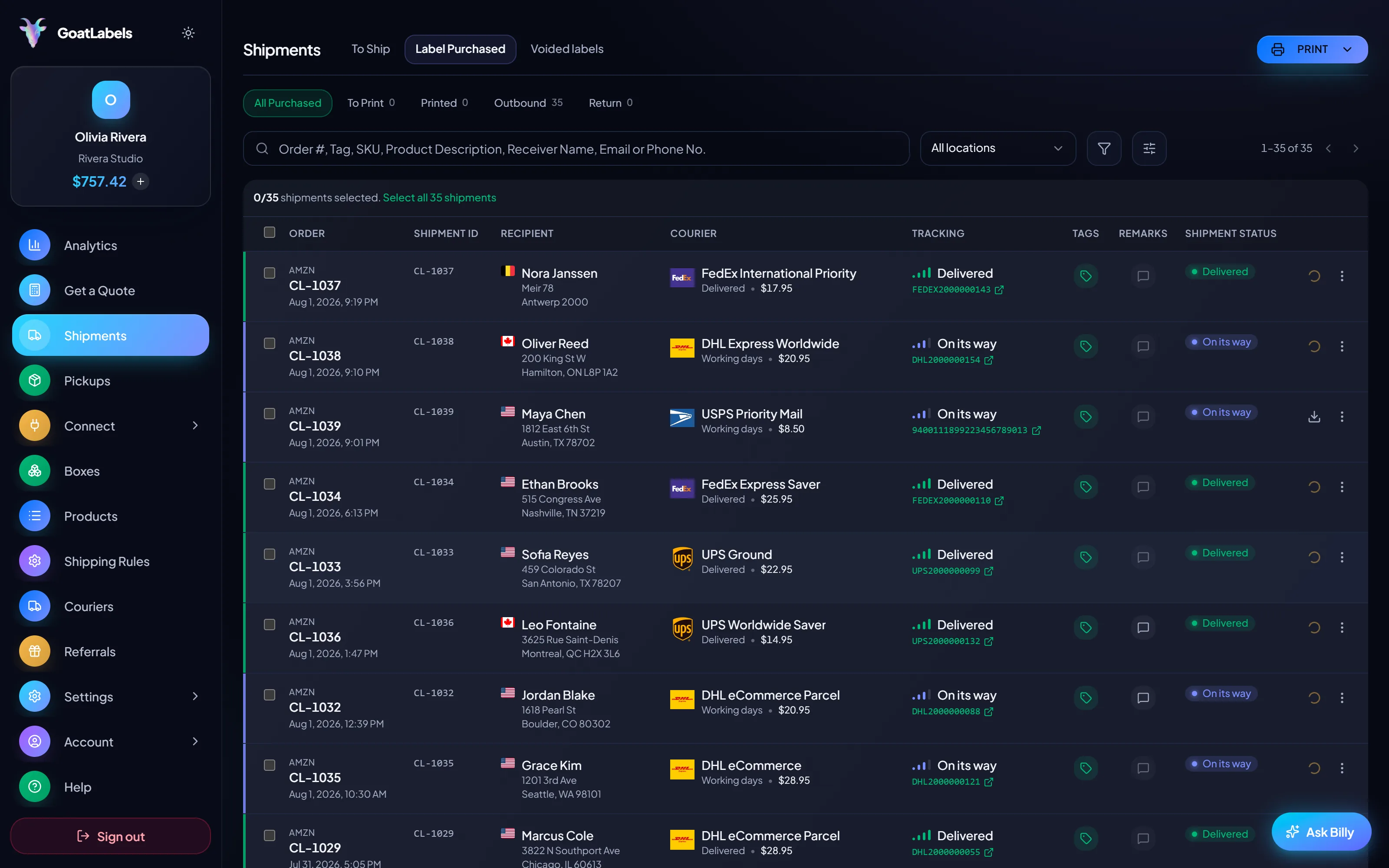
Half the dread of moving shipping tools is the install-and-configure evening. There isn't one. The browser you are reading this in is the client, the phone in your pocket runs the same queue, and the first label can be printed before you have finished cancelling the old account.
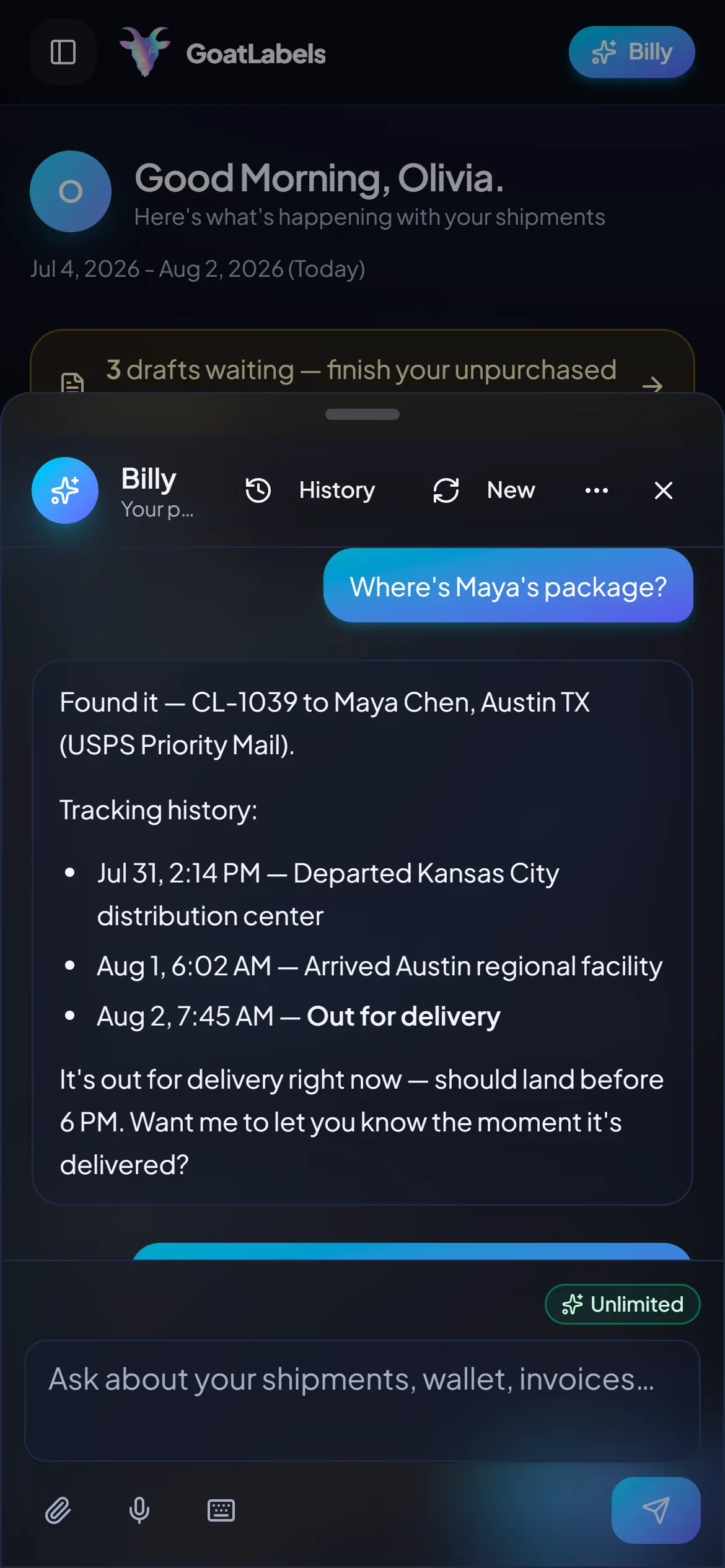
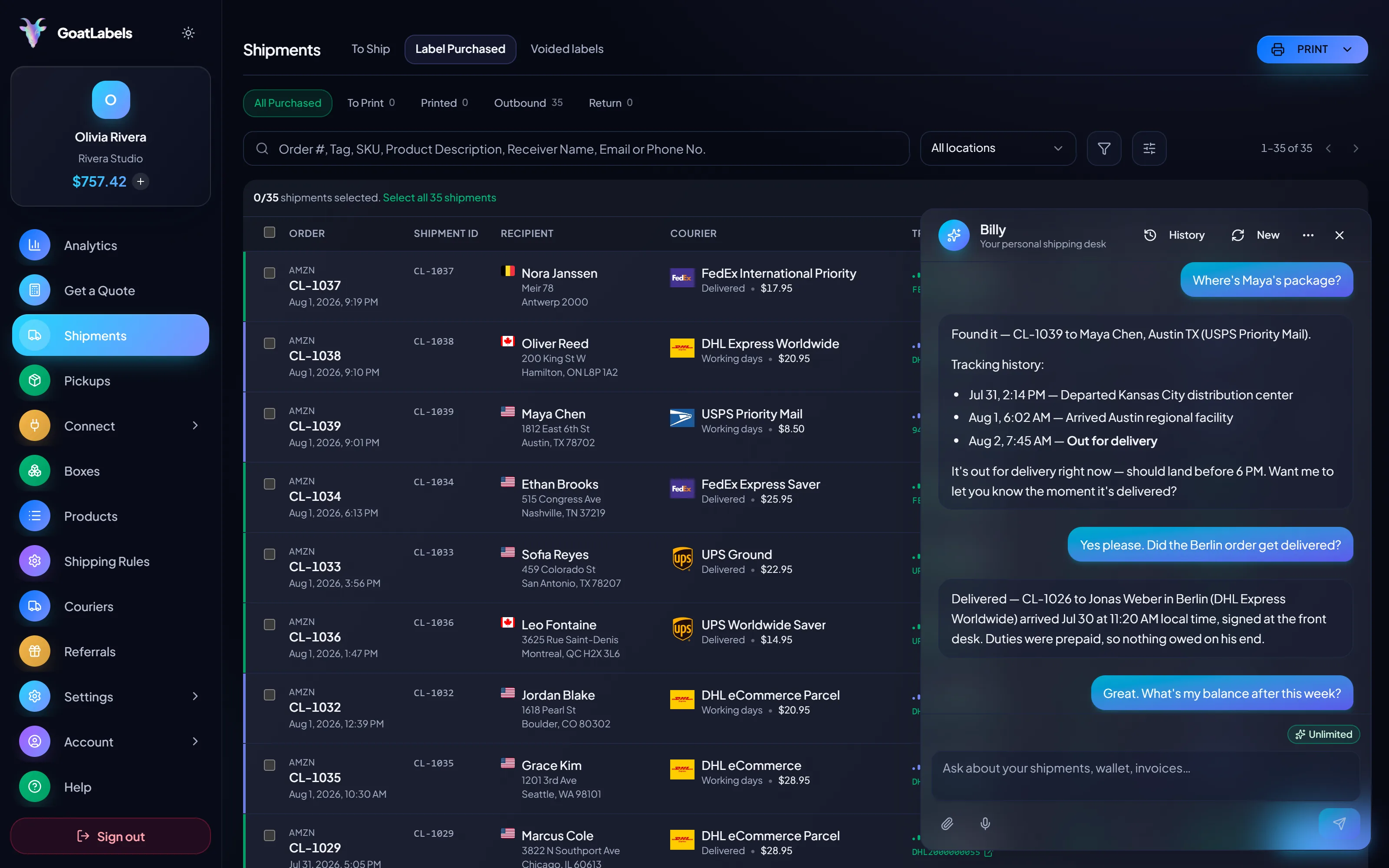
On switch day the question is how quickly a real parcel gets out the door. Hold the mic, say who it is going to, and Billy looks up the buyer, rate-shops USPS, UPS and FedEx (DHL on international lanes), and queues the label against your prepaid balance, then answers for it afterwards. That is a faster first label than any onboarding checklist. This is the real product, not a render.
Listening
"Where's Maya's package?"
Out for delivery
CL-1039 · Austin, TX · by 6 PM
Plain English in — names, addresses, weights, carriers, services · nothing to install and nothing to migrate · reads the all-in rate back before a cent leaves the wallet · phone, browser, or Telegram on Pro.
Three carriers on the same parcel, each an all-in number that is the exact amount leaving your prepaid balance. This is the comparison to run on your first day: quote the parcel here, look at what you were about to pay, and let one real number decide the migration.
Ground Advantage
2 to 5 days$11.40
all-in · no surprises
Ground
1 to 5 days$9.85
all-in · no surprises
Ground
1 to 5 days$11.20
all-in · no surprises
If something in your stack talks to your current provider, this is the step to schedule before the cancellation date, not after. REST, JSON, one Bearer header. Real idempotency keys so a retried request cannot double-buy a label, signed webhooks for tracking and label events instead of polling, and errors that name what to fix.
POST /api/v1/shipments
Authorization: Bearer sk_live_…
Idempotency-Key: ord_8421

{
  "to": { "name": "Joyce", "city": "Berlin", "country": "DE" },
  "parcel": { "weight": 2.6, "weight_unit": "lb" },
  "service": "fedex_intl_priority"
}
Free covers 50 shipments a month with the public API, the store connectors, and Billy in the web app all unlimited underneath it; the quoted label price is what you pay from a prepaid wallet. Pro is a flat monthly fee for unlimited shipments and Billy on Telegram. Pro has no minimum term and you can cancel it anytime to fall back to Free, so the overlap during a switch costs only the labels you print.
 — draft a label without opening the dashboard
Rate by plan
illustrativePro: one flat monthly plan, unlimited shipments
$0 / forever
Enough to finish the migration without paying for two tools.
The assistant that reads a DM, a screenshot, or a voice note into a drafted label runs unlimited in the web app on Free. Pro adds Billy on Telegram.
Telegram, Pro
GET /api/v1/shipments
200 OK · plan: free
Unlimited calls on Free — still unlimited on Pro.
High-volume shippers can ask about custom pricing, which we review account by account. Compare it against what you pay on
ShippoPirate ShipShipStation
Label prices are quoted live from USPS, UPS and FedEx (plus DHL on international lanes) and shown as one all-in number — the same number that leaves your wallet. Stamps.com's plans move, so compare against their current pricing page rather than a figure on ours. Full pricing details
The migration is shortest for sellers whose shipping never really needed the desktop-and-plan model in the first place — spiky volume, off-platform orders, and small teams printing from a phone.
 TikTok Shop & live commerce
Switch during a quiet stretch and the move costs only the labels: pre-fund before the next drop and print all night; on Free (up to 50 shipments a month) the weeks after cost nothing.
 Etsy & independent creators
Connect the stores that have connectors, and handle the market stall, the comment sale, and the friend-of-a-friend order in the same queue as everything else.
One queue, connector or not
Order #1024 · pasted from a comment thread

 Orders no import job could carry over

 REST and the UI, one balance
1
wallet behind the API and the dashboard
A video took off and I had 80 TikTok Shop orders by morning. I printed every label from my phone on the bus to the post office.
Early customer · TikTok
TikTok Shop seller
TikTok Shop
I run my Etsy shop from the kitchen. The AI reads the order, picks the carrier, the label prints. That's the whole workflow now.
Early customer · Etsy
Etsy maker
Etsy
The API is what every shipping API pretends to be. Idempotency that actually works.
Sasha R.
Staff engineer, marketplace
Still weighing it up? Stamps.com vs free shipping software compares the fee against what free actually includes, and how subscription billing works on Stamps.com covers why the timing of the cancellation matters. Developers should start with the API alternative. Ready for step six? Follow how to cancel Stamps.com, and see Stamps.com refunds vs void to wallet for what happens to a leftover postage balance.
Fund a wallet with card, Apple Pay, Google Pay, ACH, or crypto, print the rest of today's queue here, and compare the all-in USPS, UPS and FedEx rates (DHL on international lanes) against what you were about to buy.
Sign up in seconds, no card required. Your first top-up may need an approved application. No monthly fee on Free, up to 50 shipments a month.
Updated