

USPS
Ground Advantage
2–5 days$7.40
$1.20 of Premium insurance included
all-in · exactly what leaves the wallet
Endicia postage is prepaid into a meter-style balance, so leaving has a sequence: stop automatic refills first, spend the balance down, then cancel and ask for the remaining balance on the same call. Your thermal printer and 4x6 workflow survive: labels print the same, now rate-shopped across USPS, UPS and FedEx on domestic parcels, with DHL on international lanes, from a wallet.
The USPS services you printed on Endicia are still here at commercial pricing, now quoted against UPS and FedEx on every domestic parcel, with DHL on international lanes.


 DHL: international
Card, Apple Pay, Google Pay, ACH, or crypto fund one prepaid balance. Nothing tops itself up unasked, and Free bills nothing monthly for up to 50 shipments a month.
Checked on from Endicia's own pages. Plans, fees and policies change, so confirm on the vendor's current page before you decide. Endicia is a trademark of its owner and is not affiliated with GoatLabels.
Nothing about the packing table changes. What changes sits upstream of it: the order stops being typed into a form, the postage stops living in a meter that tops itself up, and the quote covers USPS, UPS and FedEx at once, plus DHL on international lanes. Run the week as a parallel: drain the old balance on the parcels USPS was always going to win, and put the bulky and the heavy through here.
same as last time — two boxes to the shop address in Reno
A shipment does not have to begin at a form: the same order can arrive by store sync, by paste, or spoken out loud, and becomes the same draft label either way.
 Billy AI
No auto-purchase threshold sits underneath this balance, so nothing can refill while you are winding the other account down. Print from a browser, a phone share sheet, or the thermal printer over Wi-Fi.
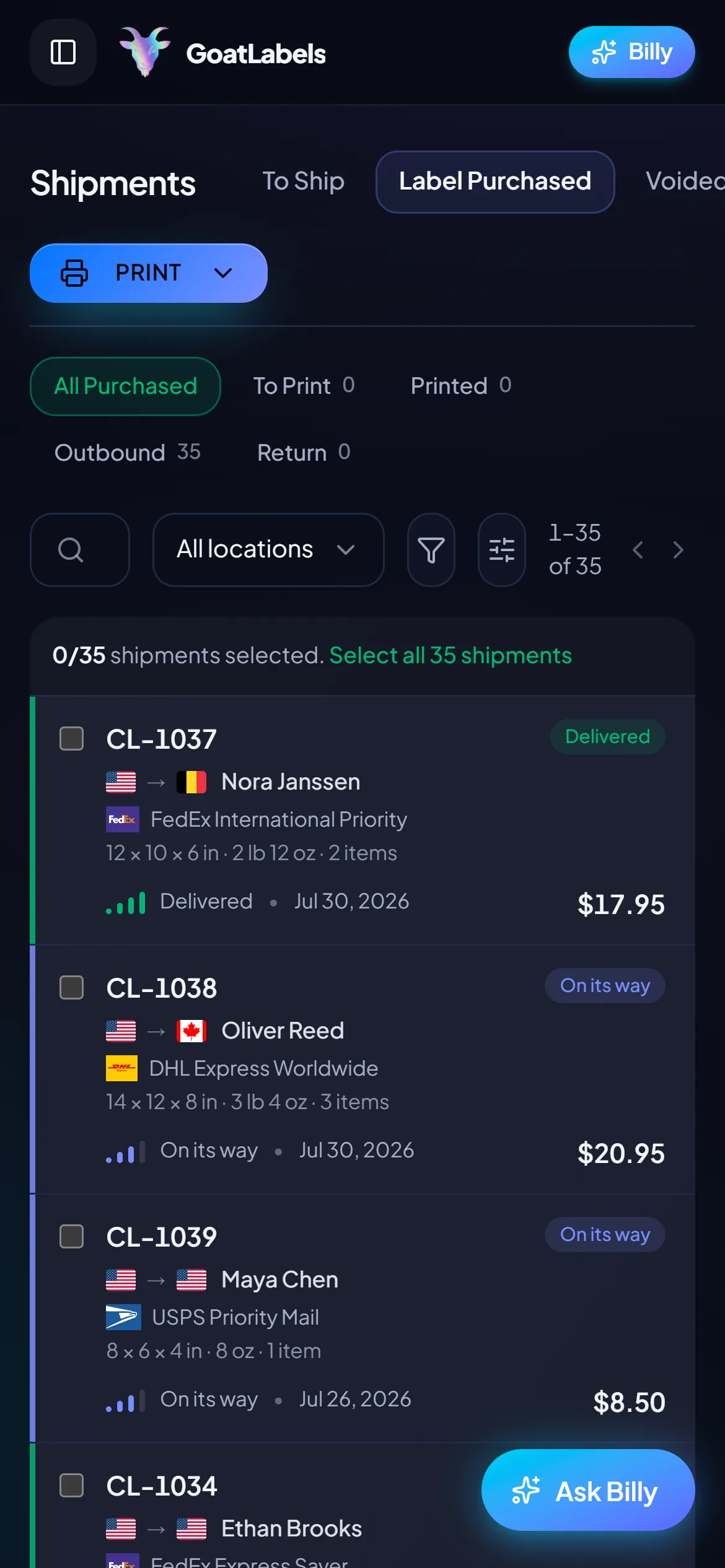
A meter-style client waits for you to type into it. Shopify, Etsy, WooCommerce, TikTok Shop and the rest sync orders straight into the To Ship queue instead, with tracking pushed back when you print — and an Instagram or Facebook message becomes a label by being pasted, which is the nearest thing left to the old typing step and takes seconds rather than minutes.
 Shopify
 Etsy
Etsy WooCommerce
 TikTok Shop
 Amazon
 eBay
eBay Squarespace
 Wix
Wix WalmartShopify PlusSoon
 Square
 BigCommerce
 Magento
 ZapierSoon
 NetSuiteSoon
 EcwidSoon
 Temu
Temu SheinSoon
 ChannelAdvisorSoon
 SkuVaultSoon
 Zoho InventorySoon
 Patreon
Endicia does not hold your postage the way a checking account holds money — it holds it the way a postage meter does. You buy postage into a balance ahead of time, the software spends the balance down as you print, and an automatic purchase setting quietly tops it back up whenever it dips below a threshold you configured years ago and have probably forgotten. That one setting is why leaving Endicia has a correct order, and why doing the steps backwards costs real money.
The trap fires during the cutover itself. Your last week on Endicia is often your busiest week on it, because you are printing the balance down on purpose, clearing the queue before you close the account. Every one of those labels pushes the balance toward the refill threshold — and if automatic purchase is still switched on, the software will dutifully buy you a fresh block of postage in the middle of your exit. You end the week with more trapped postage than you started with, charged to a card you were about to stop watching.
So the sequence is fixed: switch off automatic postage purchase first, before you print anything else. Then spend the balance down on parcels you were sending anyway. Only then cancel, and ask for what remains on the same call: Endicia's terms say you may request a refund of your postage balance when you call to close the account. Finally give one more card statement a careful read to confirm the meter really stopped. Each step exists to protect the one after it, which is why the order matters more than the speed.
Unused Endicia postage is not lost when you leave, but it does not simply follow you out the door either. Endicia's terms say you may request a refund of your postage balance when you call to close the account, and that free or offer-related postage is never refunded; its account help says the unused balance goes back to the card on file when the account closes. The mechanism is straightforward; the waiting is the part that surprises people.
Two practical notes. First, print any reports you need before that call: Endicia's account help says closure is permanent and advises printing reports for taxes or records first. Second, an individual label you printed and never mailed is a separate track from the unspent balance: stray labels go through the unused-label refund flow on their own deadline, so sweep those first and deal with the balance second. Doing them in that order means nothing expires while you wait on the bigger refund.
Endicia bills in arrears, at the end of each billing cycle, whether or not any postage moved that month, so the month you cancel in is still billed. Its terms ask for the cancellation at least 24 hours before the billing period ends to avoid the next charge. Practically, that means the cheapest exit is an unhurried one. Find the cycle date in your account before you do anything irreversible, work the refill switch-off and the spend-down in the weeks ahead of it, and cancel comfortably before the renewal, online from your account settings or by phone with Endicia support.
Get the cancellation confirmed in writing: a reference number, a date, the channel you used. Then give the card one more statement of attention. One charge for the month you cancelled in is expected; anything after that is what the confirmation is for, and if the refill you switched off in step one somehow fires anyway, the same paperwork covers that too. A cancellation you can prove is a five-minute email — a cancellation you cannot prove is a billing argument.
One family note: Endicia and Stamps.com sit under the same corporate roof, and the exits rhyme. If you are closing a Stamps.com account in the same season, the checklist on how to cancel Stamps.com applies the same discipline, and switching from Stamps.com covers that product's own migration path.
Here is the part sellers worry about that turns out to be a non-event: the printer. A 4×6 thermal workflow is not proprietary to anyone — the printer prints PDF label files, and it does not care who sold them. A GoatLabels label comes out as a standard 4×6 PDF, so the thermal printer on your desk keeps its job, the label rolls keep theirs, and the packing table does not change shape. There is no driver to replace and no hardware to buy, because the hardware was never the lock-in.
What changes is upstream of the printer. Postage stops living in a meter-style balance that refills on the software's schedule and starts living in a prepaid wallet you fund when you choose (card, Apple Pay, Google Pay, ACH, or crypto), spent label by label, with no monthly fee underneath it on Free and nothing that tops itself up unasked. And every domestic parcel is priced across USPS, UPS and FedEx at once, with DHL joining on international lanes, each as one all-in number that is exactly what leaves the balance. The USPS services you know are still there at commercial pricing; they just have to win the parcel against UPS and FedEx on the same quote.
Run the first week as a parallel. Keep the Endicia balance draining on the small domestic parcels USPS was always going to win, and put the bulky, the heavy, and the border-crossing parcels through the side-by-side quote here. By the time the old balance reads zero you will know, from your own boxes rather than from a comparison page, what the second carrier column is worth — and the wallet model means the trial itself costs nothing but the labels you actually bought. The full pricing arrangement is one page: no monthly fee on Free (up to 50 shipments a month), pay per label.
Endicia is a trademark of its owner and is not affiliated with GoatLabels. Its cancellation flow, refund policy, and account terms are its own and change — your Endicia account pages are the authoritative source for the current process.
The parts of Endicia worth keeping — discounted postage, a thermal-printer workflow, labels in seconds — all survive the move. The parts that made leaving a project are the parts that do not exist here.
Card, Apple Pay, Google Pay, ACH bank transfer, and crypto all top up one prepaid wallet, spent label by label. There is no auto-purchase threshold hiding in a settings page, so no refill can ever fire while you are not looking.
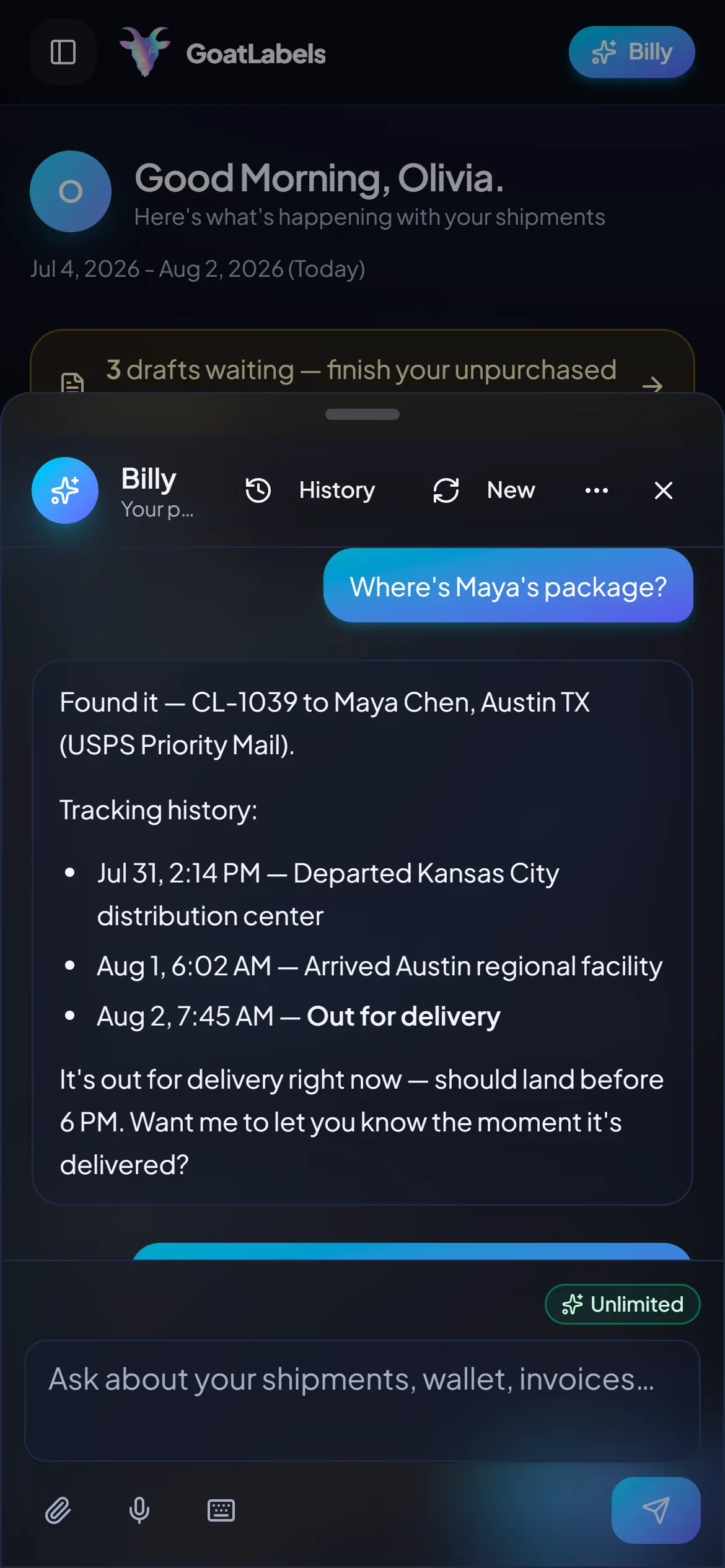
Billy reads a pasted order, a screenshot, or a spoken address, drafts the whole label, and validates the address before anything is spent, so the retyping step just stops existing.
BillyLIVEThe subscription was the cost of admission to the meter. Here admission is free: no monthly fee on Free (up to 50 shipments a month), pay per label from the wallet, and a month you ship nothing in costs exactly nothing.
Every domestic parcel is priced across USPS, UPS and FedEx at once, with DHL on international lanes, each as one all-in number that is exactly what leaves the balance. The USPS habit survives wherever USPS wins; it just stops winning by default.
UPS$12.48FedEx$13.22DHL$14.10USPS$11.79REST and JSON, one Bearer header, idempotency keys so a retry cannot double-buy a label, signed webhooks for tracking events. Unlimited calls on every plan, backed by the same wallet as the dashboard.
Label ready · 4×6 PDF
Reno, NV · printed over Wi-Fi
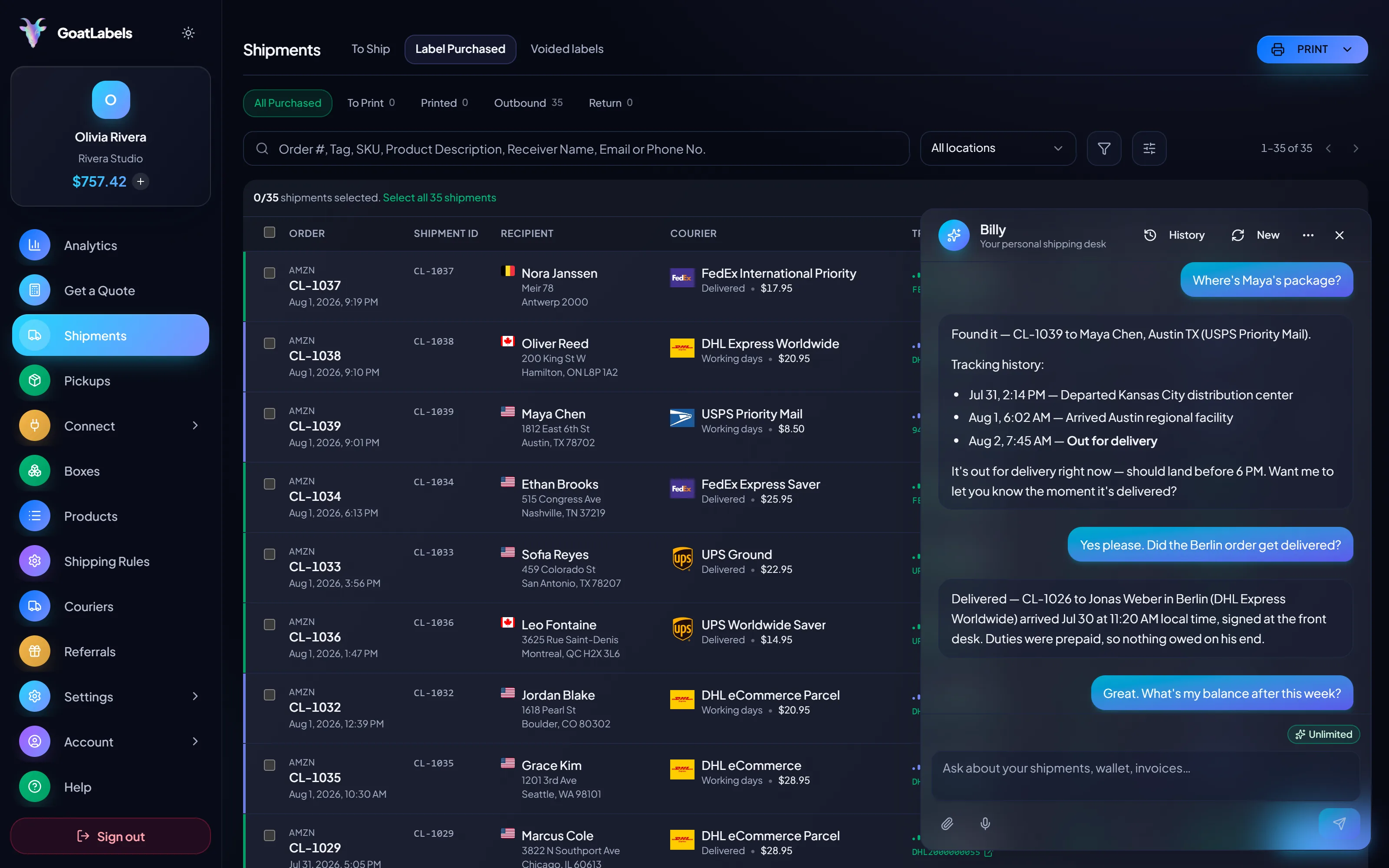
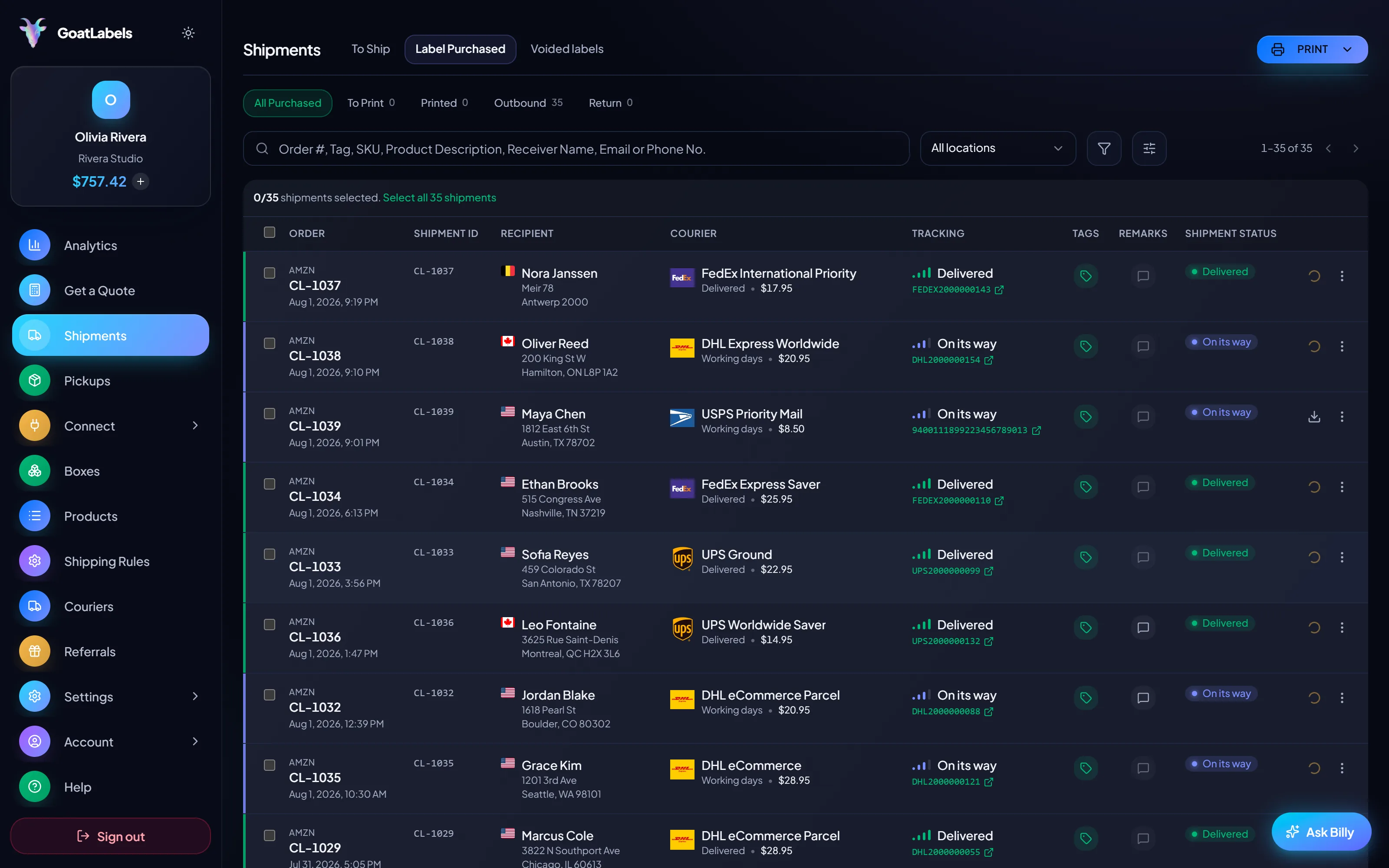
The old client was software installed on a computer, which meant shipping happened wherever that computer was. The queue, the quotes, the balance, and the print button all fit on the phone instead, and the thermal printer on your desk takes the job over Wi-Fi either way.
The meter era's basic unit of work was typing a shipment into a window. Hold the mic instead: Billy takes the address out loud, validates it, quotes USPS, UPS and FedEx on the box in your hands (DHL on international lanes), and queues the label. Included on every plan. This is the real product, not a render.
Listening
"Two boxes to the shop in Reno, same as last time."
Out for delivery
Reno, NV · scanned this morning
Speaks plain English · remembers repeat buyers and saved box sizes · phone, browser, or Telegram on Pro.
On a small domestic parcel USPS often does win, and nothing here argues otherwise. What changes is why: it wins because it was cheapest on this box, quoted beside UPS and FedEx. Each column is one all-in number, and the one you pick is exactly what leaves the balance. Figures are illustrative.
Ground Advantage
2–5 days$7.40
$1.20 of Premium insurance included
all-in · exactly what leaves the wallet
Ground
3–4 days$10.80
$1.20 of Premium insurance included
all-in · exactly what leaves the wallet
Home Delivery
2–4 days$11.40
$1.20 of Premium insurance included
all-in · exactly what leaves the wallet
Here the dashboard, the phone, and your own scripts all talk to the same account and the same balance over REST and JSON, with unlimited calls on every plan, the free one included.
POST /api/v1/shipments
Authorization: Bearer sk_live_…
Idempotency-Key: ord_8421

{
  "to": { "name": "Joyce", "city": "Berlin", "country": "DE" },
  "parcel": { "weight": 2.6, "weight_unit": "lb" },
  "service": "fedex_intl_priority"
}
The subscription was the cost of admission to the meter, and the refill setting was the cost of forgetting about it. Neither exists here: you fund a prepaid balance when you choose and spend it label by label, with no monthly fee. Free covers 50 shipments a month; Pro is a flat plan for volume, and it still refills nothing on its own.
 — draft a label without opening a dashboard at all
Rate by plan
illustrativePro: one flat monthly plan, unlimited shipments
$0 / forever
Admission is free, and a month you ship nothing in costs exactly nothing.
The assistant that replaces the desktop form — pasted orders, screenshots, spoken addresses, destinations validated before money moves — runs unlimited in the web app on Free. Pro adds Billy on Telegram.
Telegram, ProGET /api/v1/shipments
200 OK · plan: free
Unlimited calls on Free — still unlimited on Pro.
Put a real parcel through and compare the side-by-side rate against what that label costs you on
ShippoPirate ShipShipStationLabel prices are quoted live from USPS, UPS, FedEx, and DHL as one all-in number, and that exact amount leaves your prepaid balance. Endicia's own fees, refund windows, and account terms are its own to change — your Endicia account pages are the authoritative source. Full pricing details
Refills off first, the balance second, the cancellation third, one more statement fourth. What differs is which part of the old setup you were most attached to.
 4×6 rolls, a scale, and a habit
The hardware was never the lock-in. A standard 4x6 PDF prints from a browser, a phone share sheet, or the same thermal printer over Wi-Fi, so the packing table survives untouched, with no driver to swap and nothing to buy.
 The balance and the refill switch
Switch automatic purchase off before you print anything else, then decide whether to spend the balance down or reclaim it. Doing those two in the wrong order is how an exit week ends with more trapped postage than it started with.
Refills off, then the balance
Each step exists to protect the one after it

Orders that arrive as messages
 The boxes another carrier should have had
3
carriers quoted side by side on the awkward domestic parcel
Same family, different product? How to cancel Stamps.com andswitching from Stamps.com cover the sibling exit. For what the labels cost afterwards, see USPS shipping labels andpricing.
A video took off and I had 80 TikTok Shop orders by morning. I printed every label from my phone on the bus to the post office.
Early customer · TikTok
TikTok Shop seller
TikTok ShopI run my Etsy shop from the kitchen. The AI reads the order, picks the carrier, the label prints. That's the whole workflow now.
Early customer · Etsy
Etsy maker
EtsyThe API is what every shipping API pretends to be. Idempotency that actually works.
Sasha R.
Staff engineer, marketplace
Fund a prepaid wallet with card, Apple Pay, Google Pay, ACH, or crypto, quote your usual parcel across USPS, UPS and FedEx (DHL on international lanes), and let your own box decide before the old balance reaches zero.
Sign up in seconds. No card required. No monthly fee on Free, up to 50 shipments a month.
Updated