GoatLabels GoatLabels
The exit, step by step.

How to cancel Stamps.com and where to go next


Five steps out. Zero fees after.

Cancel Stamps.com by phone or account settings before your next billing date, then switch to a platform like GoatLabels, where Free labels cost only the rate-shopped carrier price for up to 50 shipments a month.

Where cancelled accounts land softly

USPS, UPS and FedEx rate-shopped on every domestic parcel, DHL on international lanes, the same label prices on both plans, and no monthly fee on Free, up to 50 shipments a month.

UPS FedEx DHL USPS DHL: international
Live quotes One all-in price each.
Quote = debit No later invoice.
Same via API Free on every plan.

Free up to 50 a month, nothing to cancel

Card, Apple Pay, Google Pay, ACH, or crypto into one prepaid balance, spent label by label.

VisaMastercardAmerican ExpressApple PayGoogle PayBitcoinEthereumTether (USDT)
Prepaid Spent only on labels.
No fee Stopping costs nothing.
Accepted voids credited Back to the balance.
The cancellation checklist

Cancelling cleanly, in five steps.

None of this is complicated, but the order matters: the billing date decides whether one more charge lands, and the confirmation decides whether you can prove it shouldn't have. Stamps.com's exact flow is theirs and changes — treat these steps as the checklist and their help pages as the current map.

  1. 1

    Check your next billing date first

    The fee bills at the end of each cycle, so one final charge can still land after you cancel. Find the billing date in your account before you do anything else, and aim to cancel comfortably before it, not the night it renews.

  2. 2

    Use up or note your postage balance

    Pre-purchased postage sits in a prepaid balance, separate from the subscription. Stamps.com's help center says the remaining balance is refunded within 4 to 8 weeks after you close, except promotional postage, so print down what you can, switch off auto-fund, and note the rest.

  3. 3

    Cancel online or by phone

    Stamps.com's cancel page lists two paths. Online: log in, choose Manage Account from the My Account menu, then Change/Cancel Plan under Account Settings, and follow the link to close the account. By phone: call the Customer Care Center, Monday to Friday, 6am to 6pm Pacific Time. Whichever you use, be explicit that you want the subscription cancelled, not paused or downgraded.

  4. 4

    Get the confirmation in writing

    A cancellation you cannot prove is a billing dispute waiting to happen. Save the confirmation email or note the reference number, the date, and who you spoke to before you consider it done.

  5. 5

    Watch the next card statement

    Stamps.com bills at the end of each billing cycle, and its cancel page says closing after the trial can still bring one more service fee plus applicable taxes. Expect that one; a charge beyond it is what the paperwork from the last step is for.

Stamps.com is a trademark of its owner and is not affiliated with GoatLabels. Cancellation paths, fees, and refund policies are theirs and change — their current help pages and your account are the authoritative source for the exact process.

Where to go next, so you never do this again.

Land somewhere with nothing to cancel

The best insurance against another cancellation call is a platform you can leave without one. GoatLabels bills per label from a prepaid wallet, Free has no subscription, and Pro cancels from the account with no minimum term: stop shipping and the spending stops with you, no phone call required.

Keep the carriers, drop the fee

Live, all-in label prices are on both GoatLabels plans, and every domestic parcel is quoted against USPS, UPS and FedEx at once, with DHL on international lanes. You leave a fee behind.

Switch before you cancel, not after

Free has no monthly fee for up to 50 shipments a month, so the overlap costs only the labels: print a few real orders on GoatLabels while the old account runs out its cycle, compare the all-in totals, and cancel from a position of certainty rather than hope.

And when you should not cancel at all

  • You print sheet postage for envelopes and mail rather than parcel labels — that remains Stamps.com's home turf, and cancelling would leave a real gap.
  • Your volume is high and steady enough that the fee amortises to pennies per label — the subscription maths genuinely works at that shape.
  • You need a carrier or mail class outside USPS, UPS, FedEx, and DHL — that is the honest list of what GoatLabels rate-shops.

What Stamps.com's own pages say, checked 2026-10-23

  • You can cancel by phone with the Customer Care Center, Monday to Friday 6am to 6pm Pacific Time, or online under My Account, Manage Account, Account Settings, Change/Cancel Plan, then the close-account link. (Stamps.com: How to Cancel Your Account)
  • Stamps.com bills at the end of each billing cycle, so closing the account after the trial can still bring one more service fee plus any applicable taxes. (Stamps.com: How to Cancel Your Account)
  • After you close the account, the remaining postage balance is refunded within 4 to 8 weeks except promotional postage, and the subscription runs to the end of the current cycle with no refund for unused time. (Stamps.com Help: Close Your Account)
  • An unused label with tracking is refunded through an electronic request, due within 28 days of printing for USPS and 30 days for UPS and DHL, and approved refunds return to the Stamps.com account balance within 21 days. (Stamps.com Help: Request a Label Refund)
  • Refund Assist, a setting you switch on, files refund requests for USPS labels not scanned within 21 days of printing and credits part of the approved refund to the account balance. (Stamps.com Help: Refund Assist)
  • Stamps.com does not charge the subscription during its 30-day trial; after it, the subscription bills monthly from the original sign-up date unless you cancel first, and postage, carrier services and add-ons such as insurance are charged on top of it. (Stamps.com pricing)
  • Postage comes out of a prepaid account balance, topped up by at least $10 at a time or by an auto-fund setting that buys more when the balance falls to a level you choose. (Stamps.com Help: Fund Your Account Balance)
  • Stamps.com lists Basic at $14.99 a month for individuals and small offices, with 1 user and up to 25 stamps and 10 shipping labels a month; Professional at $29.99 a month for busy offices, with 3 users and unlimited stamps and labels; and Multi-Location from $49.99 a month for organizations with multiple locations, with unlimited stamps and labels, 10 users per location and 2 locations included. (Stamps.com pricing)
  • Stamps.com says it supports UPS, USPS, FedEx and DHL Express, with international carriers listed from the Professional plan up. (Stamps.com pricing)
  • Its SERA REST API signs in with OAuth 2.0, accepts an Idempotency-Key header on POST calls, publishes an OpenAPI specification and offers a staging environment with no service or transaction fees. (Stamps.com/Endicia REST API (SERA) reference)

Checked on from Stamps.com's own pages. Plans, fees and policies change, so confirm on the vendor's current page before you decide. Stamps.com is a trademark of its owner and is not affiliated with GoatLabels.

Day one after cancelling

Shipping again before the old account closes.

There is no migration project here. Sign up, fund a prepaid wallet with card, Apple Pay, Google Pay, ACH, or crypto, and the first label can print the same afternoon: paste the order or connect the store, let Billy draft the label and validate the address, pick the cheapest all-in quote from USPS, UPS and FedEx (DHL on international lanes), and print. Nothing recurs on Free, so the next cancellation guide you read will be about something else.

1
Any order shape in
Store sync, API, DM, or screenshot
maya_boutique

Hey! 2x hoodies (M) 1x tee (L) 😅 Ship to: Maya R. Austin, TX 78701

Shopify
Synced into To Ship
Etsy
Synced into To Ship
DM screenshot
Order
#1847
Customer
Jordan Lee
Items
1x Hoodie (L)
Address
Brooklyn, NY
Drop the screenshot or paste the DM

Connectors, REST API, DMs, and screenshots — one queue, working from day one.

2 Billy Billy AI

Your setup wizard is an assistant, not a manual.

Billy AI
  • Reads a pasted order, a screenshot, or a spoken address
  • Fills the addresses and the package details
  • Validates the address before a cent is spent
  • Rate-shops every carrier on the lane and hands back a draft to confirm
Drafted. Checked. Yours to confirm.
3
Clean label out
Bought from the wallet
Paid from your prepaid balance
Card, Apple Pay, Google Pay, ACH, or crypto
$12.47
USPS
Label purchased
USPS Priority Mail — all-in rate
$12.47

No approval queue, no software install, and no subscription on Free starting the clock on a future cancellation.

Reconnect everything in an afternoon.

Connectors for the storefronts, AI for everything else.

Shopify, Etsy, WooCommerce, eBay and Wix sync into To Ship and get tracking pushed back when you print, reconnecting after a switch takes minutes, not a weekend. And the orders with no storefront at all, a DM, a screenshot, go straight through Billy.

Shopify logo Shopify
Etsy logo Etsy
WooCommerce logo WooCommerce
eBay logo eBay
Wix logo Wix
What you land on, feature by feature.

Everything you cancelled your way out of.
Nothing that restarts the meter.

Live rates, address validation, batch printing, store sync — all present, none behind a recurring charge. The switch costs you a wallet top-up and about ten minutes.

One prepaid wallet,
five ways to fund it

Card, Apple Pay, Google Pay, ACH bank transfer, and crypto all top up the same balance, and every method buys identical rates, carriers, and features. Void a shipment and, after the carrier accepts the void, the credit lands back in the wallet.

Wallet balance
$1,247.36 USD
AI

AI drafting from
whatever you have

A DM, a comment thread, a voice note, a screenshot — Billy reads any of them into a drafted, address-validated label. The orders that made desktop postage software feel slow are the ones it is fastest on.

Billy Billy LIVE
Where's the package to Maya?
It's in transit via UPS. Expected Friday, Aug 7.
UPS
1Z8923A6B05G4123456
In transit
Austin, TX → Dallas, TX
Ask Billy anything...

Nothing recurs on Free,
so nothing gets cancelled

Fund the wallet, pay per label, stop whenever. A Free account costs nothing at rest and Pro has no minimum term, which means walking away never requires a phone call, a retention script, or a guide like this one.

Shipment summary
UPS Ground $12.49
Insurance $0.75
Fuel surcharge $0.32
Total $13.56

USPS, UPS, FedEx, and DHL
in one account

Live all-in prices side by side, USPS, UPS and FedEx on every domestic parcel and DHL on international lanes, and the number you pick is the exact amount that leaves the balance. No day-after adjustment invoice.

Compare rates
UPS UPS $12.48
FedEx FedEx $13.22
DHL DHL $14.10
USPS USPS $11.79
Duties inside the quote where DDP applies

A REST API,
if you want one

REST and JSON, one Bearer header, idempotency keys so a retry cannot double-buy a label, signed webhooks for tracking and label events. Unlimited calls on every plan, same wallet as the dashboard.
POST /v1/shipments
{
"to": { "name": "Maya" },
"from": { "name": "Alex" },
"service": "ups_ground",
"label_format": "pdf"
}
Webhook delivered
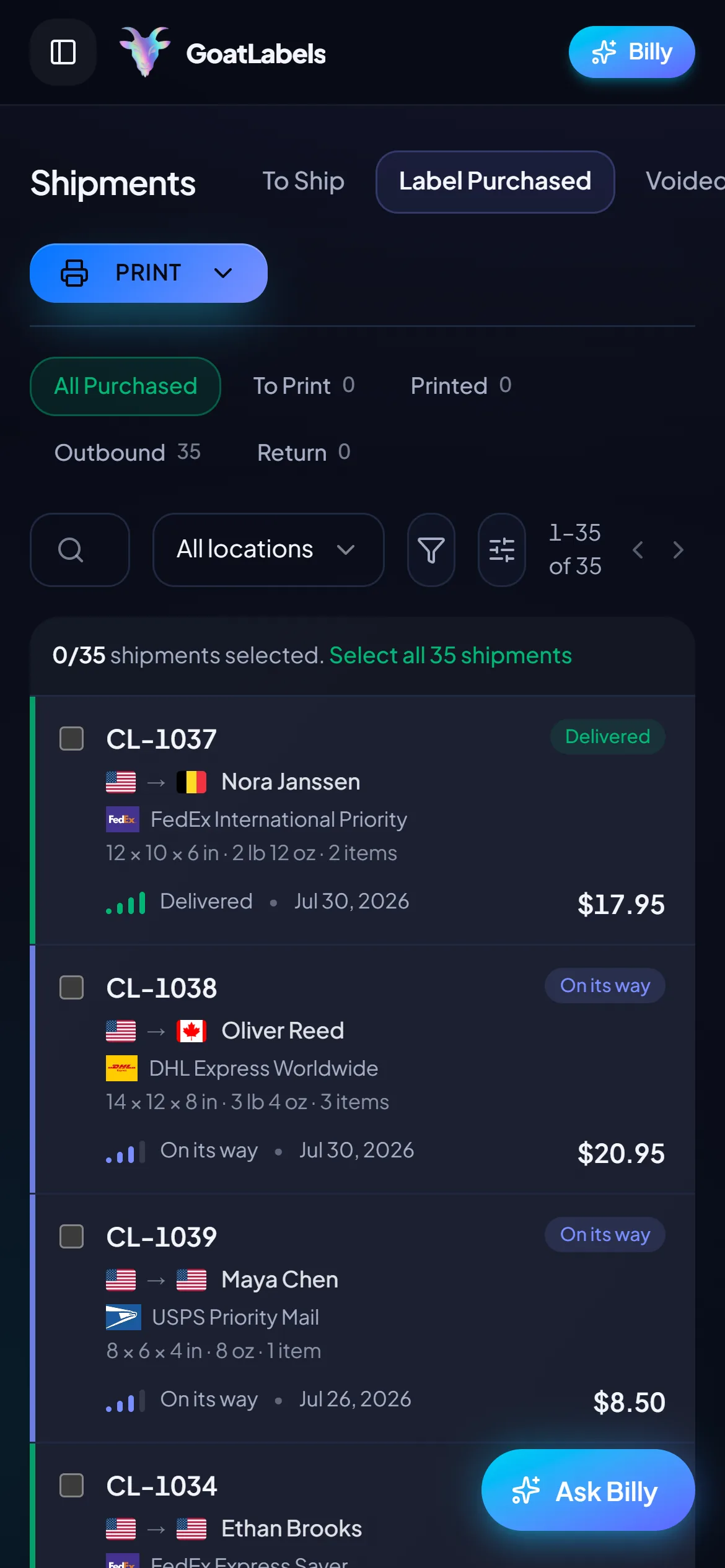
GoatLabels mobile shipments queue with all-in carrier prices
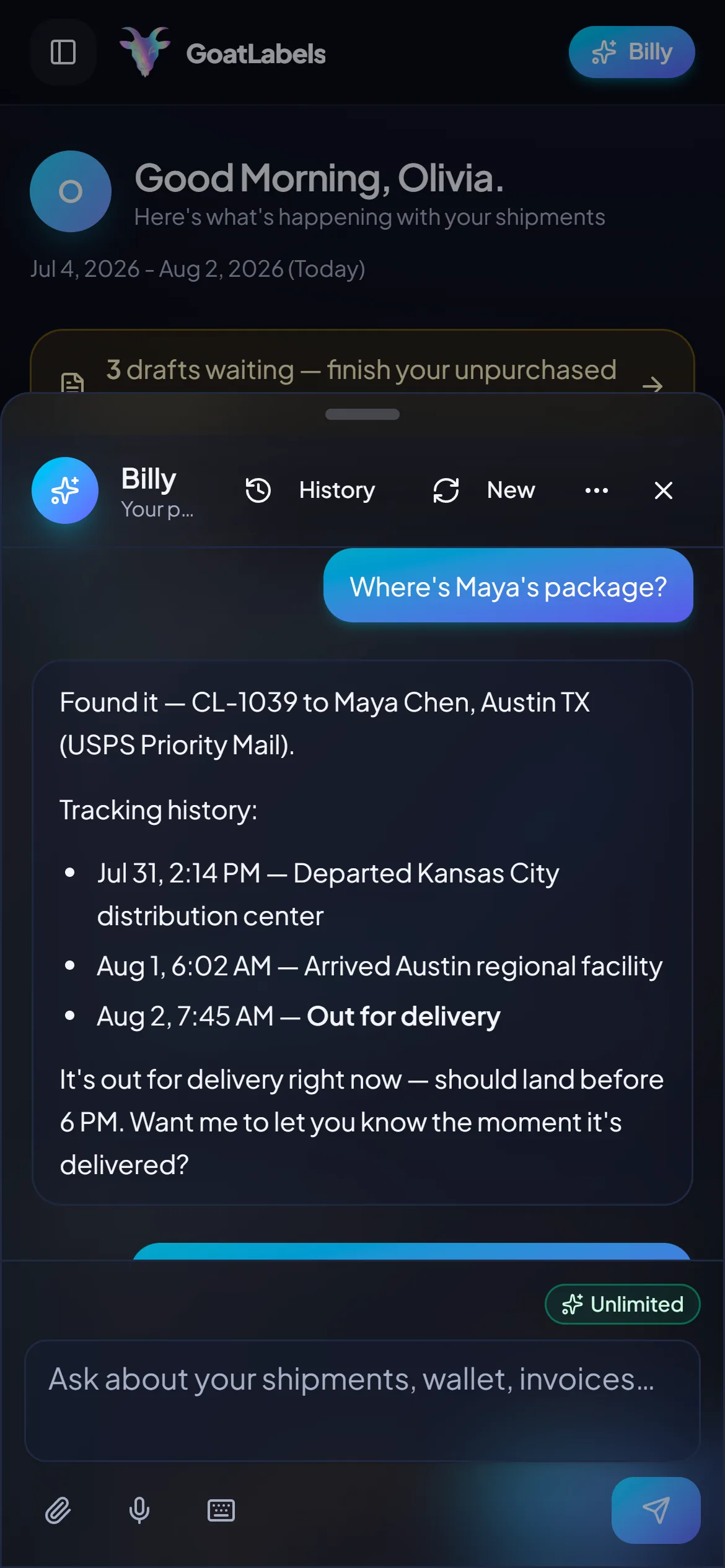
Billy drafting a label from a pasted DM on mobile

Label ready

CL-1038 · Brooklyn, NY

No desktop software this time

The replacement lives in your pocket.

One thing not to re-create from the old setup: the desk. The queue, the quotes, and the buy button all fit on the phone in your hand: paste the order, compare carriers, print to a thermal printer over Wi-Fi, done.

Paste the DM, snap the thread, or drop the screenshot — Billy pulls the name, the address, and the parcel out of it.
No install, no licence, no client to update: the browser is the whole product.
USPS, UPS and FedEx come back as all-in prices on one screen, DHL on international lanes.
Buy from the prepaid balance and one-tap print to a share sheet or a thermal printer over Wi-Fi.
Hold the mic at the packing table and say the address — Billy drafts it and reads the rate back.
Day-one simple

Say the order out loud, and you've migrated.

The fastest proof the switch worked: hold the mic, say who the parcel is going to, and Billy rate-shops USPS, UPS and FedEx (DHL on international lanes), reads the all-in prices back, and queues the label against your prepaid balance. That is the entire onboarding. This is the real product, not a render.
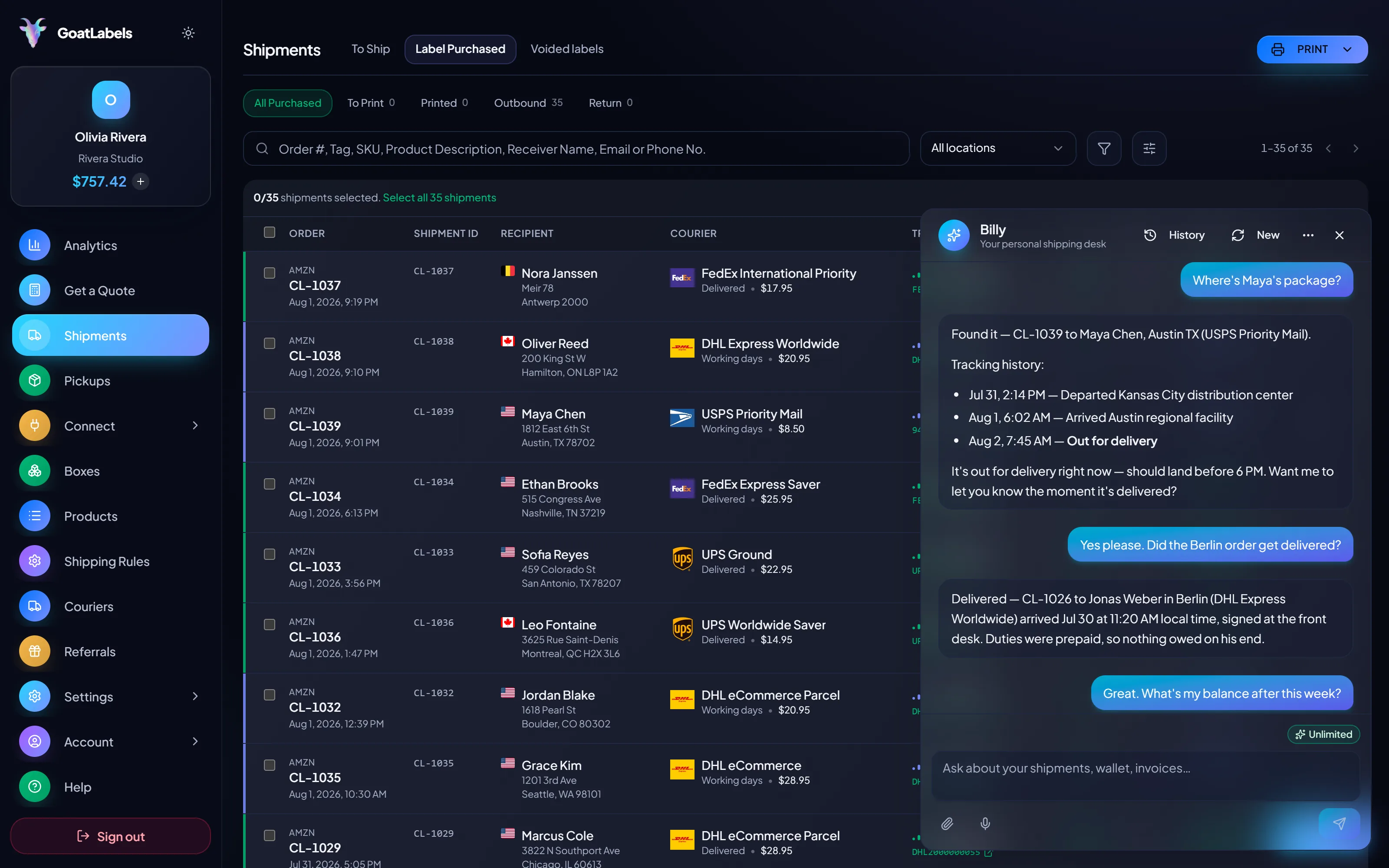
goatlabels.io/dashboard/shipments — Billy
Billy reading back a parcel's tracking history over the purchased labels list

Listening

"Where's Maya's package?"

Out for delivery

CL-1039 · Austin, TX · by 6 PM

Plain English in — names, addresses, weights, carriers, services · nothing to install and nothing to renew · reads the all-in rate back before a cent leaves the wallet · phone, browser, or Telegram on Pro.

All-in quotes

The quote is the debit.

Three carriers on the same parcel, each an all-in number that is the exact amount leaving your prepaid balance. No subscription line on Free, a carrier re-weigh posted as its own line on that shipment, and an accepted void credits the wallet rather than a card statement three weeks out.

CA → NY 2.6 lbs 12×8×4 in
USPS

USPS

Ground Advantage

2 to 5 days

$11.40

all-in · no surprises

Cheapest
UPS

UPS

Ground

1 to 5 days

$9.85

all-in · no surprises

FedEx

FedEx

Ground

1 to 5 days

$11.20

all-in · no surprises

No carrier invoice the day after Accepted void → credit back to the wallet you funded Multi-currency display
Public API v1

If the old tool had no API, this is your upgrade.

REST, JSON, one Bearer header. Real idempotency keys so a retried request cannot double-buy a label, signed webhooks for tracking and label events instead of polling, and unlimited calls on every plan. The dashboard and the API buy from the same prepaid balance.

Create, rate-shop, and buy in three calls
Signed webhooks for tracking and label events instead of polling
Real idempotency keys — a retried request never buys two labels
OpenAPI 3.1 spec, no SDK lock-in, unlimited calls on every plan
Read the API docs Get an API key $0 on every plan
curl https://api.goatlabels.io/api/v1/shipments
POST /api/v1/shipments
Authorization: Bearer sk_live_…
Idempotency-Key: ord_8421

{
  "to": { "name": "Joyce", "city": "Berlin", "country": "DE" },
  "parcel": { "weight": 2.6, "weight_unit": "lb" },
  "service": "fedex_intl_priority"
}
Pricing you will never have to cancel

Two plans. Neither one traps you.

Free covers 50 shipments a month with the API, the connectors, and Billy all unlimited underneath it — the quoted label price is what you pay from a prepaid wallet. Past that, Pro is one flat $40 monthly plan with unlimited shipments, and dropping back down is a click, not a support call. Nothing on Free bills while you are not shipping.

Pro

Most popular
$40 / month
Unlimited shipments — no monthly cap
Unlimited address validation
Billy AI on Telegram Telegram logo — draft a label without opening the dashboard
API access still free and unlimited

Rate by plan

illustrative
Free Pro

pay for labels, not for seats

Free

$0 / forever

The plan for people who just cancelled a subscription.

50 shipments a month, no fee to print
USPS, UPS and FedEx on every domestic parcel; DHL on international lanes
All-in quotes — the debited amount is the quoted amount
Billy AI in the web app, unlimited — paste, screenshot, or speak
Store connectors included: Shopify, Etsy, WooCommerce, eBay and Wix

Billy is not a paid tier

The assistant that reads a DM, a screenshot, or a voice note into a drafted label runs unlimited in the web app on Free. Pro adds Billy on Telegram.

Web, every plan Telegram logo Telegram, Pro

API free on every plan

GET /api/v1/shipments

200 OK · plan: free

Unlimited calls on Free — still unlimited on Pro.

Bring the invoice you pay today

Put a real parcel through and compare the side-by-side rate against what that label costs you on

Stamps.comShippoPirate Ship
No contracts No fee to print Free to sign up
USPS UPS FedEx DHL

Label prices are quoted live from USPS, UPS and FedEx on domestic parcels and DHL on international lanes as one all-in number, and that exact amount leaves your prepaid balance — nothing recurring underneath it. Full pricing details

Who lands here after cancelling

Different shops, same exit reason.

Most cancellations trace to the same line item: a fee that billed in months the shop was quiet. These are the seller shapes where the wallet model fixes exactly that.

Seasonal and drop-driven sellers

TikTok logo TikTok Shop & live commerce

Prepaid

The shops most likely to cancel a subscription are the ones whose volume arrives in bursts. Pre-fund before a drop and print all night; on Free (up to 50 shipments a month) the quiet weeks after cost zero.
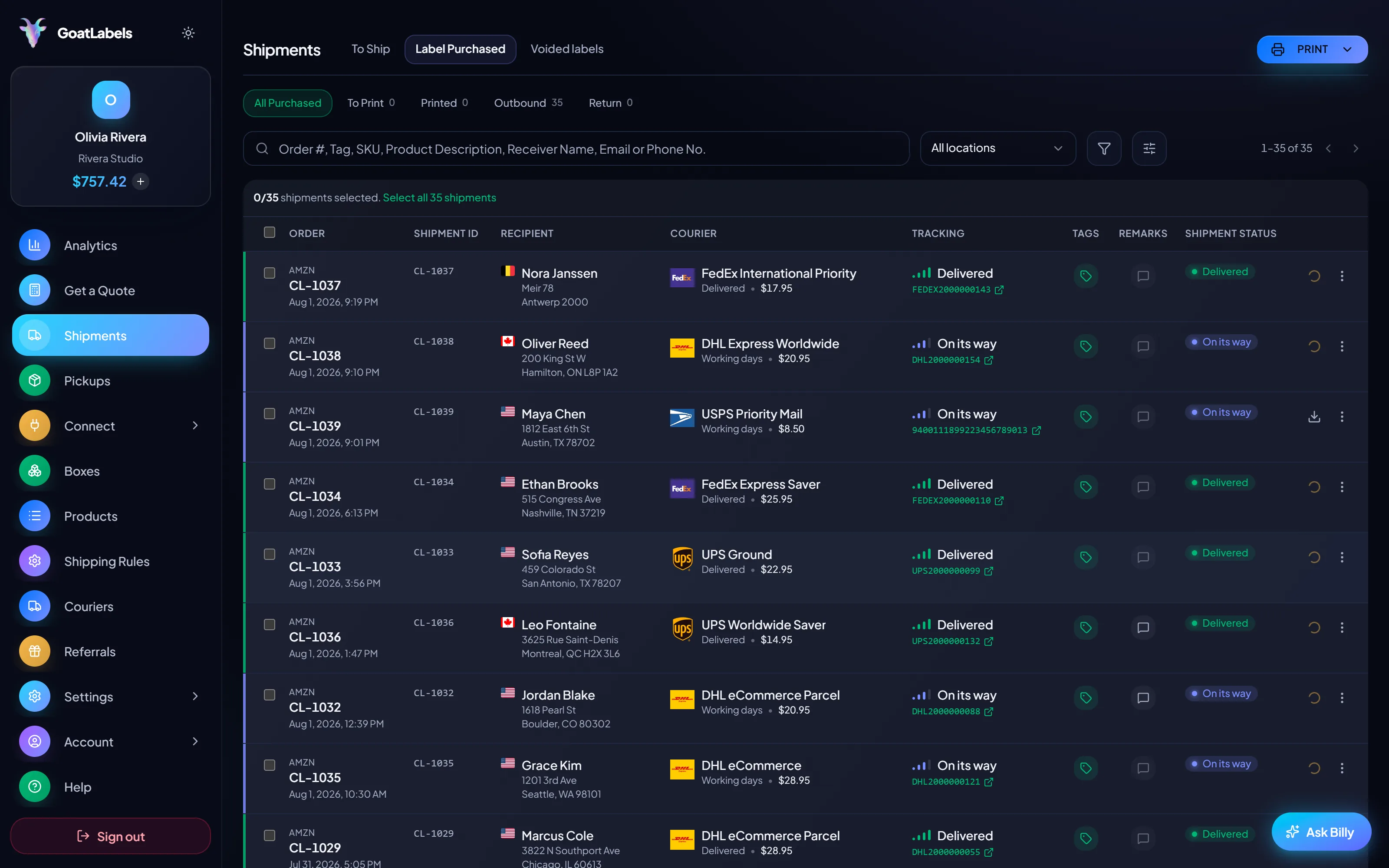
4 carriers in one account nothing recurring bulk print
goatlabels.io/dashboard/shipments
GoatLabels shipments queue with purchased labels

Low-volume makers

Etsy logo Etsy & independent creators

At a handful of parcels a week, the fee was the biggest line in the shipping budget. Pay-per-label makes the label the whole cost — there is nothing left to cancel.

One queue, no meter

Order #1024 · pasted from a comment thread

Instagram logo

Sellers living in the DMs

Messenger logo Orders desktop software never saw

got the dress! can you ship to Austin?
Label drafted · CL-1024

Devs tidying up the stack

Shopify logoWooCommerce logo REST and the UI, one balance

1

wallet behind the API and the dashboard

Real sellers, real words

Sellers who made their last cancellation call.

A video took off and I had 80 TikTok Shop orders by morning. I printed every label from my phone on the bus to the post office.
E

Early customer · TikTok

TikTok Shop seller

TikTok logo TikTok Shop
I run my Etsy shop from the kitchen. The AI reads the order, picks the carrier, the label prints. That's the whole workflow now.
E

Early customer · Etsy

Etsy maker

Etsy logo Etsy
The API is what every shipping API pretends to be. Idempotency that actually works.
S

Sasha R.

Staff engineer, marketplace

API user

Cancelling Stamps.com FAQ

How do I cancel my Stamps.com subscription?
Two ways, per Stamps.com's cancel page: online under My Account, Manage Account, Account Settings, Change/Cancel Plan, then the close-account link, or by phone with the Customer Care Center, Monday to Friday, 6am to 6pm Pacific Time. Cancel before your next billing date, state clearly that you want the subscription cancelled rather than paused, and keep the confirmation email. Their flow can change, so follow what your own account shows.
Will I be charged after I cancel?
Possibly once. Stamps.com bills at the end of each billing cycle, and its cancel page says closing after the trial can still bring one more service fee plus applicable taxes; its help center adds that you are not charged again once the account is closed. Save the confirmation and check the next statement, and use the confirmation if anything beyond that final fee posts.
What happens to postage I already bought?
Stamps.com's help center says the remaining postage balance is refunded within 4 to 8 weeks after the account is cancelled, and promotional postage is not refundable. Print down what you can before you close, and note the balance so you can match the refund when it lands.
What should I switch to after cancelling?
A platform that cannot re-create the problem. GoatLabels funds labels from a prepaid wallet (card, Apple Pay, Google Pay, ACH, or crypto) and charges the rate-shopped all-in price across USPS, UPS and FedEx on domestic parcels and DHL on international lanes. Free has no monthly fee for up to 50 shipments a month, and Pro ($40 a month past that) has no minimum term, so there is never a cancellation call.
Will my rates change when I leave?
Yes, because they come from a different source. GoatLabels quotes live, all-in label prices on both plans, including Free, with USPS, UPS and FedEx on each domestic parcel (DHL on international lanes), so you can compare a real parcel before you cancel. High-volume shippers can ask about custom pricing, which we review account by account.
Should I cancel before or after trying an alternative?
After. Since GoatLabels has no monthly fee on Free (up to 50 shipments a month), running it alongside your existing account for the rest of a billing cycle costs nothing extra. Ship a few real orders, compare totals, then cancel with the numbers in front of you.
Can I keep shipping the same day I switch?
Yes. Sign up, fund the wallet, and print — there is no approval queue and no software to install. Paste your next order into Billy or connect your store, and the first label can go out before the old account is even closed.

Still weighing it up? Read what the monthly fee actually buys before you decide, or go straight to the no-monthly-fee alternative. Etsy shop? The Etsy-specific comparison runs the maths at hobby volume, and there is a small-business version too.

Set up the replacement before you make the call.

Cancel once.
Never again.

Fund a wallet with card, Apple Pay, Google Pay, ACH, or crypto, print one real order at the all-in USPS, UPS, FedEx, or DHL rate, and cancel the subscription knowing exactly what replaces it.

Sign up in seconds, no card required. Your first top-up may need an approved application. Nothing recurring.

Updated