

USPS
Priority Mail Intl
10–15 days$7.40
$1.90 of duties and taxes prepaid, not billed to your buyer
all-in · comparable to your old invoice line
Switching is a sequence, not a leap: export open orders and history, reconnect any of the 13 stores GoatLabels syncs (Shopify, Amazon, eBay, Etsy, Walmart and more), and move other channels through CSV import or Billy's paste-to-draft. Fund the wallet, rate-shop the first batch, and close the Easyship plan only after the last open shipment delivers.
USPS, UPS and FedEx rate-shopped on every domestic parcel, DHL on international lanes: the first batch you route here is the real comparison.


 DHL: international
Card, Apple Pay, Google Pay, ACH, or crypto top up one prepaid balance — the parallel-running week costs only the labels you print.
Checked on from Easyship's own pages. Plans, fees and policies change, so confirm on the vendor's current page before you decide. Easyship is a trademark of its owner and is not affiliated with GoatLabels.
Cutover week has exactly one deliverable: a real batch of real orders, priced and printed here while the old account finishes what it already started. This is that batch. Reconnected storefronts refill the queue on their own; everything else arrives as the export file you took in step one, mapped once and saved as a preset.
one-off from a channel that didn't carry over — shipping to Lisbon
Thirteen storefronts reconnect and sync; every other channel arrives through this file or by paste. Saving the mapping as a preset is what makes only the first file cost any attention.
 Billy AI
Rate-shop this batch properly and let the all-in numbers argue against your own old invoices. Then cancel — but only once the last open shipment on the other side reads delivered and no claim is still running.
Shopify, Amazon, eBay, Etsy, TikTok Shop, WooCommerce, Squarespace, Wix, Walmart, Square, BigCommerce, Magento, and Temu reconnect and start syncing into the To Ship queue, with tracking pushed back when you print. For those thirteen, migrating is re-authorising. Every other channel your old account connected for you arrives as a CSV row or a pasted order instead, and this page would rather say so now than let you find out in week two.
 Shopify
 Etsy
Etsy WooCommerce
 TikTok Shop
 Amazon
 eBay
eBay Squarespace
 Wix
Wix WalmartShopify PlusSoon
 Square
 BigCommerce
 Magento
 ZapierSoon
 NetSuiteSoon
 EcwidSoon
 Temu
Temu SheinSoon
 ChannelAdvisorSoon
 SkuVaultSoon
 Zoho InventorySoon
 Patreon
The order of operations in any platform exit is: copy everything out while you still can, and cancel last. From Easyship that means four exports. First, open and unshipped orders — this file becomes your first import batch on the other side, so it earns the most care. Second, shipment history with tracking numbers: six months from now a buyer will ask about a parcel you sent through the old account, and the answer should not live behind a login you closed. Third, saved product and customs data, which seeds the template rebuild covered below. Fourth, invoices, because your bookkeeper's questions outlive every subscription.
Do the exports before touching anything else, and stash them somewhere that is not the platform you are leaving. Nothing about exporting commits you to a timeline — it simply converts the migration from a leap into a sequence, because every later step in this page assumes the data is already safely yours.
Here is the honest split. GoatLabels syncs 13 storefronts: Shopify, Amazon, eBay, Etsy, TikTok Shop, WooCommerce, Squarespace, Wix, Walmart, Square, BigCommerce, Magento, and Temu. For those the migration is a re-authorisation: connect the store, orders flow into the To Ship queue, and tracking is pushed back when you print. Any other channel Easyship connected for you does not carry over as a connection. Those orders move on one of two rails instead: the exported file goes through CSV import — map the columns once, save the preset, validate every row before paying, a mechanic covered end to end on bulk shipping labels from CSV — or one-off orders are pasted in and Billy drafts the label, the workflow that lives onAI shipping labels.
The table below is the part most switch guides skip: which columns in an Easyship order export feed which GoatLabels import fields. You perform this pairing once in the import mapper and save it as a preset, so only the first file costs any attention.
| Easyship export column | GoatLabels import field | Migration note |
|---|---|---|
| Receiver name / company | Recipient name | Map both if you ship B2B — the mapper accepts a second column for the company line. |
| Address line 1 and 2 | Street address | Two export columns, two import fields. Every row is address-validated before any money moves. |
| City / state / postal code / country | City, state, ZIP, country | Country must be the two-letter code; the validator flags rows where it is spelled out. |
| Phone and email | Recipient contact | Optional domestically, load-bearing for international labels — keep both mapped. |
| Total weight and dimensions | Parcel weight and dimensions | Check the units your export used against the units you map to — the classic silent migration bug. |
| Item description / declared value / HS code | Customs item fields | Carries your customs data into each row. You supply the HS code; Billy drafts descriptions only. |
The column groupings above are a general map, not a copy of any one Easyship export header. Easyship can rename or reorder export columns at any time, so treat your own freshly exported header row as the source of truth and this table as the map of where each field lands. The import mapper reads your file's actual headers, which is what makes a renamed column a ten-second fix rather than a broken migration.
International sellers accumulate customs state without noticing: item descriptions that clear without questions, declared values, countries of origin, and the HS codes attached to each product. None of that transfers between platforms automatically, and pretending otherwise is how a migration strands a border parcel. The rebuild here is deliberate but short: each repeat SKU becomes a saved customs template — description, declared value, origin country, and the HS code you supply — created once and attached to every future shipment of that product.
Two things shorten the job. If your Easyship export carried customs columns, the CSV mapping above brings the same data in row by row, so the templates can be built from your own file rather than from memory. And Billy drafts customs descriptions from a plain-language account of what you sell — though the HS code remains yours to supply, because classification is the seller's legal responsibility and no software should pretend to own it. What goes on the form itself, and when, is covered oncustoms forms for small parcels.
Shipping migrations fail in one specific way: the old tool goes dark before the new one has printed anything real, and a day's orders sit in a box while someone reads documentation. The fix is a deliberate overlap. Fund the wallet with a modest top-up, reconnect the synced stores, and route the week's new orders through GoatLabels while everything already in flight finishes on Easyship. Rate-shop the first batch properly, every parcel against every carrier on its lane, and let the all-in numbers argue against your old invoices rather than against a comparison page.
The overlap is deliberately cheap to hold. Free has no subscription for up to 50 shipments a month, so the parallel period costs exactly the labels you buy through it; the pressure to finish comes only from the Easyship plan still billing on its own clock. A week is usually enough to prove the workflow on real parcels — including one void, one international label, and one CSV batch, the three things worth testing before you trust any platform with a season. What a month costs after the switch is on thepricing page; how this same week played out for Shippo leavers is onswitch from Shippo.
Cancel last, and cancel on a checklist rather than a feeling. The labels Easyship already sold you remain valid with the carriers, because cancellation cannot un-ship a parcel. Cancelling a paid plan is a downgrade to Free that takes effect at the end of the billing cycle, and closing the account outright closes your window into those shipments: tracking views, support escalation, any claim or dispute still in progress. So the trigger for cancellation is not the day the new workflow feels comfortable; it is the day the last open Easyship shipment shows delivered and no claim remains open. Until then the plan is doing one final job, and it is worth one more billing cycle to let it finish.
Before you press the button: confirm the exports from step one actually open and contain what you think, note the plan's billing date so the cancellation lands before the next charge rather than the day after, and keep the confirmation email. Then the sequence is complete — orders arrive through synced stores, CSV, or paste; every parcel is rate-shopped across carriers; and the only thing you left behind is the monthly plan-sizing decision.
The habit (weigh, quote, print) survives the move untouched. What changes is the machinery around it: no seats or contract, carriers bidding on every parcel, and orders arriving however your buyers actually send them.
Card, Apple Pay, Google Pay, ACH, and crypto fund one prepaid balance that is spent label by label. The monthly what-tier-are-we question you are migrating away from simply has no equivalent here — a quiet month leaves the balance untouched.
The channels that do not carry over as connections still carry over as orders: paste the text, drop a screenshot, or say the address, and Billy drafts the label for you to confirm. The unglamorous truth of migrations is that the long tail moves by hand — this is the hand.
BillyLIVENo subscription on Free (50 shipments a month) means running both platforms in parallel costs only the labels you chose to buy. Cut over at the pace your open shipments dictate, not the pace a billing date forces.
USPS, UPS and FedEx are quoted at all-in prices on every domestic parcel from day one, DHL on international lanes. The first real batch you rate-shop is the moment the migration proves itself or doesn't, and it is checkable on your own boxes, not ours.
UPS$12.48FedEx$13.22DHL$14.10USPS$11.79REST, JSON, signed webhooks, idempotency keys, unlimited calls on every account. If part of your Easyship workflow was automated, the same three calls — create, rate, buy — rebuild it here without a platform fee attached.
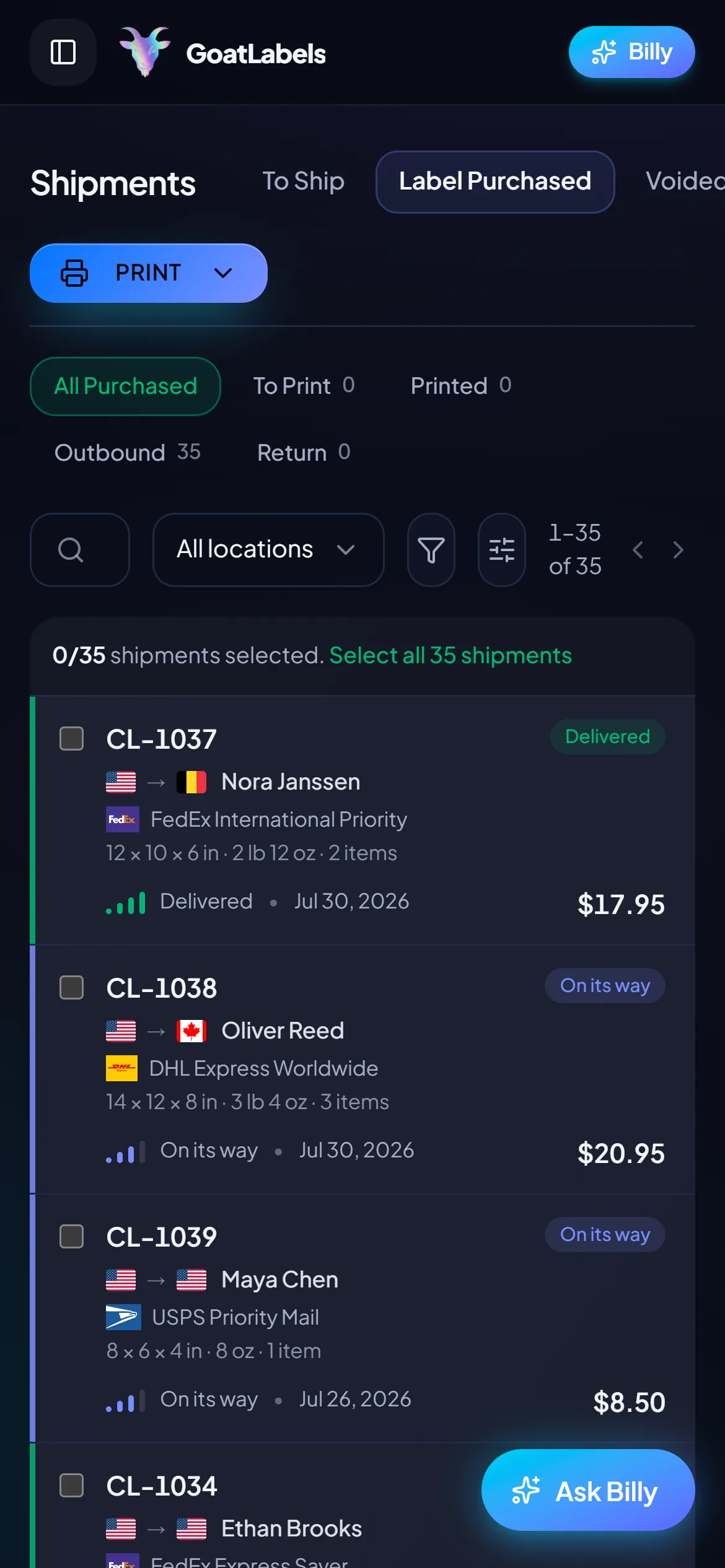
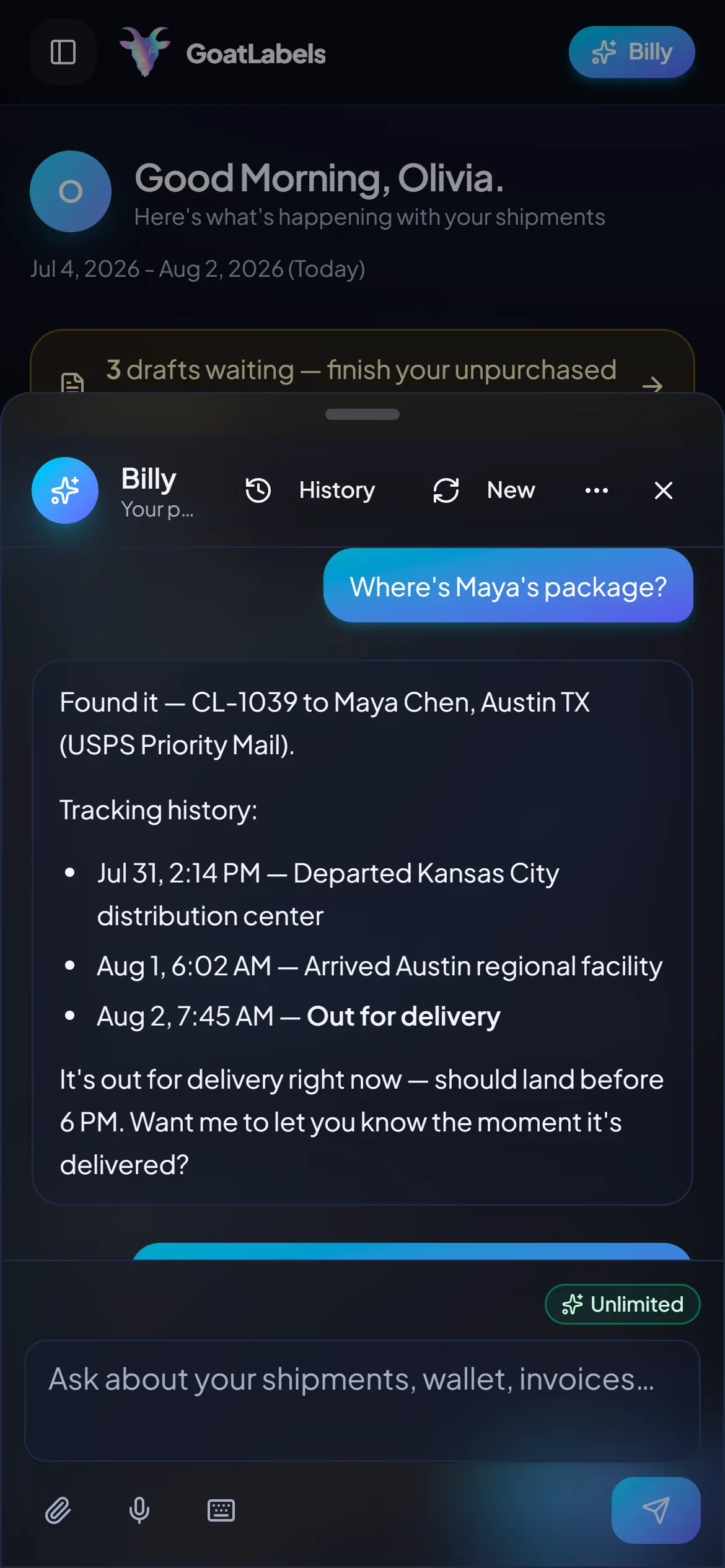
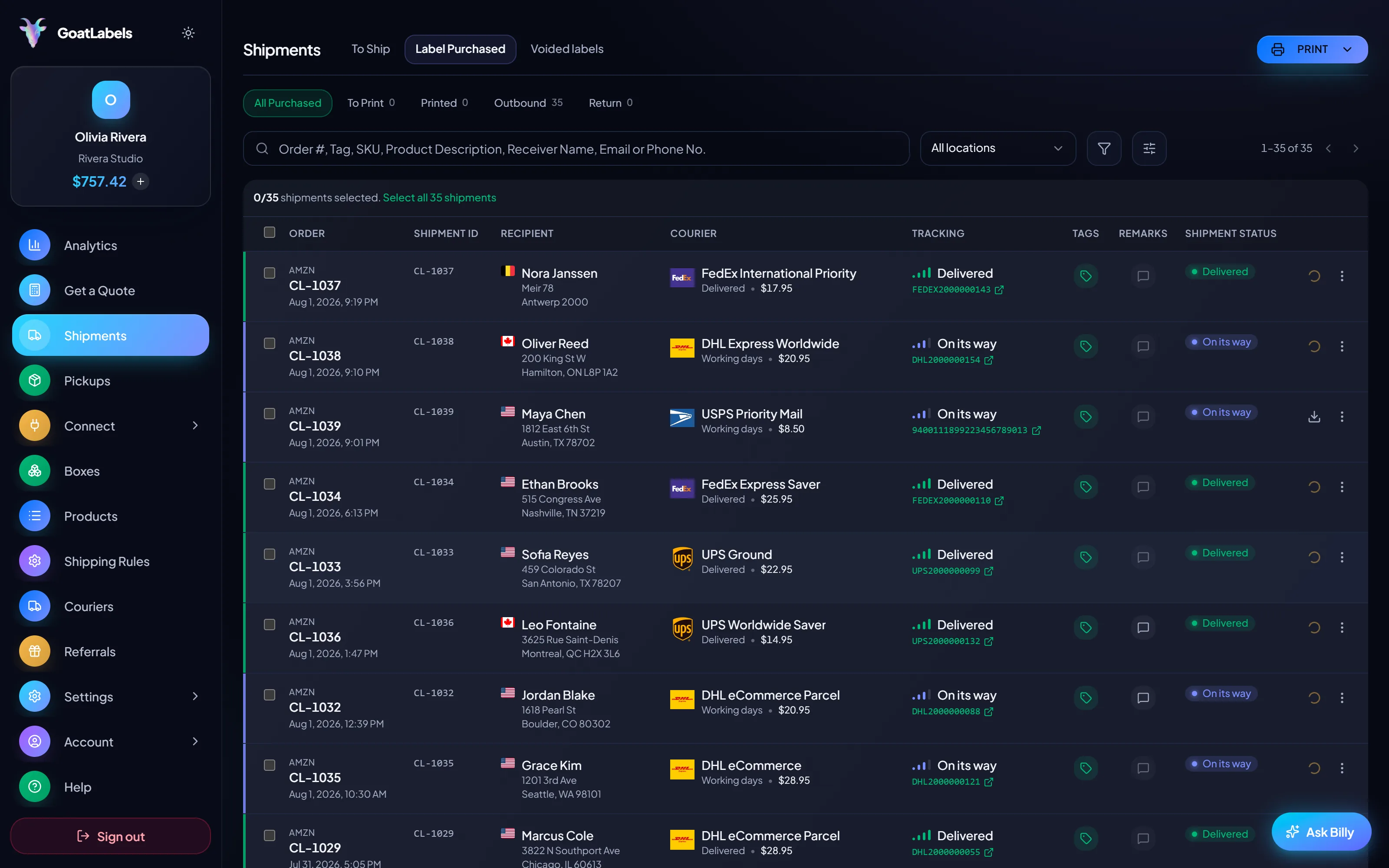
Cutover batch printed
Old account still finishing its own
The three things worth testing before you trust any platform with a season are one void, one international label, and one CSV batch — and none of them need a laptop. Run all three on the phone during the week you are running both tools.
The awkward part of running both platforms for a week is remembering which parcel went out on which one. Ask out loud and Billy answers for the shipments bought here — status, carrier, what it cost — so the overlap does not become two dashboards and a spreadsheet. Included on every plan. This is the real product, not a render.
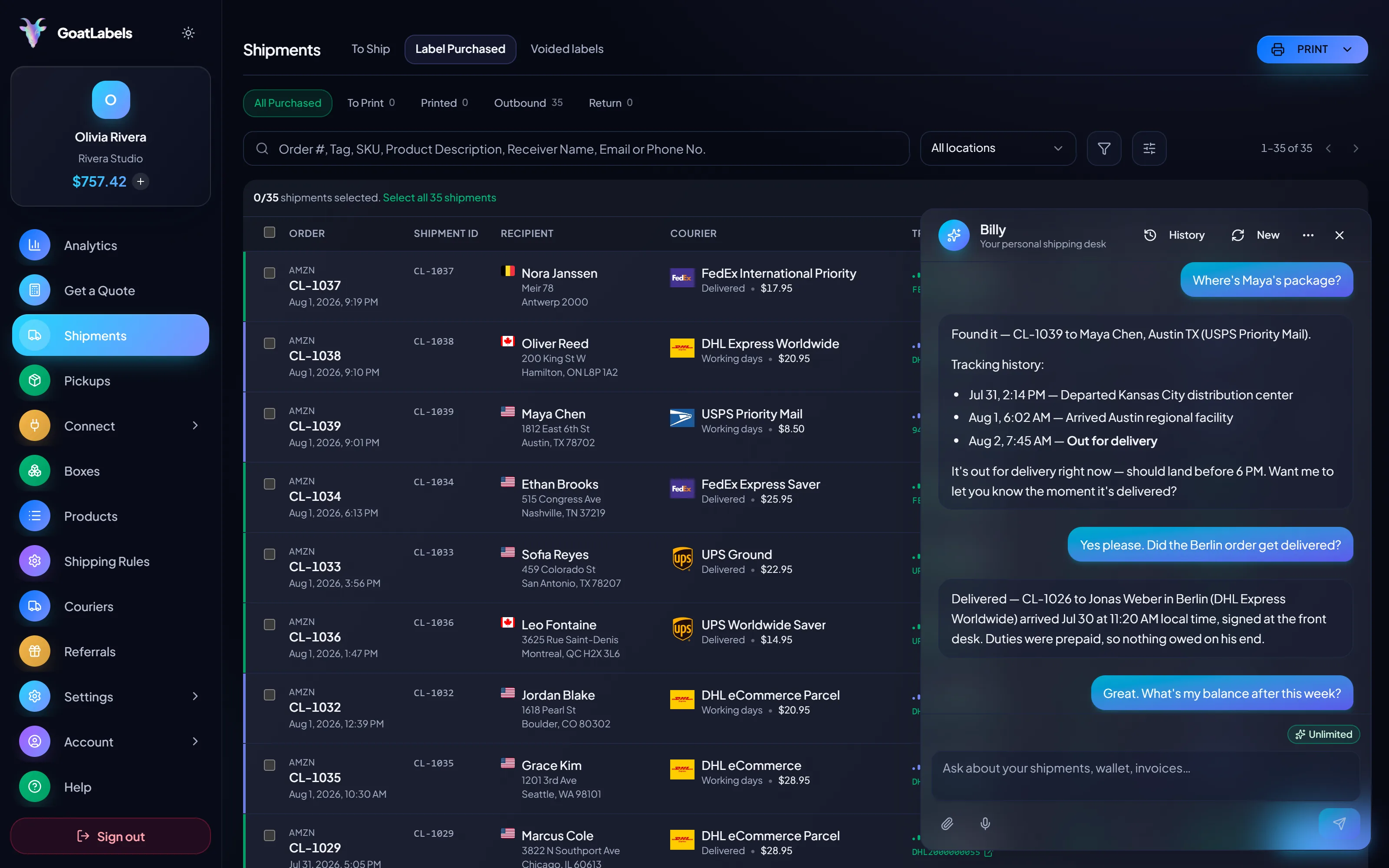
Listening
"Which of this week's parcels went out from here?"
Out for delivery
Lisbon, PT · cleared customs this morning
Speaks plain English · answers only for the shipments bought here · phone, browser, or Telegram on Pro.
Migration arguments end when a real box gets priced. The same parcel is quoted against every carrier at once and each column is one all-in number, with duties and taxes inside it where the service supports DDP, which is what makes a cross-border quote here directly comparable to the line on the invoice you are leaving. Figures are illustrative.
Priority Mail Intl
10–15 days$7.40
$1.90 of duties and taxes prepaid, not billed to your buyer
all-in · comparable to your old invoice line
Intl Connect Plus
3–5 days$8.90
$2.20 of duties and taxes prepaid, not billed to your buyer
all-in · comparable to your old invoice line
Express Worldwide
1–2 days$9.80
$2.50 of duties and taxes prepaid, not billed to your buyer
all-in · comparable to your old invoice line
Migrations stall on the scripts nobody documented. The rebuild here is three calls — create, rate, buy — over REST and JSON behind one Bearer header, with no platform fee attached to running them, so the automated half of your workflow can move in the same week as the manual half.
POST /api/v1/shipments
Authorization: Bearer sk_live_…
Idempotency-Key: ord_8421

{
  "to": { "name": "Joyce", "city": "Berlin", "country": "DE" },
  "parcel": { "weight": 2.6, "weight_unit": "lb" },
  "service": "fedex_intl_priority"
}
The overlap only stays cheap if one side of it is not billing you monthly, and this side is not on Free: no subscription for up to 50 shipments a month, and the parallel period costs only the labels you route through it. Past 50, Pro is one flat $40 a month with no minimum term.
 — draft a one-off without opening the dashboard
Rate by plan
illustrativePro: one flat monthly plan, unlimited shipments
$0 / forever
Fund a modest top-up for cutover week and spend it label by label.
The assistant that absorbs the channels which lost their sync — pasted orders, screenshots, spoken addresses, customs descriptions drafted for you — runs unlimited in the web app on Free. Pro adds Billy on Telegram.
Telegram, ProGET /api/v1/shipments
200 OK · plan: free
Unlimited calls on Free — still unlimited on Pro.
On Pro we will work with you to beat the label rates you are already getting from
EasyshipShippoShipStationLabel prices are quoted live from USPS, UPS, FedEx, and DHL as one all-in number, with duties inside it where the service supports DDP, and that exact amount leaves your prepaid balance. Easyship's own plans and export formats are its own to change — your freshly exported header row is the source of truth. Full pricing details
The sequence is the same for everyone — export, reconnect, cut over, close. What differs is which of those four steps is the long one for you.
 Descriptions, values, origins, HS codes
Nothing imports a competitor's customs presets, so this is the one part of the move that is genuinely work. If your export carried customs columns, the mapping rebuilds the templates from your own file instead of from memory.
 Thirteen sync, the rest go to CSV
The honest cost of switching. Map the export columns once, save the preset, and the long tail becomes a file drop rather than a data-entry session — but it is a file drop, not a connector, and nobody here is pretending otherwise.
Map once, save the preset
A renamed column becomes a ten-second fix

The orders that always moved by hand

 Create, rate, buy — rebuilt
3
core calls to rebuild: rate, buy, void
Still deciding rather than migrating? Start withthe Easyship alternative page andhow Easyship pricing actually works.
A video took off and I had 80 TikTok Shop orders by morning. I printed every label from my phone on the bus to the post office.
Early customer · TikTok
TikTok Shop seller
TikTok ShopI run my Etsy shop from the kitchen. The AI reads the order, picks the carrier, the label prints. That's the whole workflow now.
Early customer · Etsy
Etsy maker
EtsyThe API is what every shipping API pretends to be. Idempotency that actually works.
Sasha R.
Staff engineer, marketplace
Fund a wallet with card, Apple Pay, Google Pay, ACH, or crypto, route this week's orders through live carrier quotes, and close the Easyship plan when the last open shipment delivers.
Sign up in seconds. No card required. No monthly fee on Free, up to 50 shipments a month.
Updated