

USPS
Ground Advantage
2 to 5 days$11.40
all-in · no surprises
Switching from Shippo takes minutes: create a free GoatLabels account, fund the prepaid wallet, and Billy AI drafts your first labels. Free has no subscription for up to 50 shipments a month and no per-label platform fee.
USPS, UPS and FedEx on every domestic parcel, DHL on international lanes: live all-in rates from day one, with no carrier accounts to bring across.
Top up with card, Apple Pay, Google Pay, ACH, or crypto and run both tools in parallel for as long as you like.
Migrations are frightening in proportion to how much state they move. This one moves very little: no carrier accounts to re-provision, no negotiated contracts to transfer, and no data model to map. The address book is a CSV, the storefronts are a few clicks, and the labels start the moment the wallet has money in it.
| GoatLabels | Shippo | |
|---|---|---|
| Step 1 — open the account | Free, in seconds, no card required. Nothing on the Shippo side has to change yet. | Keep it running exactly as it is while you evaluate. |
| Step 2 — bring the addresses | Export your address book to CSV and import it, or skip it entirely: Billy reads addresses from pasted orders. | Shippo's help center documents a CSV export from the Shipments page; check it for the address fields you need. |
| Step 3 — reconnect the stores | Any of Shopify, Etsy, WooCommerce, eBay or Wix connects in a few clicks and starts filling the To Ship queue. | Leave the connectors in place until you have printed a few labels here. |
| Step 4 — fund the wallet | Card, Apple Pay, Google Pay, ACH, or crypto into one prepaid balance. Top up what a week of labels costs. | A Pro plan keeps billing on its own cycle until you cancel it; Starter has no plan fee. |
| Step 5 — print one real label | Rate-shop the parcel, compare the all-in number, buy it. That comparison is the whole decision. | Quote the same parcel there and compare the carrier rate plus whatever your plan adds. |
| Step 6 — cancel, or don't | No contract and no monthly fee on Free (up to 50 shipments a month), so running in parallel costs you nothing but the labels you buy. | Cancel or downgrade from the Plan page in the Shippo app, or through Shippo support, when you are satisfied. A downgrade takes effect at the end of the billing cycle. |
Shippo is a trademark of its owner and is not affiliated with GoatLabels. Their plans, fees, and carrier list change — compare against their current pricing page before you decide.
Free has no monthly fee for up to 50 shipments a month, so keeping GoatLabels alongside Shippo costs only the labels you buy through it. Ship a day's orders each way and compare real all-in numbers instead of arguing about pricing pages.
There is no per-label platform fee to negotiate away, and the only tier above Free is one flat $40 Pro plan with unlimited shipments. The carrier rate you accept is the amount debited from the wallet, from the very first parcel you print.
You do not have to migrate an address book to get started. Paste an order, drop a screenshot, or say the address, and Billy drafts the whole label — recipient, parcel, and service — so your first shipment happens before any import does.
Checked on from Shippo's own pages. Plans, fees and policies change, so confirm on the vendor's current page before you decide. Shippo is a trademark of its owner and is not affiliated with GoatLabels.
Start with an account and a funded wallet — card, Apple Pay, Google Pay, ACH, or crypto — and you can print before you have imported anything at all. Connect any of the store connectors when you are ready and orders drop into the To Ship queue with tracking pushed back on print; wire the free REST API when your developer has an afternoon. In the meantime, paste an order, drop a screenshot, or dictate it, and Billy fills in the addresses, the package details, and the service, then hands the draft back for you to confirm. Rate-shop USPS, UPS and FedEx at the all-in price (DHL on international lanes), buy from the prepaid balance with no platform fee inserted in between, and print from your phone or a thermal printer. Nothing on the Shippo side has to be cancelled for any of that to work.
Hey! 2x hoodies (M) 1x tee (L) 😅 Ship to: Maya R. Austin, TX 78701
Connectors, REST API, DMs, and screenshots — one queue, no import mapping and no migration project.
 Billy AI
No per-label platform fee and no monthly fee on Free (up to 50 shipments a month), so a parallel run costs only the labels you buy.
Shopify, Etsy, WooCommerce, eBay and Wix reconnect in a few clicks and start syncing into To Ship with tracking pushed back when you print — the same shape of integration you already had. What is new is everything that never had a connector: paste an Instagram or Facebook DM, or a screenshot of one, and Billy builds the label anyway.
 Shopify
 Etsy
 WooCommerce
 eBay
 Wix
The carriers, the batch printing, and the API all came with you, plus the Shopify, Etsy, WooCommerce, eBay and Wix connectors if you sold there, which is why this migration is short. What changes is the billing, a prepaid wallet and one flat Pro fee in place of Shippo's label bands, and what arrives is an assistant that drafts labels from the orders no connector ever saw.
Card, Apple Pay, Google Pay, ACH bank transfer, and crypto all top up the same balance, and every method buys identical rates, carriers, and features. Top up a week's worth to start; void a shipment and, after the carrier accepts the void, the credit lands back in the wallet.
The fastest way to test a new shipping tool is to give it one real order. Paste the message, drop the screenshot, or say it out loud, and Billy drafts the entire label — no address book import required before your first parcel goes out.
Billy
LIVE

Fund the wallet, pay per label, and let the overlap period cost only the labels you buy through it, up to 50 shipments a month on Free. Past that, Pro is one flat monthly plan with unlimited shipments.
Live all-in rates from USPS, UPS and FedEx side by side on domestic parcels, and from DHL on international lanes, with no carrier accounts to provision or credentials to move across; that is most of why the migration is short. The number on screen is the exact amount that leaves your balance. That is the honest carrier list; if you need one outside it, Shippo's broader network is the reason to stay.
UPS
$12.48
 FedEx
$13.22
 DHL
$14.10
USPS
$11.79
REST and JSON, one Bearer header, idempotency keys so a retry cannot double-buy a label, and signed webhooks for tracking and label events instead of polling. Free and unlimited on every plan, so your developer can port the client on their own schedule rather than yours.
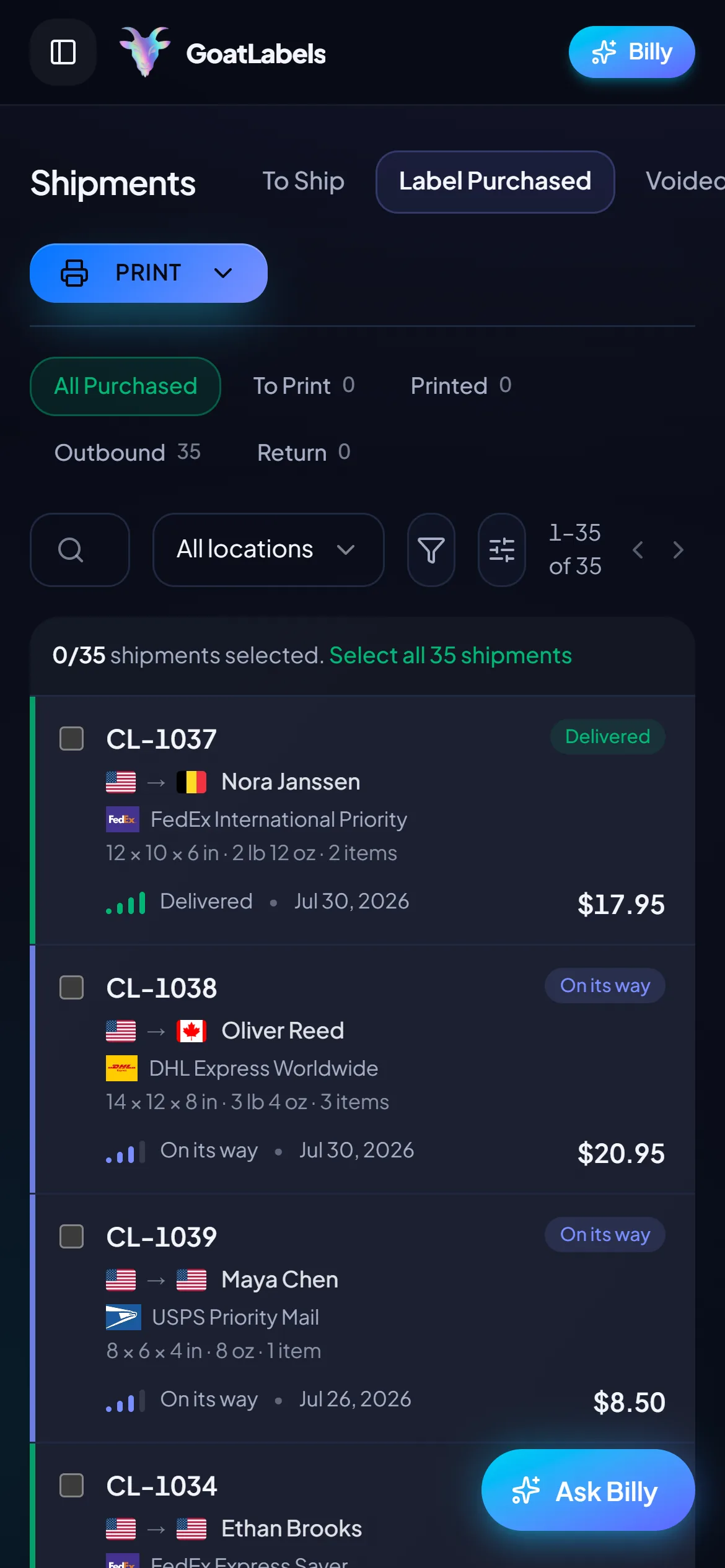
Label ready
CL-1038 · Brooklyn, NY
Most tool switches start with an import screen. This one can start with the next order that lands: paste it, snap it, or say it, and Billy drafts the label on the phone already in your hand. The address book import is something you do later, if you bother at all.
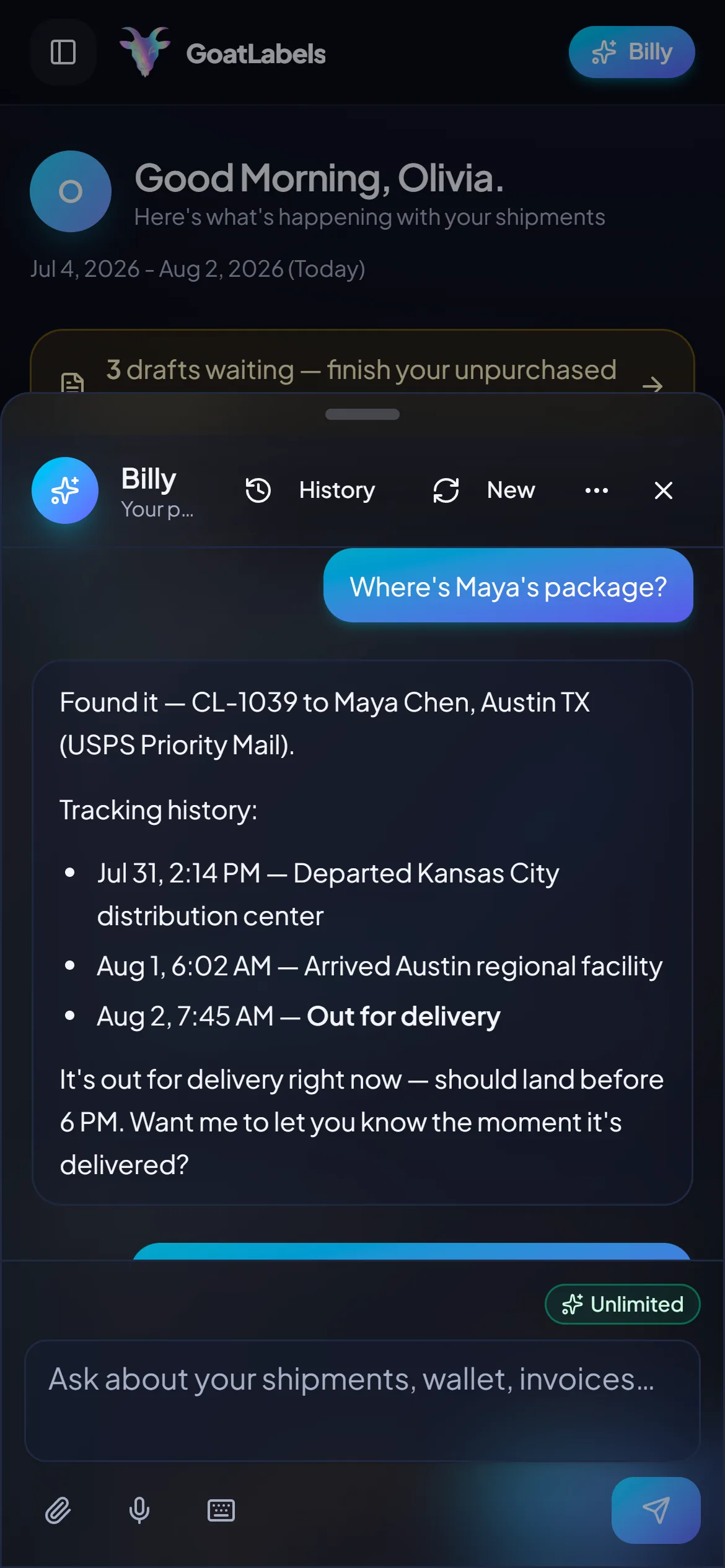
The real cost of switching tools is the week your team spends learning one. Hold the mic, say who the parcel is going to, and Billy looks up the buyer, rate-shops USPS, UPS and FedEx (DHL on international lanes), and queues the label against your prepaid balance, then answers for it afterwards when someone asks where the parcel is. This is the real product, not a render.
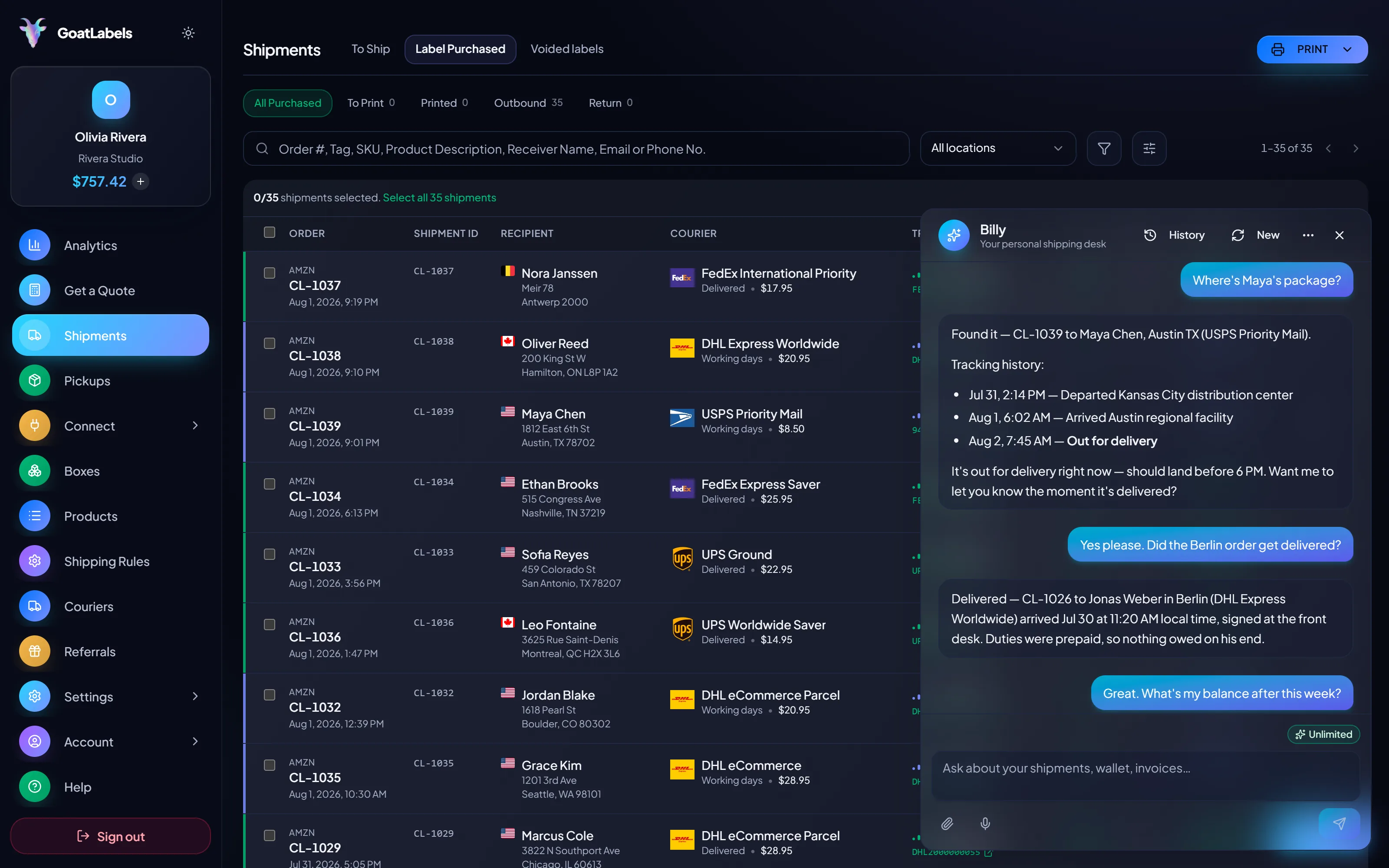
Listening
"Where's Maya's package?"
Out for delivery
CL-1039 · Austin, TX · by 6 PM
Plain English in — names, addresses, weights, carriers, services · nothing to import and nothing to map · reads the all-in rate back before a cent leaves the wallet · phone, browser, or Telegram on Pro.
Three carriers on the same parcel, each an all-in number that is the exact amount leaving your prepaid balance. This is the comparison that decides the migration: quote the same parcel in both tools and put the two final numbers side by side, rather than comparing pricing pages.
Ground Advantage
2 to 5 days$11.40
all-in · no surprises
Ground
1 to 5 days$9.85
all-in · no surprises
Ground
1 to 5 days$11.20
all-in · no surprises
The API migration is the same three calls: create the shipment, read the rates, buy the label. REST, JSON, one Bearer header, real idempotency keys so a retried request cannot double-buy, signed webhooks instead of polling, and an OpenAPI 3.1 spec to generate from. Unlimited calls on every plan, so a long parallel run costs nothing.
POST /api/v1/shipments
Authorization: Bearer sk_live_…
Idempotency-Key: ord_8421

{
  "to": { "name": "Joyce", "city": "Berlin", "country": "DE" },
  "parcel": { "weight": 2.6, "weight_unit": "lb" },
  "service": "fedex_intl_priority"
}
Free covers 50 shipments a month with the public API, the store connectors, and Billy all unlimited underneath it — enough to run a full parallel trial without spending anything beyond the labels themselves. Pro is a flat monthly fee for unlimited shipments when you are ready for it. Neither one is a minimum you have to hit before a label prints, and neither is something you commit to on day one.
 — draft a label without opening the dashboard
Rate by plan
illustrativePro: one flat monthly plan, unlimited shipments
$0 / forever
Enough to run a full side-by-side trial without a subscription under it.
The assistant that reads a DM, a screenshot, or a voice note into a drafted label runs unlimited in the web app on Free — which is how you print a first label before importing anything. Pro adds Billy on Telegram.
Telegram, Pro
GET /api/v1/shipments
200 OK · plan: free
Unlimited calls on Free — still unlimited on Pro.
High-volume shippers can ask about custom pricing, which we review account by account. Compare it against what you pay on
ShippoPirate ShipShipStation
Label prices are quoted live from USPS, UPS and FedEx on domestic parcels and DHL on international lanes, shown as one all-in number, the same number that leaves your wallet. Shippo's fees and plans change; the Shippo figures on this page were checked against Shippo's own pricing pages on 2026-10-17, so confirm them there before you decide. Full pricing details
These are the sellers for whom the switch is worth testing on the first label, and the ones who should stay exactly where they are appear on this page too.
 Switch in the quiet month
The best time to migrate is a slow week, and a prepaid wallet makes that free: fund it and test it on Free (up to 50 shipments a month), with no monthly fee until a rush takes you past 50 and onto Pro ($40 a month, no minimum term).
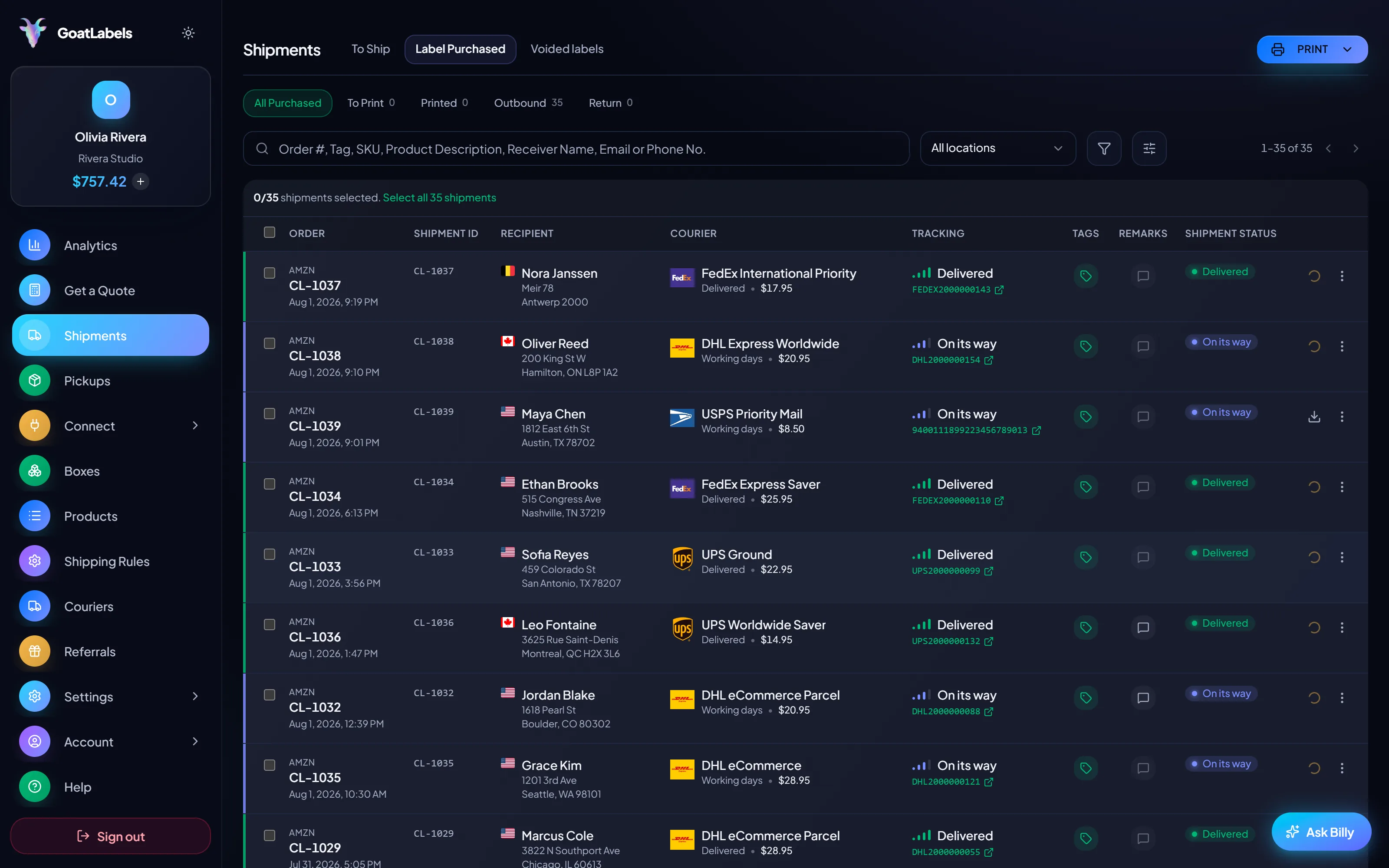
 Bring the connectors, gain the rest
Reconnect the storefronts that have connectors, and handle the market stall, the comment sale, and the friend-of-a-friend order in the same queue as everything else.
One queue, connector or not
Order #1024 · pasted from a comment thread

 The orders that never became JSON

 Three calls, one balance
1
wallet behind the API and the dashboard
A video took off and I had 80 TikTok Shop orders by morning. I printed every label from my phone on the bus to the post office.
Early customer · TikTok
TikTok Shop seller
TikTok Shop
I run my Etsy shop from the kitchen. The AI reads the order, picks the carrier, the label prints. That's the whole workflow now.
Early customer · Etsy
Etsy maker
Etsy
The API is what every shipping API pretends to be. Idempotency that actually works.
Sasha R.
Staff engineer, marketplace
Want the comparison behind the migration? Read GoatLabels vs Shippo and the Shippo pricing teardown. Shipping a specific channel? See the Etsy and TikTok Shop pages, or the API alternative.
Fund a wallet with card, Apple Pay, Google Pay, ACH, or crypto, paste in the next order that lands, and compare the all-in USPS, UPS and FedEx rates (DHL on international lanes) against the quote you were about to buy. Cancel nothing until that comparison has answered the question.
Sign up in seconds, no card required. Your first top-up may need an approved application. No monthly fee on Free, up to 50 shipments a month.
Updated