

USPS
Ground Advantage
2 to 5 days$11.40
all-in · nothing collected at print time
Your Rollo printer is open hardware: it prints any 4×6 PDF from any software. Rollo's own app charges a per-label service fee after a new account's first 200 labels; GoatLabels charges nothing per label beyond the postage itself, rate-shops USPS, UPS and FedEx (DHL on international lanes), and outputs the same 4×6 PDF your printer already handles.
USPS, UPS and FedEx priced on every domestic parcel, DHL on international lanes. The winner comes out of your Rollo as the same 4×6 PDF it already prints.


 DHL: international
Card, Apple Pay, Google Pay, ACH, or crypto fund one prepaid wallet. No software fee rides on the label; Free covers up to 50 shipments a month, and Pro ($40 a month) removes the cap.
A Rollo is a direct thermal printer with standard drivers. Plug it in — USB or Wi-Fi depending on the model — and your computer or phone sees an ordinary printer that happens to eat 4×6 label stock instead of letter paper. It will render whatever PDF any application sends it, because that is what printers do. Nothing in the hardware knows or cares which website, marketplace, or shipping platform generated the file.
That obvious fact gets blurred by bundling: the printer and the app share a brand, the app is pitched as the printer's natural companion, and plenty of owners quietly assume the two are a set. They are not. Buying the printer was a hardware purchase, full stop — it did not enrol you in anyone's label pricing, and no software choice you make afterwards can be locked in by the device on your desk. The printer is yours; the question this page answers is only ever about the software above it.
Rollo's app sells convenience with a meter on it: alongside the postage itself, the app charges a service fee on each label you generate through it once a new account's first 200 fee-free labels are used. The structure matters more than the amount. A per-label software fee is a second price attached to every parcel, collected at the moment of printing, and it applies whether the parcel earned you forty dollars or four. Rollo's Rewards tiers lower the fee as you print more, and the current figures sit in the dated Rollo facts on this page.
Every label bought here is delivered as a standard 4×6 PDF, which is exactly the shape a Rollo was built to print. There is no integration to configure and none is claimed — the handoff is the ordinary print path your operating system already owns. Buy the label, open the PDF, print to the Rollo with the paper size set to 4×6 and scaling set to actual size, and the label comes out edge to edge with the barcode crisp at the printer's native resolution. Direct thermal means no ink and no toner, same as always.
The settings card below is the whole setup, verified on a Rollo against real purchased labels. Do the first one as a test: print a single label, check that the corners are not clipped and the barcode has clean quiet zones, and scan it with any barcode app if you want belt and braces. After that the settings persist and printing is one tap — from a desktop browser, or from a phone via the share sheet to a Wi-Fi model at the packing table.
Rollo print settings — verified on a Rollo with purchased labels
The arithmetic of a per-label fee is a straight line: multiply the fee by every label you print past the free ones. It looks like nothing next to one parcel, which is precisely how it is designed to be read. But a per-parcel cost scales with the thing you are trying to grow — double your orders and the fee line doubles with them, having added no work and no value the postage did not already carry. Worse, it is regressive against your smallest sales: a fixed fee takes a far larger bite of a six-dollar sticker order than of a sixty-dollar bundle, so the sellers with the thinnest margins pay the highest effective rate.
GoatLabels has no per-label software fee to multiply. Labels are paid for from a prepaid wallet at the quoted all-in carrier price, and the software around them (the carrier quote, Billy, the connectors, the API) is free on every plan, with no monthly fee on Free, up to 50 shipments a month. We are not free of economics: like every postage platform, we earn inside the carrier rate itself, and the pricing page spells the model out. What we do not do is attach a second, growing price to your print volume. At a handful of labels a month the difference is pocket change; at live-selling or holiday volume it is a line item you can name — run your own monthly label count against the fee in the dated Rollo facts on this page and the multiplication does the arguing.
Honesty cuts both ways. If you print a few labels a month, the fee is genuinely immaterial — convenience wins at that volume, and if the app's workflow already fits your marketplaces, staying put is a defensible choice. The app is also built by the people who built your printer, which keeps the print path frictionless in the way a first-party pairing usually is. Check Rollo's current site for what its rate program and integrations cover today, and weigh that against what the fee costs at your real volume. The case for moving is strongest when your volume is climbing, your orders arrive in batches (a day's orders can come in as one CSV file), or your parcels vary enough that a side-by-side quote of USPS, UPS and FedEx (DHL on international lanes) beats any single rate table, with the all-in price doing the comparing and USPS commercial pricing still on the menu when it wins.
Rollo is a trademark of its owner and is not affiliated with GoatLabels. Its app pricing, rates, and integrations are its own and change — check Rollo's current site for today's specifics.
Checked on from Rollo's own pages. Plans, fees and policies change, so confirm on the vendor's current page before you decide. Rollo is a trademark of its owner and is not affiliated with GoatLabels.
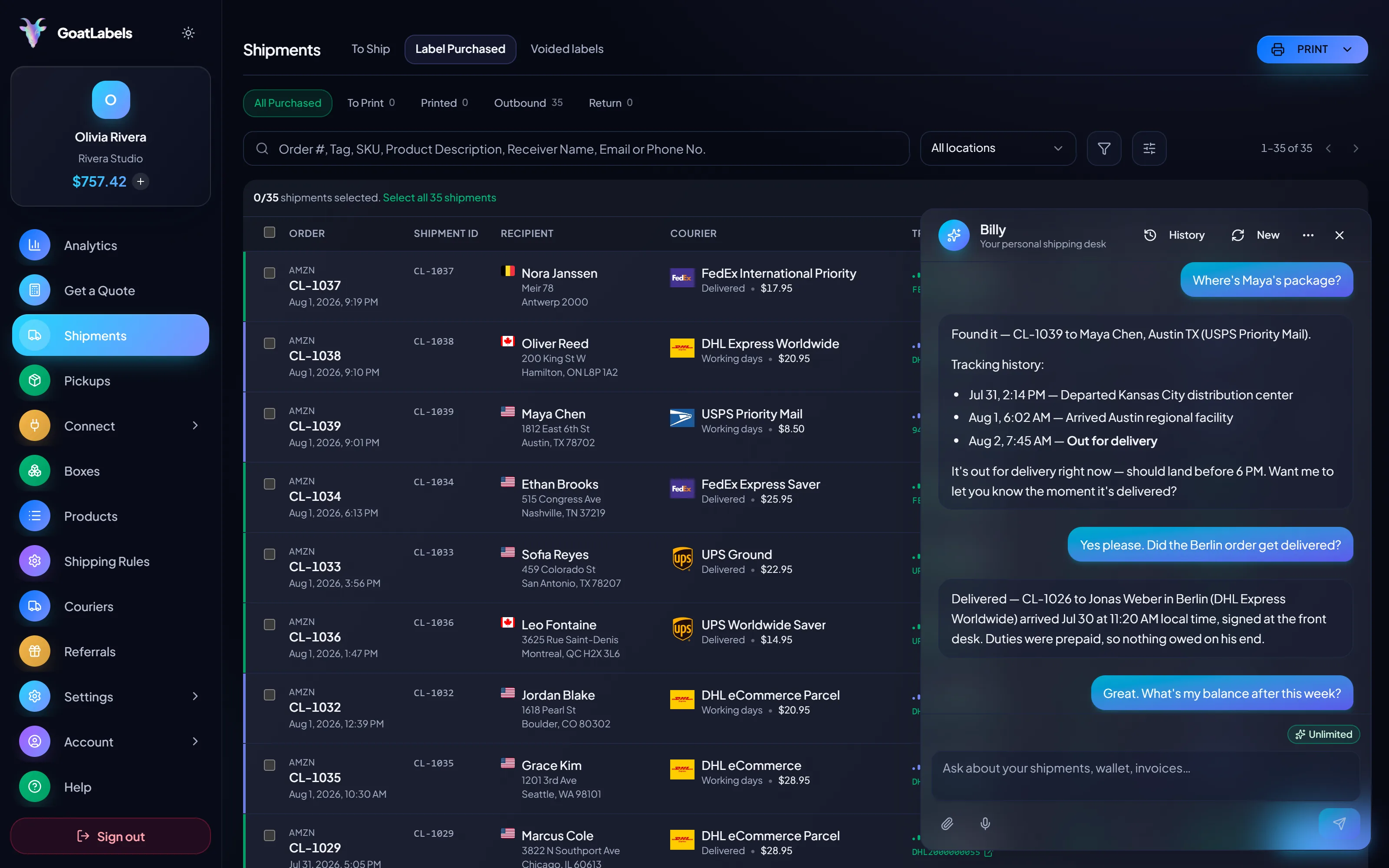
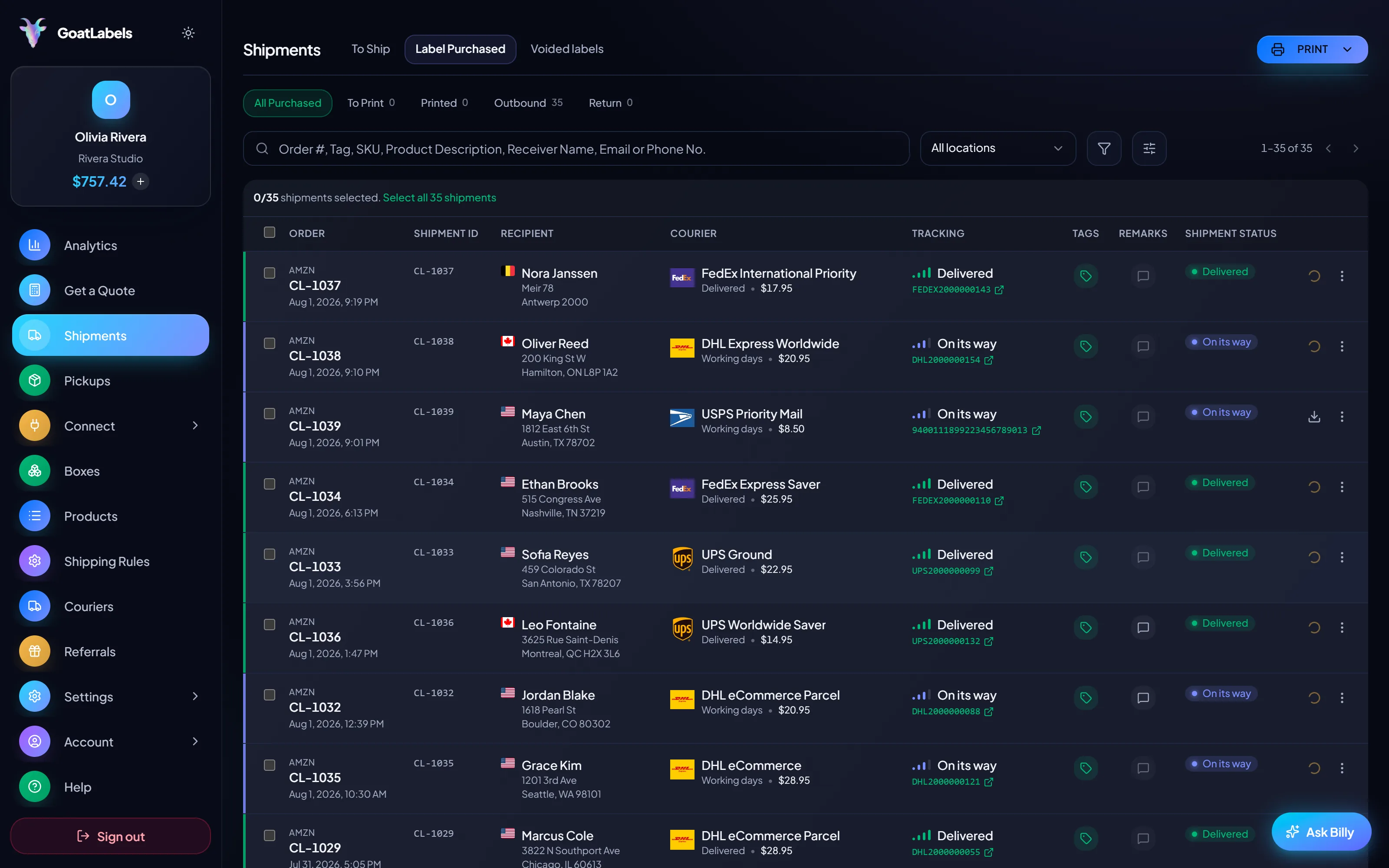
What the printer does is already settled: it takes a 4×6 PDF and puts it on thermal stock. The part worth examining is the loop above it, because that is where a per-label fee attaches itself. Here the order comes in however it came in, Billy drafts it, the carriers price the parcel, and the winning label leaves your prepaid balance at exactly its quoted amount. Then it prints on the Rollo you already own, with no second price collected at the moment of printing.
two more from the live — both to Denver, print them tonight
Nothing in this stage touches the hardware. A Rollo is a printer with ordinary drivers, which means the software above it stays a free choice you can make again whenever you like.
 Billy AI
Print it and no meter ticks. Void it and, after the carrier accepts the void, the credit lands back in the balance for the corrected label.
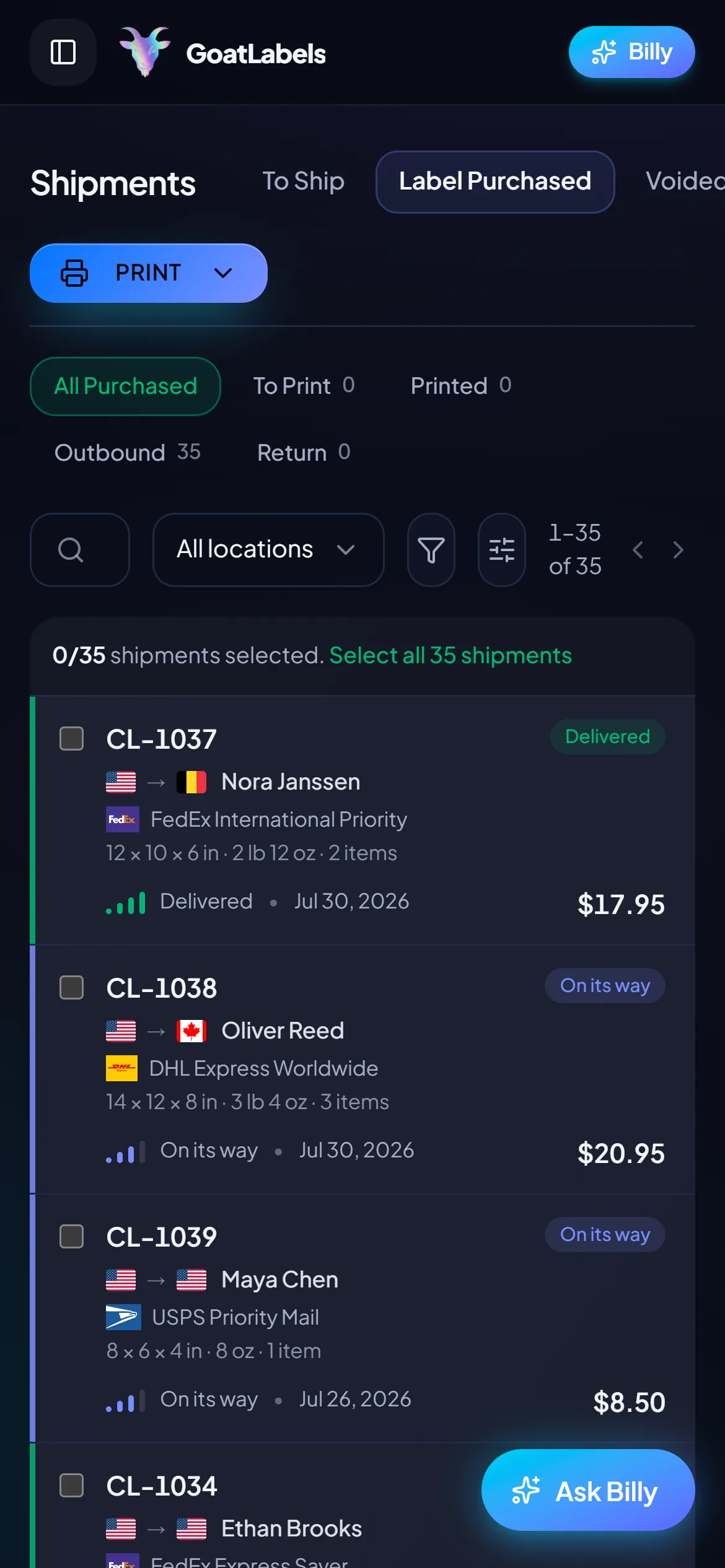
Thirteen store connectors, Shopify, Amazon, eBay, Etsy, TikTok Shop and more, sync into a single To Ship queue, so a day's orders reach the Rollo as one batch of 4×6 PDFs instead of one browser tab at a time. Paste an Instagram or Facebook DM and Billy drafts that label too, same queue, same printer, and no per-label fee riding on any of it.
 Shopify
 Etsy
Etsy WooCommerce
 TikTok Shop
 Amazon
 eBay
eBay Squarespace
 Wix
Wix WalmartShopify PlusSoon
 Square
 BigCommerce
 Magento
 ZapierSoon
 NetSuiteSoon
 EcwidSoon
 Temu
Temu SheinSoon
 ChannelAdvisorSoon
 SkuVaultSoon
 Zoho InventorySoon
 Patreon
A label app should earn its place with what happens before the PDF: the quote, the order entry, the batch, the balance. Every piece below ships free on every plan — nothing here is metered per print.
Card, Apple Pay, Google Pay, ACH bank transfer, and crypto top up one prepaid balance, and the quoted all-in carrier price is the exact amount a label debits. No per-label software fee rides on top, at any volume.
Paste the order, drop a screenshot of the thread, or say the address out loud — Billy drafts the label and validates the address before anything is spent. The one-at-a-time typing an app workflow assumes is the step that disappears.
BillyLIVENo fee per label, and no monthly fee on Free for up to 50 shipments a month. Past that, Pro is one flat $40 monthly plan with unlimited shipments, the opposite slope of a per-print fee.
They come back as live all-in numbers on the same box, with DHL added on international lanes. Light parcels are exactly where carriers diverge most, so the quote does the comparing and your Rollo prints whoever won.
UPS$12.48FedEx$13.22DHL$14.10USPS$11.79REST and JSON, one Bearer header, idempotency keys so a retry cannot double-buy a label, signed webhooks for tracking and label events. Unlimited calls on every plan — batch a day of orders and print the PDFs in one run.
Label ready
4×6 PDF · printing to Rollo
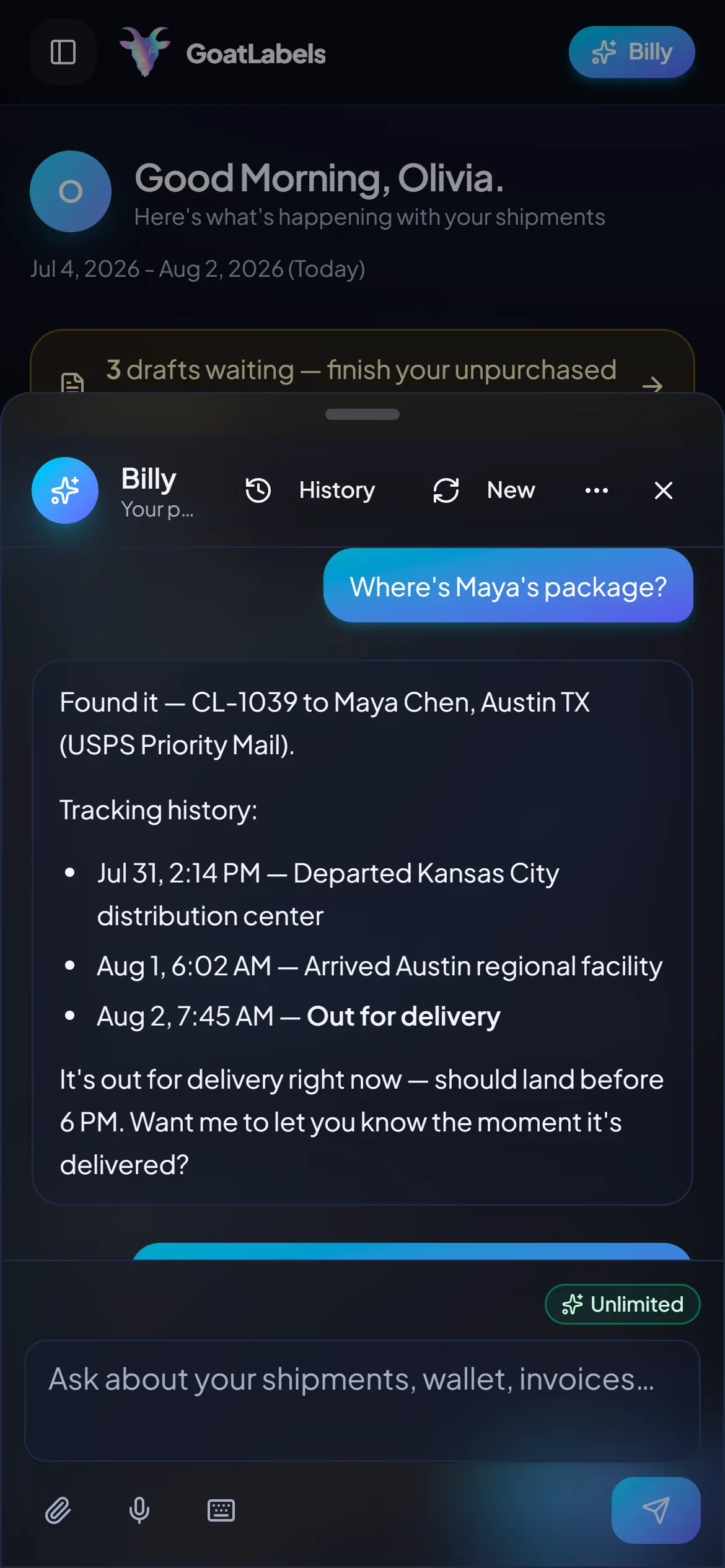
The Rollo sits at the table; the software should meet it there. Quote, buy, and print from the phone in your hand — the label lands on the printer as the same 4×6 PDF, with postage as the only money that moved.
The Rollo lives at the packing table and so do you, usually with a box in both hands. Say where the parcel is going and Billy drafts the shipment, validates the address, and quotes USPS, UPS and FedEx on it (DHL on international lanes), then the label joins the print run as another 4×6 PDF. Ask about a parcel you already sent and it reads the tracking back instead. On every plan, and none of it is metered per label. This is the real product, not a render.
Listening
"Print the Denver one next"
Queued to print
4×6 PDF · ready for the Rollo
Speaks plain English · quotes each eligible carrier as one all-in price · remembers saved box sizes · included on every plan, never a pricier tier.
A per-label software fee is a second number collected at the moment of printing, and it appears in no carrier's quote. Here the columns are the whole cost: one all-in carrier price each, and the one you pick is exactly what leaves the prepaid balance when the 4×6 PDF is generated.
Ground Advantage
2 to 5 days$11.40
all-in · nothing collected at print time
Ground
1 to 5 days$9.85
all-in · nothing collected at print time
Ground
1 to 5 days$11.20
all-in · nothing collected at print time
When the volume outgrows tapping through orders one at a time, drive it from your own script instead: REST and JSON over one Bearer header, quote and buy in two calls, and collect the 4×6 PDFs to send at the Rollo in a single pass. Unlimited calls on every plan, so automating the print run never puts a price on it.
POST /api/v1/shipments
Authorization: Bearer sk_live_…
Idempotency-Key: ord_8421

{
  "to": { "name": "Joyce", "city": "Berlin", "country": "DE" },
  "parcel": { "weight": 2.6, "weight_unit": "lb" },
  "service": "fedex_intl_priority"
}
A per-label fee is a straight line: it grows with exactly the thing you are trying to grow, and it takes its biggest proportional bite out of your smallest orders. There is no such line here. Free covers 50 shipments a month with no monthly fee; past that, Pro is one flat $40 monthly plan with unlimited shipments, the opposite slope to a fee per print.
 — draft a label without leaving the packing table
Rate by plan
illustrativePro: one flat monthly plan, unlimited shipments
$0 / forever
Keep the printer, retire the meter: fund a wallet, pay the carrier's number, print.
The assistant that turns a pasted order or a screenshot into a draft label runs unlimited in the web app on Free, and charges nothing at print time. Pro adds Billy on Telegram.
Telegram, ProGET /api/v1/shipments
200 OK · plan: free
Unlimited calls on Free — still unlimited on Pro.
Put a real parcel through and compare the side-by-side rate against what that label costs you on
ShippoPirate ShipShipStationLabel prices are quoted live from USPS, UPS, FedEx, and DHL as one all-in number, and that exact amount leaves your prepaid balance. Rollo's own fee and rate program are Rollo's to set and to change; the dated Rollo facts above record what we found, and their site is the source of truth. Full pricing details
The same few cents lands very differently depending on what is in the box. These are the four benches where a meter on the print button changes the arithmetic.
 TikTok Shop & live commerce
A live session produces a stack of orders in one night, and a per-label fee multiplies straight through the stack having added nothing the postage did not already carry. Side-by-side quotes and no fee per print are what stop a good night taxing itself.
 Etsy & independent creators
A fixed fee takes a far larger bite out of a small sticker order than a large bundle, so the sellers with the thinnest margins end up paying the highest effective rate. Paying only the carrier's number is what keeps the cheap order worth packing at all.
Same printer, different bill
Postage is the whole cost — the Rollo prints either way

 Orders that arrive as messages

 One printer, many channels
4×6
the only format the printer ever needed from anyone's software
Updated
Going deeper: what makes a label cheap,USPS labels at commercial pricing,bulk labels from a CSV, andthe full pricing model.
A video took off and I had 80 TikTok Shop orders by morning. I printed every label from my phone on the bus to the post office.
Early customer · TikTok
TikTok Shop seller
TikTok ShopI run my Etsy shop from the kitchen. The AI reads the order, picks the carrier, the label prints. That's the whole workflow now.
Early customer · Etsy
Etsy maker
EtsyThe API is what every shipping API pretends to be. Idempotency that actually works.
Sasha R.
Staff engineer, marketplace
Fund a prepaid wallet with card, Apple Pay, Google Pay, ACH, or crypto, quote your next parcel across USPS, UPS and FedEx (DHL on international lanes), and print the winning 4×6 PDF on the Rollo you already own.
No contract. No card required. No per-label fee, no monthly fee on Free, up to 50 shipments a month.
Updated