

USPS
Ground Advantage
2–5 days$7.40
$1.20 of Premium insurance included
all-in · nothing added at checkout
Before cancelling: export order and shipment history, deal with any funded balance, and note where connected stores will send orders next. A cancelled ShipStation subscription stays active to the end of the billing cycle, and reports cannot be run once it ends. Then decide what replaces it: for many sellers, nothing monthly needs to.
Orders, shipments, products, customers, and cost reports all export today — and none of them can be requested after closure.


 export all
A prepaid wallet funded by card, Apple Pay, Google Pay, ACH, or crypto; on Free, up to 50 shipments a month, it meters nothing but the postage itself.
Updated
ShipStation is a system of record, and cancelling it closes the record. Everything you might want later — the order history your accountant reconciles against, the shipment history that proves what you sent and when, the customer list, the product catalogue with its saved weights and dimensions — exists as reports you can export today and cannot request after the account closes. The moment to gather them is before you touch anything on the billing screen, because once the billing cycle ends ShipStation limits the account to its payment and subscription settings, and reports can no longer be run.
Work through the list mechanically rather than from memory. Export orders and shipments across your full date range, not the filtered view the screen happens to be showing. Export the product and customer records, because rebuilding saved weights and repeat-buyer addresses by hand is slower than any migration you are about to do. Write down which stores are connected and which carrier accounts are attached, since that map is the thing you will reconstruct on the other side. And download any raw label-cost reporting your bookkeeping uses — a shipping ledger is exactly the kind of thing tax season asks for eight months after you stopped caring.
Export and cancellation reference, checked against ShipStation's own help articles on 2026-10-17. Orders and shipments export as CSV files (Export Order Records, Export Shipment Records). Once a subscription ends, reports can no longer be run, access is limited to the Payment and Subscription settings, and a remaining ShipStation Balance is refunded automatically for US accounts or on request elsewhere (Cancel Subscription). Those pages change without notice. Treat their current help centre as the governing source for exactly which screens produce which files this month. Review cadence: re-checked every six months by the named marketing owner recorded with this page.
The subscription is not the only money in a ShipStation account. If you buy postage through a balance the platform provides, that balance is prepaid: your money, sitting inside their system. The clean exit is to spend it down to as close to zero as your last labels allow before you cancel, because spending postage is instant and reclaiming postage is a process. ShipStation's help says a US account's leftover ShipStation Balance is refunded automatically once the subscription has been closed for a while, and that non-US accounts and connected Stamps.com balances need a request to ShipStation Support, so whatever remains becomes a loose end that outlives the account it belongs to.
Carrier accounts you connected yourself are a different category entirely. A UPS or FedEx account you brought is billed by the carrier directly and survives the cancellation untouched — that relationship is yours, not ShipStation's. So the audit that matters before you cancel is a single column: where does money sit prepaid, and where is it billed in arrears? Prepaid money needs draining before the door shuts. Accounts billed in arrears just need to know where their next label is coming from.
Subscriptions bill on a cycle, and cancellation takes effect against the current period rather than the moment you click. Practically, that means the day you cancel decides whether you pay for another full period: cancel just after a renewal and you have bought a month you may not use; cancel just before it and the account winds down at the period's natural end. Check the renewal date on the billing screen first, put the export work in the days before it, and treat the renewal date itself as the deadline. And if what set this in motion was a price change rather than the product, the stay-or-go deliberation — downgrade, negotiate, or leave — is a separate decision we walk through on the price-increase page.
Store connections deserve more care than the subscription does. Every connected storefront is currently pointing its orders at ShipStation, and the real question is not how to disconnect — it is where orders flow the day after. Decide the destination first, connect it, and confirm a live order syncs there before you sever anything, so there is never a morning where new orders are flowing into a tool you no longer pay for. The disconnect should be the last step of the sequence, not the first.
Shipments already in transit are the easy part. Their tracking numbers were pushed to the marketplaces when you printed, and delivery scans belong to the carrier, so nothing about cancellation interrupts a parcel that is already moving. The orphan risk lives entirely in the cutover window — the gap between the old tool going quiet and the new one listening — and the sequence above exists to make that window zero mornings long.
Some cancellations are not really about the software; they are about the invoice. If the workflow serves you and only the subscription grates, it is worth knowing the subscription is not a law of nature. Our breakdown of how ShipStation's pricing works shows what each tier actually buys, and a no-monthly-fee alternative meters nothing but postage: a prepaid wallet, every domestic label rate-shopped across USPS, UPS and FedEx (DHL on international lanes), and a month you ship nothing on Free costing exactly nothing. The onboarding sequence for actually moving — reconnecting stores, running the first batch, keeping both tools alive through the cutover — belongs to the switch-from-ShipStation guide rather than this page. This page's job ends where it started: export everything, drain the balance, time the cancellation, and disconnect last.
Orders, shipments, products, customers, and any label-cost reporting you use for the books, across the full date range, not the default view. Once the subscription ends, reports cannot be run again until you resubscribe.
Spend any funded postage balance down with your last labels. Spending is instant; a leftover ShipStation Balance comes back only after the account has been closed for a while, automatically for US accounts and on request elsewhere.
Connect whatever receives orders next, confirm a live order syncs there, and only then disconnect. The orphan risk is entirely about new orders during the cutover window.
Cancellation takes effect against the current billing period, so the renewal date is the real deadline. Do the first three steps in the days before it, not the hours.
ShipStation is a trademark of its owner and is not affiliated with GoatLabels. Its cancellation flow, export screens, and billing terms are theirs to change — verify the current behaviour against their own help centre as you go.
Checked on from ShipStation's own pages. Plans, fees and policies change, so confirm on the vendor's current page before you decide. ShipStation is a trademark of its owner and is not affiliated with GoatLabels.
Step three of the sequence above only works if the destination is already listening, so it is worth seeing what listening looks like. The store points at a To Ship queue, or the order arrives as a pasted email — either way a label comes out the far end the same morning. There is no automation layer to reconstruct before the first parcel can go, which is the real reason re-pointing is a step measured in minutes rather than the excuse people use to postpone a cancellation for another billing cycle.
1x replacement filter — ship to Dana K., Portland, OR 97214
Connect the destination and watch one real order land in it before you sever anything. Until that has happened, the disconnect is the one step on the checklist you have not earned yet.
 Billy AI
No subscription sits behind this loop on Free, and Pro can be billed monthly with no minimum term, so you never have to plan an exit around a renewal date. Void a label and, after the carrier accepts the void, the credit returns to the balance rather than waiting on a card refund.
The orphan risk in a cancellation lives entirely in the cutover window — the gap between the old tool going quiet and something else listening. Shopify, Amazon, eBay, Etsy, Walmart and the rest of the 13 connected stores connect here and sync into one To Ship queue, with tracking pushed back on print, so the destination exists before the disconnect does. Channels with no connector still reach a label: paste the order or drop a screenshot.
 Shopify
 Etsy
Etsy WooCommerce
 TikTok Shop
 Amazon
 eBay
eBay Squarespace
 Wix
Wix WalmartShopify PlusSoon
 Square
 BigCommerce
 Magento
 ZapierSoon
 NetSuiteSoon
 EcwidSoon
 Temu
Temu SheinSoon
 ChannelAdvisorSoon
 SkuVaultSoon
 Zoho InventorySoon
 Patreon
Everything the plan was billing you monthly for has a metered-by-postage equivalent: one prepaid balance, USPS, UPS and FedEx competing on every domestic parcel (DHL on international lanes), and software that costs nothing to leave idle on Free.
Card, Apple Pay, Google Pay, ACH, and crypto top up one prepaid balance that is spent label by label. On Free nothing renews and an idle account costs nothing; Pro can be billed monthly with no minimum term, so you can cancel it any day.
Thirteen store connectors, Shopify, Amazon, eBay, Etsy, TikTok Shop and more, sync straight into the To Ship queue, and anything else, a pasted email, a screenshot, a spoken address, Billy drafts into a label for you to confirm. The setup you are leaving behind took an afternoon; this takes minutes.
BillyLIVEA tiered plan charges for capacity whether you use it or not — the exact grievance that brings most people to this page. Here the only meter on Free is postage: pay the all-in quote per label, and pay nothing in a month with no parcels; past 50 shipments a month, Pro is a flat $40.
USPS, UPS and FedEx are quoted on every domestic parcel, and DHL on international lanes, as all-in numbers with no carrier accounts to open or manage. The number you pick is the exact amount that leaves the balance — no day-after invoice to reconcile.
UPS$12.48FedEx$13.22DHL$14.10USPS$11.79If you had scripts pointed at your old tool, the REST API covers the same lifecycle here — create, quote, buy, void — with signed webhooks and idempotency keys, unlimited calls, on every plan including Free.
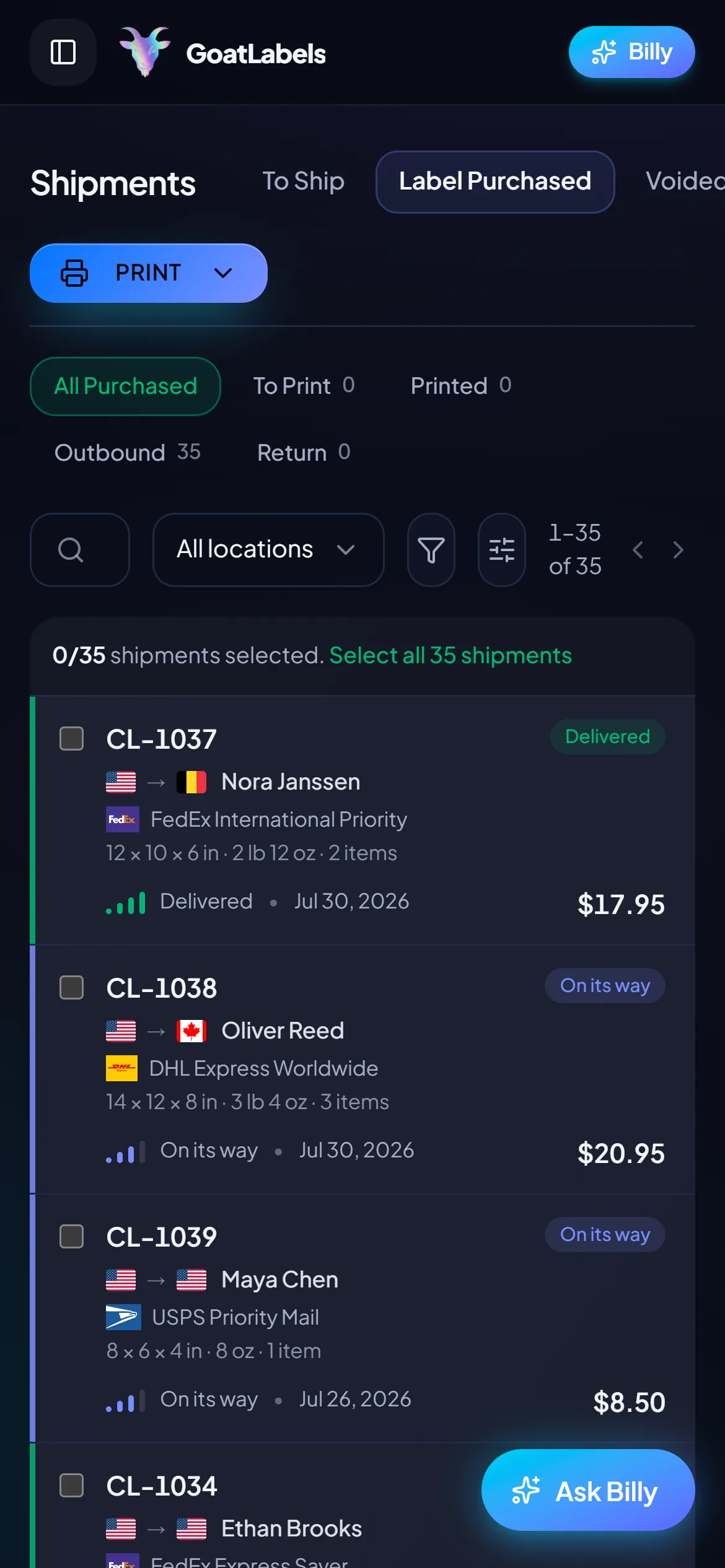
First label after cancelling
Portland, OR · printed from the phone
Cancelling a shipping platform usually buys you a week where the old thing is winding down and the new thing is not standing up yet. There is nothing here to stand up: no desktop client, no seats to assign, no per-user licence to buy before somebody can print. The queue, the quotes, and the buy button are on the phone in your hand from the first order.
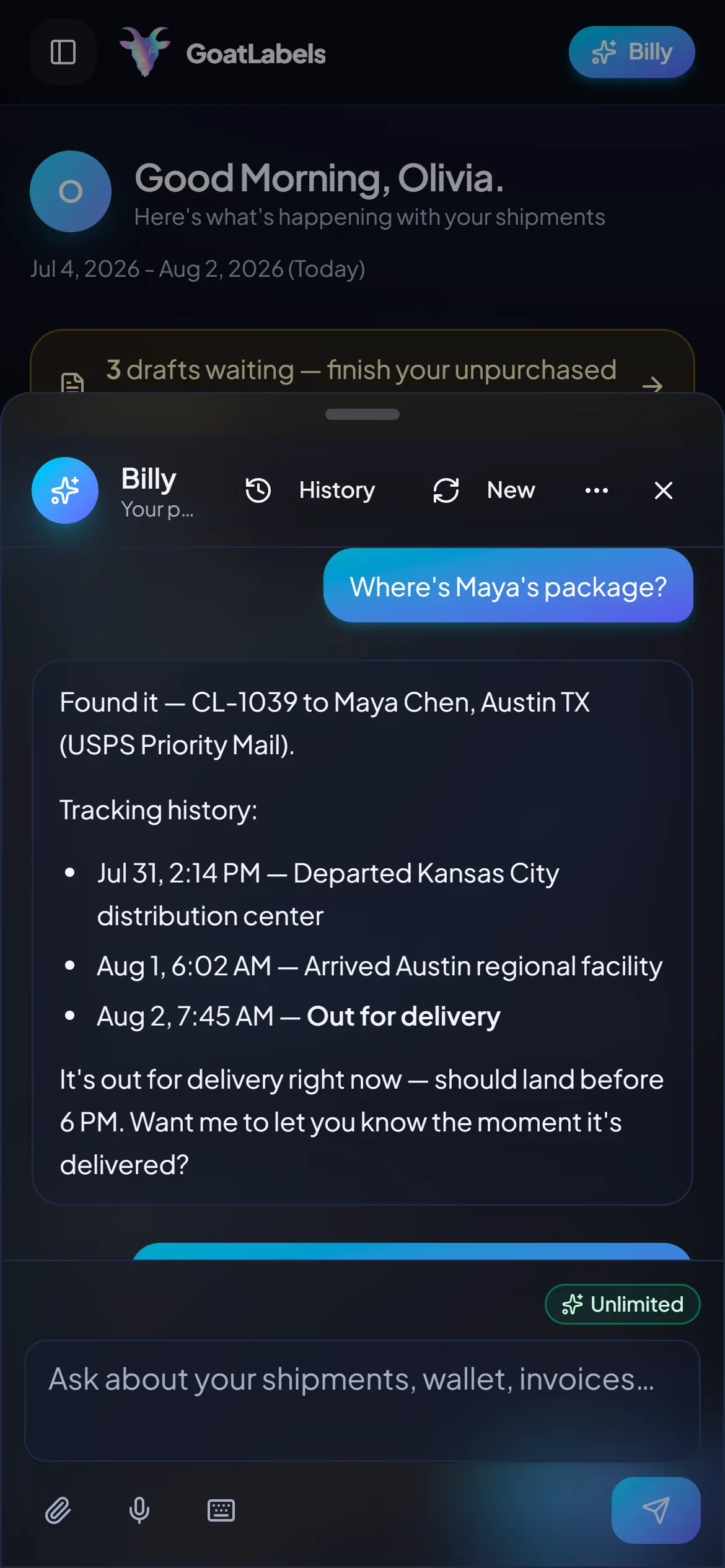
Tracking questions outlive the tool that printed the label — buyers ask about a parcel weeks after the platform that sold it was closed, which is exactly why the export step matters. Everything bought here keeps answering: ask out loud and Billy finds the shipment, reads the tracking history back, and tells you where it got to. No dashboard to log into just to look something up. This is the real product, not a render.
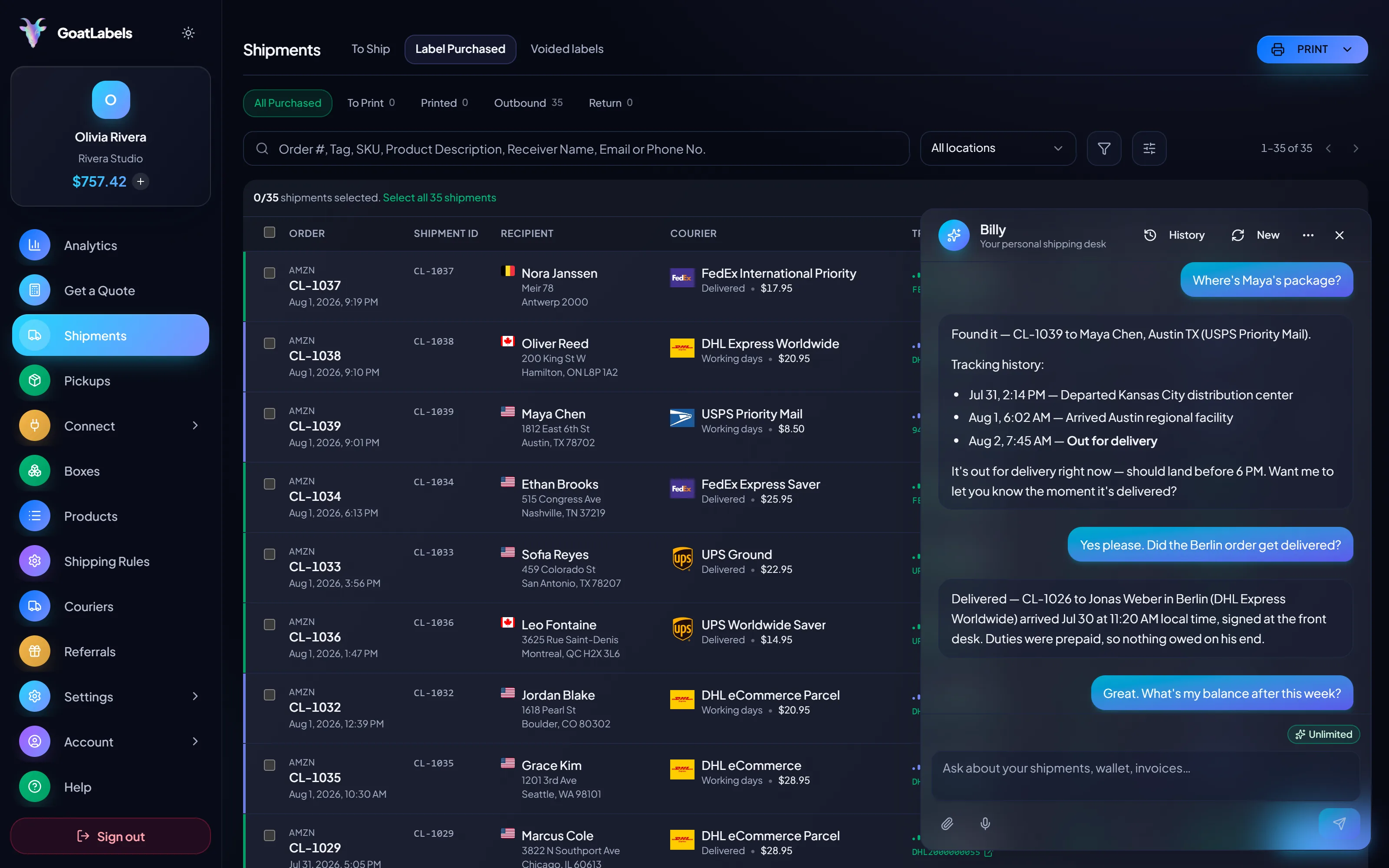
Listening
"Where is Dana's replacement filter?"
Out for delivery
Portland, OR · scanned this morning
Speaks plain English · included on every plan, never a seat · phone, browser, or Telegram on Pro.
The thing you are cancelling billed monthly for capacity and then billed the postage on top. This is the whole replacement: the parcel is priced across carriers, each column is one all-in number locked at quote time, and the column you pick is the exact amount that leaves the prepaid balance. Nothing renews behind it on Free, and monthly Pro cancels any day, so there is no date to plan the next exit around. Figures are illustrative.
Ground Advantage
2–5 days$7.40
$1.20 of Premium insurance included
all-in · nothing added at checkout
Ground
3–4 days$10.80
$1.20 of Premium insurance included
all-in · nothing added at checkout
Home Delivery
2–4 days$11.40
$1.20 of Premium insurance included
all-in · nothing added at checkout
Anything you built against the old platform is part of what you are cancelling, and it is usually the reason the exit slips a cycle. The same lifecycle is here over REST and JSON — create, quote, buy, void — so the integration can be pointed somewhere before the disconnect rather than after it.
POST /api/v1/shipments
Authorization: Bearer sk_live_…
Idempotency-Key: ord_8421

{
  "to": { "name": "Joyce", "city": "Berlin", "country": "DE" },
  "parcel": { "weight": 2.6, "weight_unit": "lb" },
  "service": "fedex_intl_priority"
}
The reason this page tells you to check the renewal date first is that a subscription decides when you are allowed to leave cheaply. Nothing renews on Free. Free covers 50 shipments a month with all four carriers, Billy in the web app, and the API underneath. Past that, Pro is one flat $40 monthly plan with unlimited shipments and no minimum term. An account you stop using on Free simply sits there, owing nothing.
 — draft a label without opening a dashboard
Rate by plan
illustrativepay for labels, not for seats
$0 / forever
Fund a balance, print labels, ignore it for a month, and owe nothing on your return.
The assistant that reads a pasted order into a draft label, and validates the address before anything is spent, runs unlimited in the web app on Free. There is no per-user licence to provision while you are mid-cutover.
Telegram, ProGET /api/v1/shipments
200 OK · plan: free
Unlimited calls on Free — still unlimited on Pro.
Put a real parcel through and compare the side-by-side rate against what that label costs you on
ShipStationShippoPirate ShipLabel prices are quoted live from USPS, UPS, FedEx, and DHL as one all-in number, and that exact amount leaves your prepaid balance. ShipStation is a trademark of its owner and is not affiliated with GoatLabels. Full pricing details
Export, drain, re-point, cancel is the same sequence for everybody. What differs is what pushed you to the billing screen — and which of the four steps is the one you are most likely to skip.
 A tier priced for last season
The plan was sized for a year that ended. Before the renewal date arrives, pull orders, shipments, products, and customers across the full date range rather than the filtered view — a closed account does not reopen for a forgotten report.
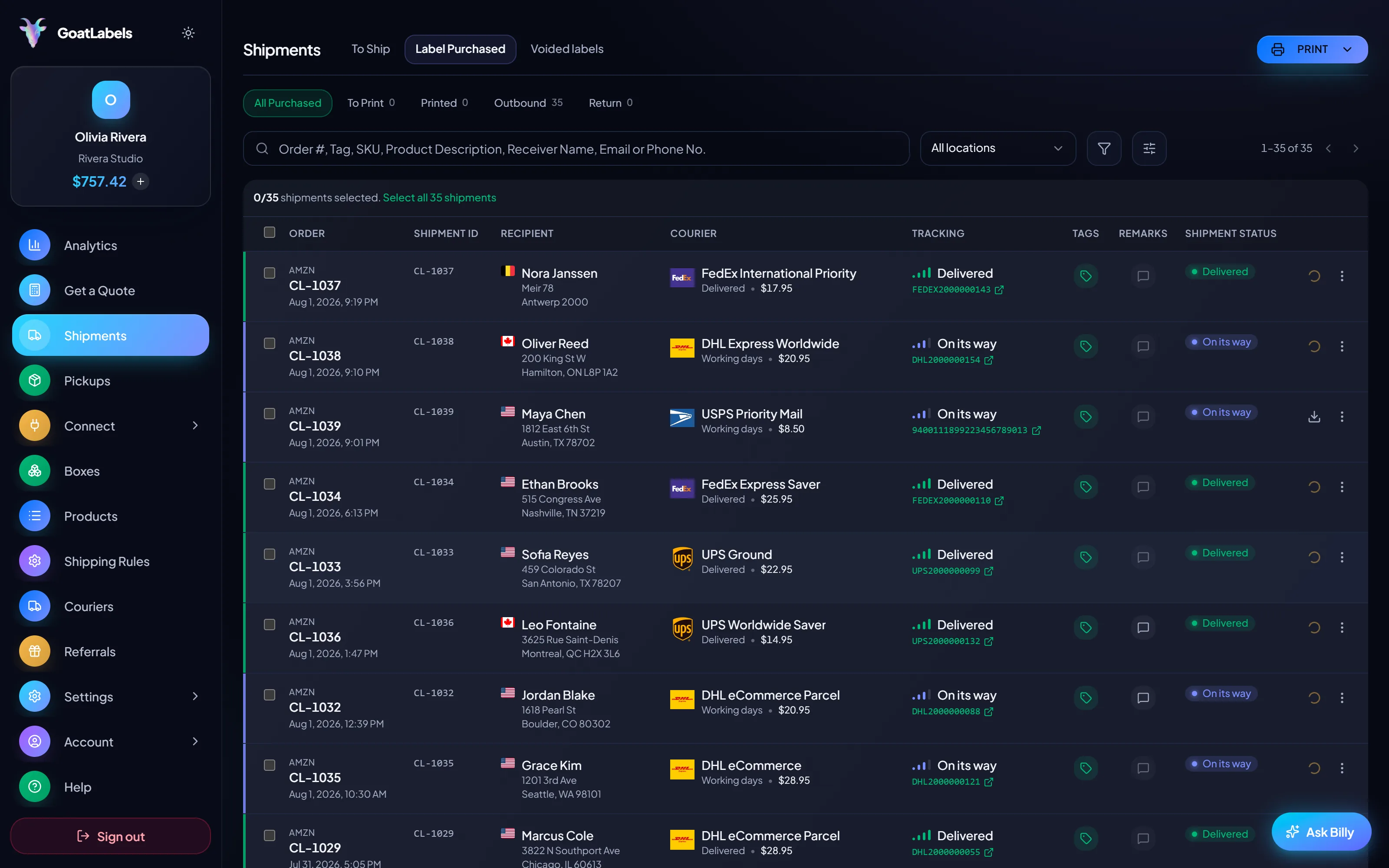
 Prepaid postage that never moved
A funded postage balance is your money sitting inside somebody else's system, and it does not follow you out. Spend it down with the last labels: spending is instant, and reclaiming a stranded balance is a refund process under the postage provider's rules.
Balance spent down
Final labels bought before the renewal date

 Nothing to re-point, because nothing syncs
 An integration is part of the cancellation
0
seats to licence before the automation can print again
Still deciding rather than leaving? Start withwhat to do about the price increase, see what the tiers actually charge for, or go straight to the migration guide when you are ready.
A video took off and I had 80 TikTok Shop orders by morning. I printed every label from my phone on the bus to the post office.
Early customer · TikTok
TikTok Shop seller
 TikTok Shop
I run my Etsy shop from the kitchen. The AI reads the order, picks the carrier, the label prints. That's the whole workflow now.
Early customer · Etsy
Etsy maker
EtsyThe API is what every shipping API pretends to be. Idempotency that actually works.
Sasha R.
Staff engineer, marketplace
Fund a prepaid wallet, sync your stores or paste an order, and rate-shop USPS, UPS and FedEx on the first domestic parcel (DHL on international lanes) before the old subscription even lapses.
Sign up in seconds. No card required. No monthly fee on Free, up to 50 shipments a month.
Updated