

USPS
Ground Advantage
2 to 5 days$11.40
all-in · no surprises
Instead of configuring ShipStation's automation rules and views, GoatLabels users paste an order and Billy AI drafts the label with the cheapest carrier quote preselected.
USPS, UPS and FedEx side by side as all-in prices, DHL on international lanes, with the cheapest already selected.
Top up with card, Apple Pay, Google Pay, ACH, or crypto and print — no presets to define first.
None of this is a claim that ShipStation is badly built. It is a claim about fit: software designed so a shipping department can encode its process is heavy in the hands of one person packing boxes between other jobs.
| GoatLabels | ShipStation | |
|---|---|---|
| Setup before the first label | Create an account, fund the wallet, paste an order. Nothing to configure first. | Connect a store or import orders; package presets, views, and automation rules are setup that pays off as volume grows. |
| How a label gets drafted | Billy reads the order text and fills the addresses, the parcel, and the service. | Automation rules apply conditions you defined earlier to a structured order record. |
| Choosing the carrier | All-in prices on one screen with the cheapest preselected: change it or accept it. | Rate comparison plus whatever the rules already selected for that order. |
| Training a second person | Show them how to paste an order and press confirm. | Teach the views, the filters, and the rules — and who is allowed to change them. |
| When something ships wrong | Void the label, credit the wallet after the carrier accepts the void, redraft from the message. | Find the rule that fired, work out why, and edit it without breaking the others. |
| Where the work happens | Phone or browser on every plan, Telegram on Pro, with the same drafting flow in each. | A browser workspace built around a shipping station, plus the ShipStation Mobile app. |
ShipStation is a trademark of its owner and is not affiliated with GoatLabels. Their interface and feature set change — check their current product pages before you decide.
Automation rules pay off at volume and cost you at the start, because you have to describe every order shape before the first one arrives. Billy inverts the order of operations: the order arrives, Billy reads it, you confirm. There is nothing to set up because nothing was predicted.
The complaint behind "too complicated" is usually count: how many views, filters, and confirmations sit between a message from a customer and a printed label. Here it is paste, glance at the prices, confirm, and the cheapest carrier is already selected when you get there.
A tool that needs training is a tool one person owns, which is how shipping becomes a bottleneck on the day that person is out. Drafting from pasted text is teachable in a sentence, so the second person at the packing table is genuinely useful on their first shift.
Checked on from ShipStation's own pages. Plans, fees and policies change, so confirm on the vendor's current page before you decide. ShipStation is a trademark of its owner and is not affiliated with GoatLabels.
That is the entire flow, and it is the same flow whether the order came from a connected store, a CSV, an API call, or a message a customer sent you at midnight. There are no views to build, no package presets to define, and no automation rules to write, because the drafting happens per order instead of being predicted in advance. Billy reads the order text, fills the addresses and the parcel, rate-shops USPS, UPS and FedEx at the all-in price (DHL on international lanes), and preselects the cheapest one, leaving you a single decision to make and a wallet balance the label debits.
Hey! 2x hoodies (M) 1x tee (L) 😅 Ship to: Maya R. Austin, TX 78701
Connectors, CSV, REST API, DMs, and screenshots — one queue, no import mapping and no saved views.
 Billy AI
One tap to print, and tracking goes back to the store the order came from without a rule doing it.
Shopify, Etsy, WooCommerce, eBay and Wix sync into To Ship and push tracking back when you print, and setting one up is a login rather than a mapping exercise. Skipping it entirely is also a supported way to work: paste the order and the label comes back drafted.
 Shopify
 Etsy
Etsy
 WooCommerce
 eBay
eBay
 Wix
Wix
Simpler tools usually get simpler by removing things. This one gets simpler by moving the work: the AI does the drafting a rule engine would have needed configuring for, so what disappears is the setup rather than the carriers, the batch printing, or the API.
Card, Apple Pay, Google Pay, ACH bank transfer, and crypto all top up the same balance, and every method buys identical rates, carriers, and features. Void a shipment and, after the carrier accepts the void, the credit lands back in the wallet — one balance to understand rather than an invoice to interpret.
This is the trade at the centre of the page. A rule engine asks you to describe orders before they arrive; Billy reads them after. The result is the same drafted label, minus the configuration you would otherwise own forever.
Billy
LIVE

Fund the wallet, pay per label, and ship nothing in February without paying for February on Free, which covers 50 shipments a month. Past that, Pro is one flat $40 monthly plan with unlimited shipments: one decision, not a plan matrix to study.
Live all-in rates side by side with the cheapest preselected, and the number you see is the exact amount that leaves your balance. That is the honest carrier list — if you need one outside it, ShipStation's broader network is a real reason to stay. Store connectors exist for Shopify, Etsy, WooCommerce, eBay and Wix, but they are never a prerequisite for printing.
UPS
$12.48
 FedEx
$13.22
FedEx
$13.22
 DHL
$14.10
USPS
$11.79
DHL
$14.10
USPS
$11.79
REST and JSON, one Bearer header, idempotency keys so a retry cannot double-buy a label, and signed webhooks for tracking and label events. Simple in the interface does not mean shallow underneath — the API is free and unlimited on every plan.
Label ready
CL-1038 · Brooklyn, NY
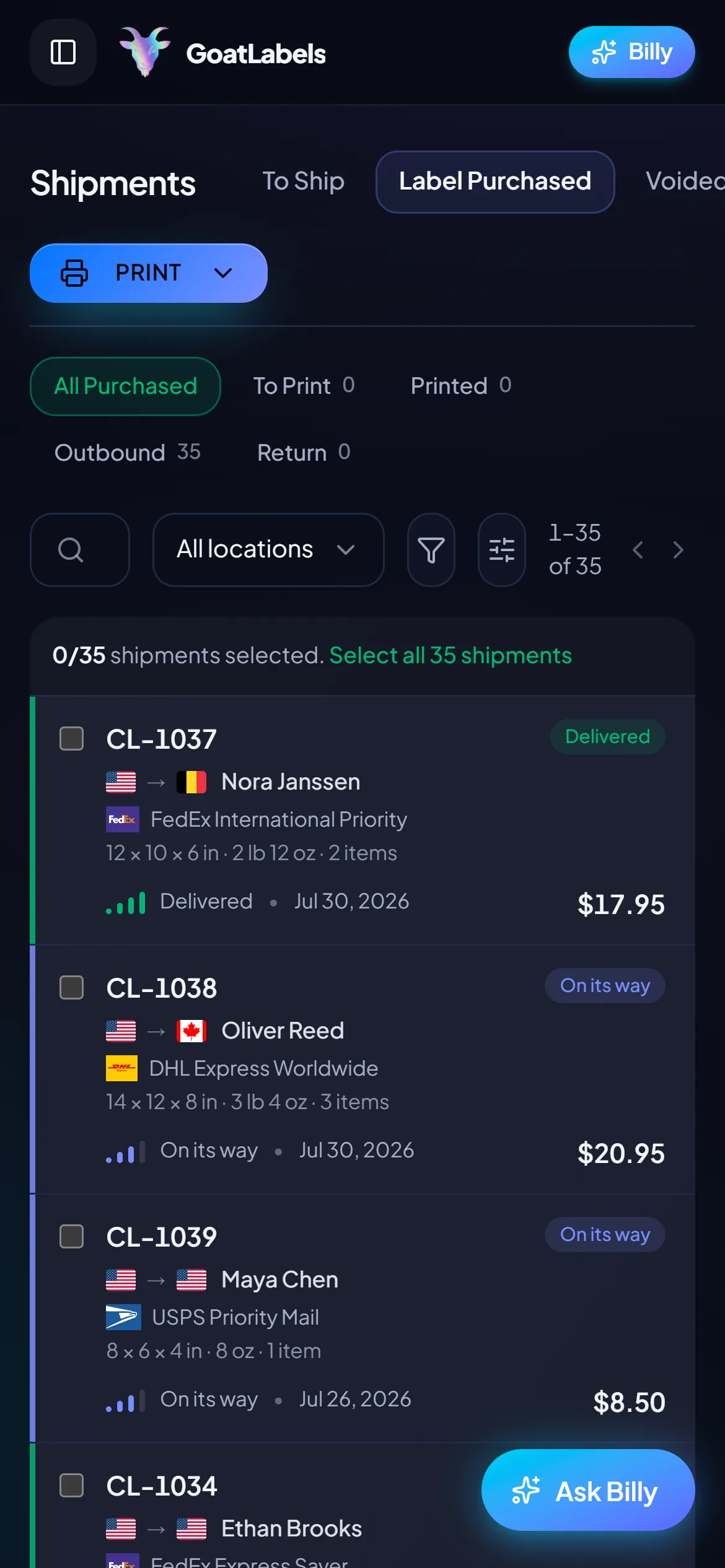
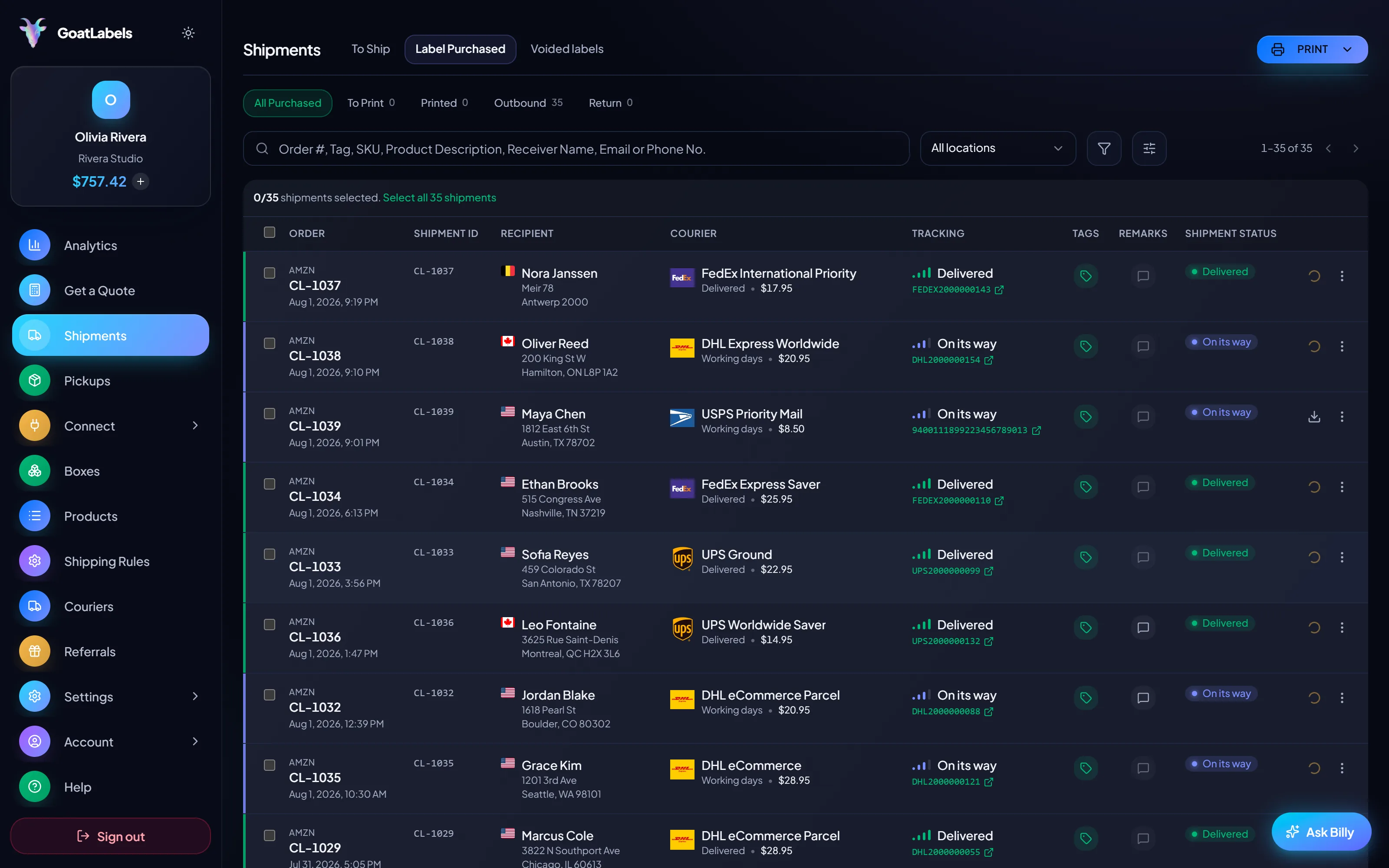
A shipping suite is designed around a station: two monitors, a scale, a queue someone works all day. If your packing setup is a table and a phone, most of that design is friction rather than power. Every step below happens on the device already in your hand.
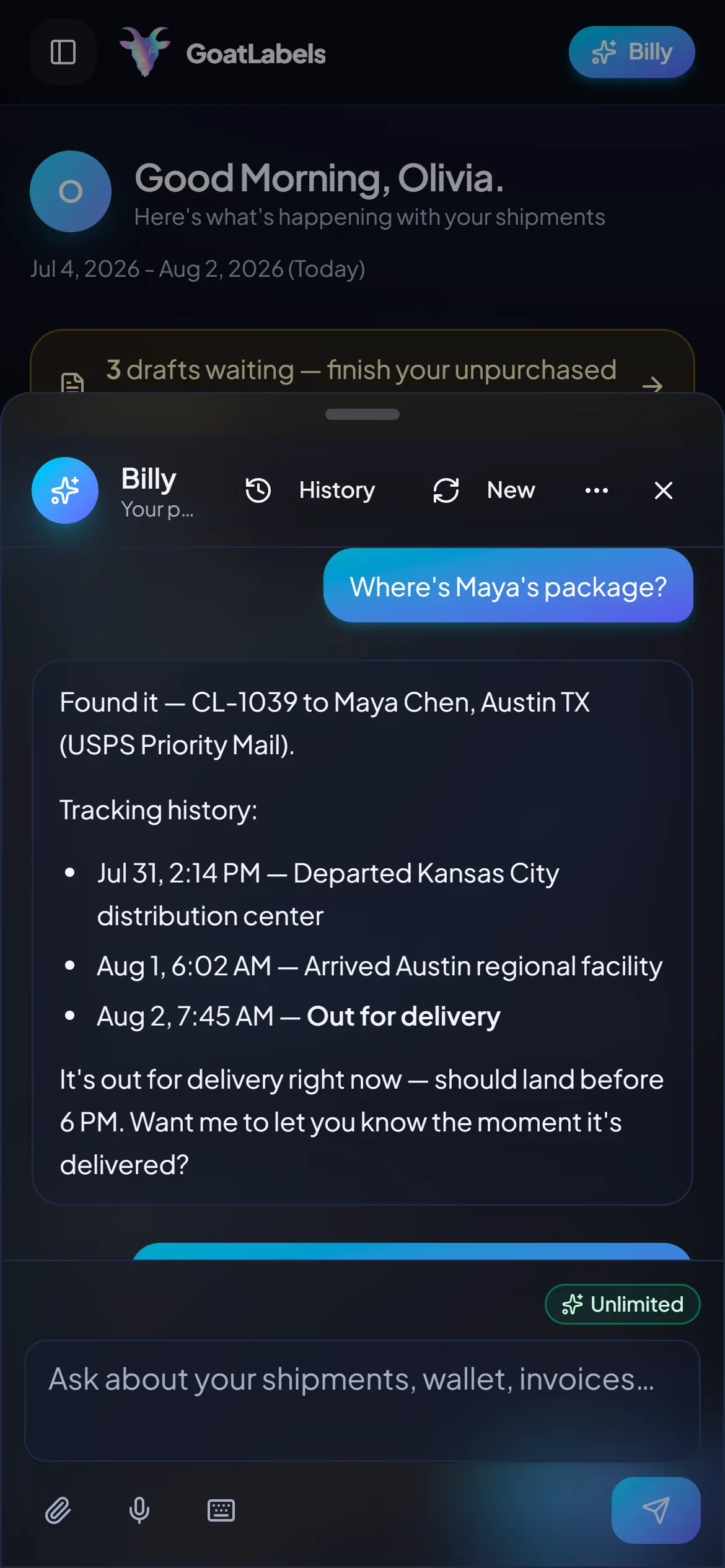
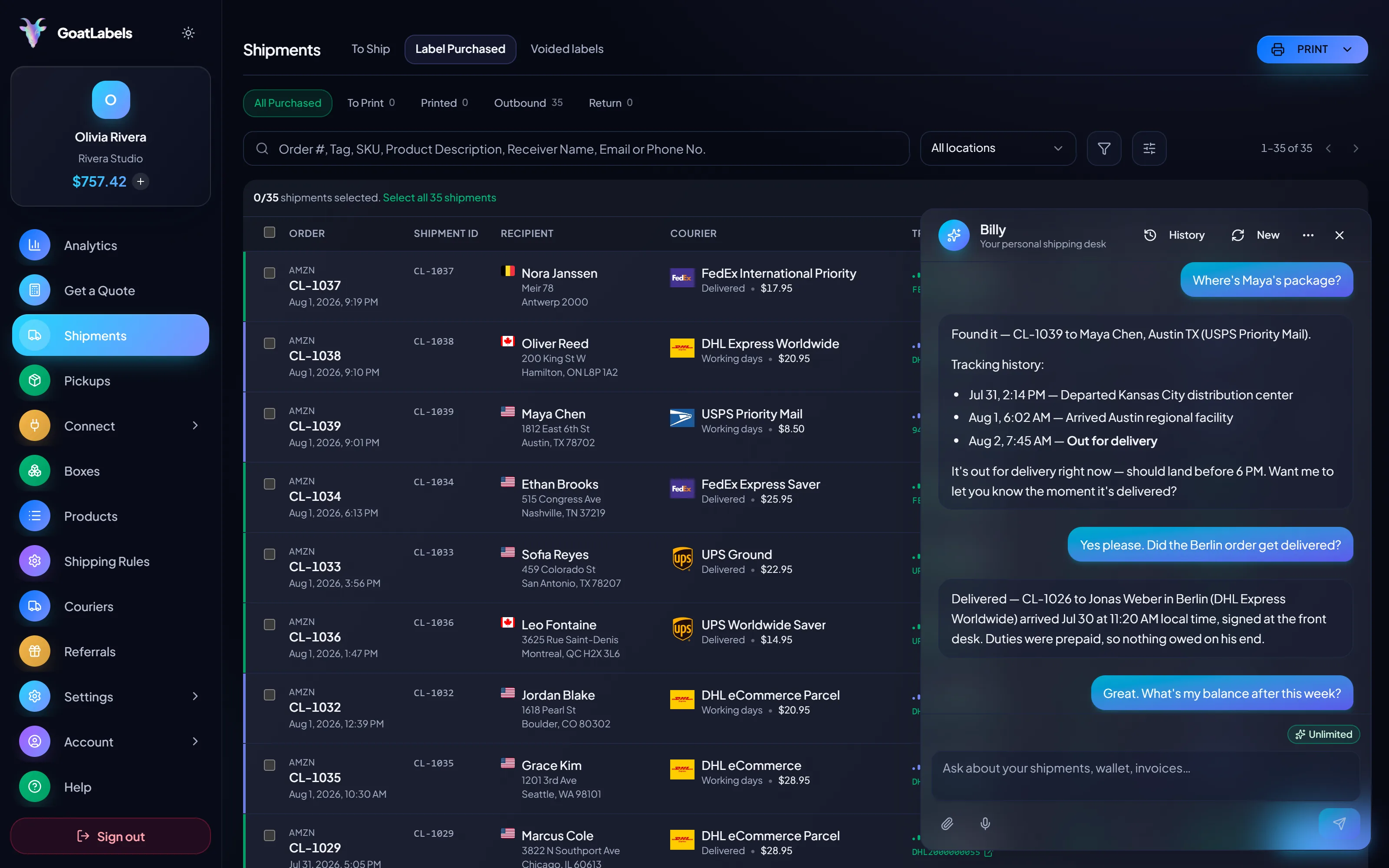
Finding a parcel in a shipping suite means knowing which view to open and how it was filtered. Here you say the buyer's name and Billy reads the status back. Drafting works the same way: say who the next one is going to and it rate-shops USPS, UPS and FedEx (DHL on international lanes) and queues the label against your prepaid balance. This is the real product, not a render.
Listening
"Where's Maya's package?"
Out for delivery
CL-1039 · Austin, TX · by 6 PM
Plain English in — names, addresses, weights, carriers, services · nothing to import and nothing to map · reads the all-in rate back before a cent leaves the wallet · phone, browser, or Telegram on Pro.
Several carriers on the same parcel, each an all-in number that is the exact amount leaving your prepaid balance. Simplicity is partly a pricing property: when nothing is added afterwards, there is no reconciliation step to learn and no adjustment to chase down a month later.
Ground Advantage
2 to 5 days$11.40
all-in · no surprises
Ground
1 to 5 days$9.85
all-in · no surprises
Ground
1 to 5 days$11.20
all-in · no surprises
If the simple path stops fitting, the API is right there and does not need a plan change to reach. REST, JSON, one Bearer header, idempotency keys so a retried request cannot double-buy a label, and signed webhooks for tracking and label events instead of polling — unlimited on every plan.
POST /api/v1/shipments
Authorization: Bearer sk_live_…
Idempotency-Key: ord_8421

{
  "to": { "name": "Joyce", "city": "Berlin", "country": "DE" },
  "parcel": { "weight": 2.6, "weight_unit": "lb" },
  "service": "fedex_intl_priority"
}
Free covers 50 shipments a month with the public API, the store connectors, and Billy all unlimited underneath it — the quoted label price is what you pay from a prepaid wallet. Pro is a flat monthly fee for unlimited shipments and Billy on Telegram. That is the whole comparison you have to make, and neither one is a minimum you have to hit before a label prints.
 — draft a label without opening the dashboard
Rate by plan
illustrativePro: one flat monthly plan, unlimited shipments
$0 / forever
Enough to run a shop from a phone without learning anything first.
The assistant that reads a DM, a screenshot, or a voice note into a drafted label runs unlimited in the web app on Free. Pro adds Billy on Telegram.
Telegram, Pro
GET /api/v1/shipments
200 OK · plan: free
Unlimited calls on Free — still unlimited on Pro.
High-volume shippers can ask about custom pricing, which we review account by account. Compare it against what you pay on
ShippoPirate ShipShipStation
Label prices are quoted live from USPS, UPS and FedEx (plus DHL on international lanes) and shown as one all-in number, the same number that leaves your wallet. ShipStation's plans change, so check the dated source block above against their current pricing page. Full pricing details
These are the sellers for whom configuration was never leverage — and the operations that genuinely need the complexity are named on this page too.
 One person, no shipping department
You are the operator, the admin, and the person who has to remember why a rule was written. Removing the rules removes all three jobs at once.
 New hands at the packing table
Paste and confirm is a one-sentence handover. Nobody has to be told which saved view is the real one or which rules they are allowed to touch.
One queue, connector or not
Order #1024 · pasted from a comment thread

 Nothing to configure a rule against
 REST and the UI, one balance
1
wallet behind the API and the dashboard
A video took off and I had 80 TikTok Shop orders by morning. I printed every label from my phone on the bus to the post office.
Early customer · TikTok
TikTok Shop seller
 TikTok Shop
I run my Etsy shop from the kitchen. The AI reads the order, picks the carrier, the label prints. That's the whole workflow now.
Early customer · Etsy
Etsy maker
Etsy
The API is what every shipping API pretends to be. Idempotency that actually works.
Sasha R.
Staff engineer, marketplace
Updated 2026-10-17
Want the full head-to-head? Read GoatLabels vs ShipStation or ShipStation vs free shipping software. If a renewal quote is what started this, these are the options, and label pricing works like this.
Fund a wallet with card, Apple Pay, Google Pay, ACH, or crypto, paste in the next order that lands, and see how long it takes to get a label out with nothing configured first.
No card required. No monthly fee on Free, up to 50 shipments a month.
Updated